

Articles tagged Touchsmart
Latest Andru Edwards Videos
HP TouchSmart PC 520-1070 review

Posted by Andru Edwards Categories: PC / Laptop, Product Reviews,
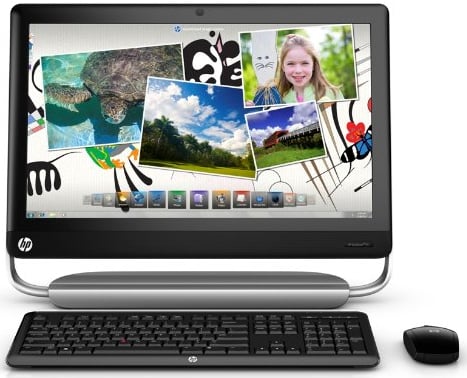
The HP TouchSmart 520-1070 ($1,399.99 direct, or $1329 on Amazon) is the high-end entry in HP's current TouchSmart line of touch-enabled all-in-one desktop PCs. Equipped with powerful components, like a quad-core processor and 2TB hard drive, it's also packed to the gills with entertainment options, offering a big 1080p display, Beats Audio, a Blu-ray drive, TV-tuner, and a remote control. An HDMI-in port is just icing on the cake, extending the life of this desktop even further for use as a monitor.
Design and Features
The 520-1070 has a glossy black plastic chassis, but it's more than just a monolithic 23-inch screen. Two vertical arms hold the touch screen aloft from the silvery plastic base, with a single immense hinge to adjust the angle. But while the hinge is housed in the base, the components are housed behind the widescreen display, which provides 1,920-by-1,080 resolution as well as a large multitouch surface. Thankfully, HP took the time to get this hinge right, and you'll find that despite your touching and tapping, the 520-1070 stays firm though it all, without the wobble that mars the experience on competitors, like the Samsung Series 7 (DP700A38-01) or Asus ET2410-06. It also has a decent range of motion, sitting at a vertical 90-degree angle that can be adjusted all the way back to a comfortable 60-degrees.
Click to continue reading HP TouchSmart PC 520-1070 review
Advertisement
Top 10 Tech Deals of the Day
Posted by Andru Edwards Categories: Displays, HDTV, Hot Deals, PC / Laptop, Portable Audio / Video, Video Games,

We've got your latest list of items that fall under the best tech Deals of the Day for you, separated out into laptops, desktops, monitors, gaming, and home entertainment. The laptop deals are right here, but be sure to click through to get a look at all the rest of what we determined to be today's top 10 deals in tech, including that HP TouchSmart 610 up there!
Laptops
- 17" Alienware M17x 3D Core i7-2630QM 2GHz Quad-core Gaming Laptop w/4GB RAM, 320GB 7200RPM HDD, 1080p, Blu-ray, 1.5GB GeForce GTX460M & NVIDIA 3D Vision Bundle for $1,749 with free shipping (normally $2,074 - use coupon code BHW1L0MX0D?MCX)
- 17.3" HP ENVY 17-1181NR Core i7-720QM 1.6GHz Quad-core 1080p Laptop w/6GB RAM, 750GB HDD, 1GB Mobility Radeon HD 5850 & Blu-ray for $997 with $13 shipping (normally $1,149 - use coupon code LOGICBUY100)
- 15.6" Dell Inspiron 15R-2nd Gen Core i5-2410M 2.3GHz Dual-core Laptop w/8GB RAM, 750GB HDD for $675 with free shipping (normally $800 - use coupon code 4J4XPNDZ1PKR2B)
- 15.6" Lenovo G575 1.6GHz Dual-core AMD Fusion Laptop (43833NU) w/4GB RAM, 750GB HDD for $439 with free shipping (normally $699 - use coupon code USPLENOVO804)
- 15.6" Lenovo IdeaPad V570 Core i7-2630QM 2GHz Quad-core Laptop w/6GB RAM, 750GB HDD for $749 with free shipping (normally $899 - use coupon code WEBEXCLUSIVEV570)
- 12.5" Lenovo ThinkPad X220 Core i5-2520M 2.5GHz Dual-core "Sandy Bridge" Laptop w/4GB RAM, 320GB HDD for $807 with free shipping (normally $949 - use coupon code BESTSELLERS)
- 11.6" Alienware m11x Core i3-330UM 1.2GHz Gaming Laptop w/8GB RAM, 320GB HDD & 1GB GeForce GT335M for $699 with free shipping (normally $899 - use coupon code BHW1L0MX0D?MCX)
Don’t forget, if you’re looking for other deals, be sure to check out our Newegg Promo Code thread. Oh, and if you're on Twitter, be sure to follow @TechPromos for the latest deals, or you can Like TechPromos on Facebook.
Click to continue reading Top 10 Tech Deals of the Day
Top 10 Tech Deals of the Day
Posted by Andru Edwards Categories: Displays, HDTV, Hot Deals, PC / Laptop, Portable Audio / Video, Video Games,

We've got your latest list of items that fall under the best tech Deals of the Day for you, separated out into laptops, desktops, monitors, gaming, and home entertainment. The laptop deals are right here, but be sure to click through to get a look at all the rest of what we determined to be today's top 10 deals in tech, including that OCZ 120 GB SSD up there!
Laptops
- 17.3" HP Pavilion g7t Core i3-370M 2.4GHz Dual-core Laptop w/6GB RAM, 500GB HDD & computrace LoJack for $453 with free shipping (normally $550 - use coupon code NBG48945)
- 15.6" Lenovo IdeaPad V570 Core i7-2630QM 2GHz Quad-core Laptop w/6GB RAM, 750GB HDD for $749 with free shipping (normally $899 - use coupon code WEBEXCLUSIVEV570)
- 15.6" HP Pavilion dv6t Core i3-2310M 2.1GHz Dual-core Laptop w/6GB RAM, 500GB HDD & Blu-ray for $495 with free shipping (normally $600 - use coupon code NBG48945)
Don’t forget, if you’re looking for other deals, be sure to check out our Newegg Promo Code thread. Oh, and if you're on Twitter, be sure to follow @TechPromos for the latest deals, or you can Like TechPromos on Facebook.
Click to continue reading Top 10 Tech Deals of the Day
Deal of the Day: $200 off HP TouchSmart tm2t multitouch tablet laptop
Posted by Andru Edwards Categories: Hot Deals, PC / Laptop,

If you’re looking for a multitouch tablet, check out our Deal of the Day featuring the HP TouchSmart tm2t. It’s a 12-inch convertible tablet with multitouch display and a ULV Core i3 processor (which you can bump up to a Core i5 if that suites your fancy.) It also packs in the ATI Mobility Radeon HD 5450 512MB graphics chip. With the HP promo code and stackable coupon, you end up getting this bad boy at a $200 discount, saving you 19%.
Save 19% on HP TouchSmart tm2t tablet laptop
Don’t forget, if you’re looking for other deals, be sure to check out our Newegg Promo Code thread.
Winner of our HP TouchSmart 600-1055 giveaway
Posted by Andru Edwards Categories: Announcements, PC / Laptop,
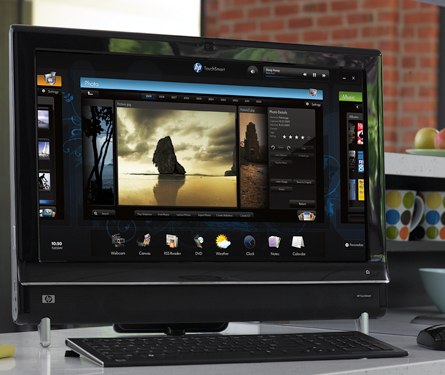
Just wanted to follow up and let you guys know that we’ve chosen a winner for our HP TouchSmart 600 giveaway. Her name is Julianna (@julianna2221 on Twitter), and all she had to do was tweet about the contest to enter. We wanna thank everyone who took the time to enter the contest, and stay tuned—we have more coming up shortly!
HP TouchSmart 600 Entertainment PC giveaway!
Posted by Andru Edwards Categories: Features, Microsoft, Video Games,
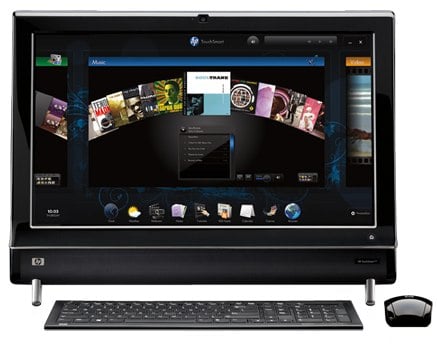
Hot on the heels of our HP TouchSmart 600 review, we’ve got a contest for you guys where we will be giving a brand new TouchSmart 600-1055 away to one of you! In case you didn’t read the review, the HP TouchSmart 600-1055 is an entertainment all-in-one PC that rocks Windows 7 64-bit, 4GB RAM, 750GB hard drive, and supports Blu-ray playback as well as HDTV tuning and DVR functions. So, how do you enter to win this bad boy? Here’s your answer:
- If you don’t have one already, sign up for a Twitter account
- Follow the Andru Edwards Twitter account
- On Twitter, post this tweet about our contest: “Hey @andruedwards hook me up with that @gearlive HP TouchSmart 600! http://bit.ly/touchsmart-600” (Click here to tweet this now)
That’s it! You must be following the Twitter accounts listed, because we will be sending the codes to the winners on Twitter via DM, and if you aren’t following, we can’t DM you. Simple as that. We will be choosing a winner at random next Monday, so you’ve got a week. Get your entry in before then!
HP TouchSmart 600 review
Posted by Andru Edwards Categories: Features, Home Entertainment, PC / Laptop, Product Reviews,
The HP TouchSmart 600-1055 is an attempt at bringing together computing and entertainment in a way that hasn’t really been done before. Incorporating the 64-bit flavor of Windows 7 Home Premium with a 1080p high definition display, HDTV playback, and integrated Blu-ray player, you begin to see the potential and possibilities that you have at your fingertips with the TouchSmart 600. Oh, right, and it also has a multi-touch capable LCD touch display, and a bunch of apps optimized for touch interaction. So, does it live up to the challenge of meeting your every need as your entertainment hub? Join us after the break as we find out. Oh, and we are giving one of these bad boys away as well. Here are the details on how you can win the HP TouchSmart 600!
Click to continue reading HP TouchSmart 600 review
HP Photosmart Premium with TouchSmart Web: First Web-Connected Printer Ever
Posted by Andru Edwards Categories: Accessories, Internet, PC / Laptop, Peripherals,

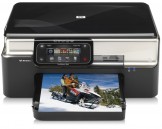
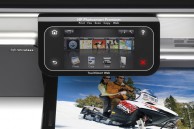
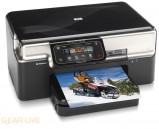
HP just unveiled their HP PhotoSmart Premium with TouchSmart Web home printer. While that is a mouthful to say, we know, it actually turns out to be pretty cool technology for those of us who do still rely on a printer. The easiest way to describe it is, imagine if your printer had an iPhone-like control panel that was connected to the Internet, and controlled both the printer and could control and pull up web data for printing. That is what HP has put together here. Through the magic of HP Applications, you’ll be able to use the 4.33-inch control pad to pull up maps with directions, coupons, movie tickets, newspaper articles, are more. Even better, the apps are smart enough to know how best to print each piece of content, so all will usually look decent. If you have a Snapfish account, the printer can connect directly to that, and print photos…I know, thrilling. Luckily, the apps will be something that just about anyone can make, so the current limits that seem to be apparent as it pertains to which services you can use with this printer may actually fall to the wayside. The only barrier to companies spending time on making apps for this printer, though, are going to be in the numbers. The reason the Apple App Store has over 50,000 apps is because there are millions of iPhone and iPod touch units out there. We aren’t so sure that people will be rushing to buy the HP Photosmart Premium with TouchSmart Web when it hits stores this fall, what with its $399 price tag, but hey, we are all for innovation, and HP has at least tried to do that with this product.
Read More  | HP
| HP
Gallery:
HP Magic Giveaway: We have a winner - and a second contest!
Posted by Andru Edwards Categories: Announcements, Features, HDTV, Home Entertainment, PC / Laptop,

Our HP Magic Giveaway came to a conclusion last night, and, wow, we are calling this one a success, as we just got inundated with entries. We first need to thank everyone involved for entering and spreading the word on Twitter, Facebook, and the like. Of course, there can only be one - but if you feel a swerve coming, read on!
First, the winner was chosen randomly out of all valid entries. The person who came out on top of Ashe, with this comment. I’ve contacted him, he replied, and things are good.
Now, about that swerve. In the original contest, we mentioned that it would be awesome if the winner were to give some of those winnings away. After all, it’s the holiday season, and who really needs 3 notebooks, a desktop, and all that stuff? So, the cool thing here is that Ashe has decided to throw some items back into the pot, and he wants us to do a second giveaway! We will get it set up today, and will run it for another week. The winner will get the following:
- HP Mini 1000 (Windows XP)
- Microsoft Office Home and Student Edition 2007 with 3 licenses
- Microsoft WIndows Live
- Corel VideoStudio X
- Kung-Fu Panda on Blu-ray disc, and DVD
That is not too shabby of a prize package right there. Wanna win it? Just head on over to our Gear Live Magic Giveaway page to enter.
Again, thanks to all entrants, and a big thank you to Ashe for giving back.
Read More | Gear Live Magic Giveaway
HP Magic Giveaway: Enter our contest to win over $6,000 in electronics!
Posted by Andru Edwards Categories: Accessories, Announcements, Features, Home Entertainment, Hot Deals, PC / Laptop,
So, a few days ago we told you about our HP Magic Giveaway, and how we’d be giving away an absolutely ridiculous amount of prizes to the winner. Now, we are announcing the the contest has officially started, and we’ve got the details on how you can enter to win. First, though, a refresher on what we are giving away:
- HP TouchSmart IQ816
- HP HDX18 Premium Notebook PC
- HP Pavilion dv4 Entertainment Notebook PC
- HP Mini 1000 (Windows XP)
- HP MediaSmart Connect
- HP Photosmart C6380 Wireless All-in-One printer
- HP 564 Photo Value Pack
- Microsoft Office Home and Student Edition 2007 with 3 licenses
- Microsoft WIndows Live
- Corel VideoStudio X
- Kung-Fu Panda on Blu-ray disc, and two DVDs
Yes, you do see four computers listed, as well as a Media Center Extender. No, you aren’t dreaming. Yes, we (and HP) are awesome. You want the goods? Here’s how to enter to win - we are making this super-simple:
- If you don’t have one already, sign up for a Gear Live account
- If you don’t have one already, sign up for a Twitter account
- Add the Gear Live Twitter account to your follow list
- On Twitter, post a tweet about our contest and link to this page. In the tweet, include the phrase “#glmagic”.
- Once that is done, leave a comment here in this post with a direct link back to your Tweet. Be sure you are signed in to your Gear Live account before you leave the comment.
Here’s an example of an appropriate Twitter entry:
“Entering to win a ton of HP gear! http://jk9.qlnk.net/ #glmagic”
BONUS ENTRIES: Want more chances to win? Share the link to our contests on the following sites, and leave us a comment linking to those as well:
- Facebook: Shared Link
- Del.icio.us bookmark
- FriendFeed: Use Post a Link
- Your blog: Have a site? Link to our contest on it!
Remember: The bonus entries are just that - bonus. In order to be eligible to win, you must complete the core Twitter requirements.
Now, as to the actual contest dates. The contest starts today, November 28th. You have until 11:59 PM PST on December 4 to enter your comments here on this post. We will then announce our winner, chosen randomly out of all valid entrants and bonus points, on December 5th. We are also going to encourage (but not require) you to think about donating a portion of the prize package to someone else. It can be a charity, a relative, friend, a fellow contest entrant - anyone. We can even handle the shipping to that third party for you. It’s all in the spirit of giving, and we will let you play Secret Santa, if you so choose.
The contest is open to anyone in the world, which is a rarity. If you are in the US, you’ll even have your tax burden taken care of. What more could you ask for? Now, good luck to all - comments are open!
Update: We’ve announced a winner - and a new contest!