

Wednesday October 23, 2013 2:21 pm
Apple releases Numbers 3.0, here’s a look at what’s new

Posted by Andru Edwards Categories: Apple, PC / Laptop, Software
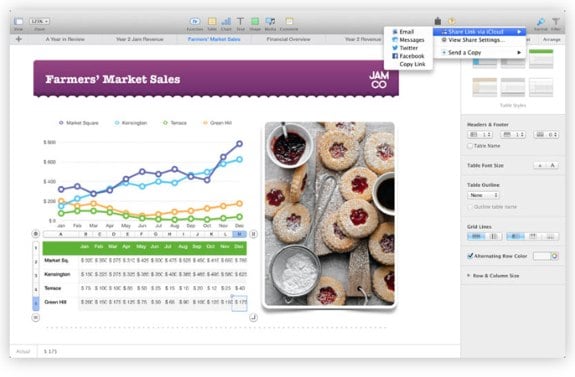
Completing the iWork app updates, Apple has released Numbers 3.0 on the Mac App Store (alongside the Pages and Keynote updates), bringing a revamped user interface to the spreadsheet program. There are a bunch of new Apple-designed templates in the mix, as well as simplified formulas, charts, tables, and more. iCloud collaboration is also thrown in, allowing multiple users to edit the same document at once, in realtime. Here's a list of improvements:
- Stunning new user interface
- Brand-new Apple-designed templates
- Simplified toolbar gives you quick access to shapes, media, tables, charts, and sharing options
- New Format Panel automatically updates based on selection
- Quickly click through a spreadsheet using new tab navigation
- Get function suggestions as soon as you start typing a formula
- Get live formula results, error checking, exact value, and cell format with the new smart cell view
- Add your favorite functions to Quick Calculations for instant results
- Search the integrated function browser for built-in help and sample formulas
- Use gorgeous preset styles to make your text, tables, shapes, and images look beautiful
- Animate data with new interactive column, bar, scatter, and bubble charts
- Use new 2D bubble charts
- Enhanced conditional highlighting makes it easy to automatically highlight cells based on numbers, text, dates, and durations
- Easily filter through large tables with the new Filter Panel
- New star ratings cell format
- Quickly and easily share a link to your work via Mail, Messages, Twitter, or Facebook
- Anyone with the link will always have access to the latest version of the spreadsheet and can edit it with you at iCloud.com with Numbers for iCloud beta
- All-new calculation engine for fast performance
- New unified file format across Mac, iOS, and web makes spreadsheets work seamlessly everywhere
- Turn on Coaching Tips for guided in-app help
You can download the new Numbers for free if you're an existing user, or get it for $19.99 if you're a first timer.
Be sure to check out all the rest of the news from the Apple iPad event!