

Tuesday October 22, 2013 8:24 pm
Apple Pages hits 5.0, here’s a look at what’s new

Posted by Andru Edwards Categories: Apple, PC / Laptop, Software
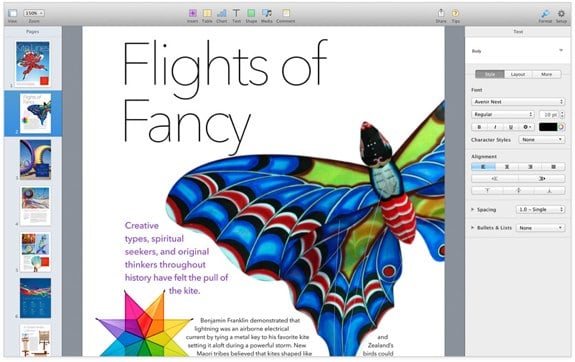
Apple has updated Pages to version 5.0 as part of a bunch of refreshed iWork and iLife updates in conjunction with its Apple iPad event today. Apple's word processor sees a host of new features integrated, including new writing tools, better performance, and a new design with a bunch of Apple-designed templates. Deep iCloud integration is here as well, allowing you to access yoru documents across all your OS X and iOS devices. Here's the full list of what's new in Pages:
- Stunning new user interface
- Over 60 Apple-designed templates
- Simplified toolbar gives you quick access to shapes, media, tables, charts, and sharing options
- New Format Panel automatically updates based on selection
- Enhanced change tracking, comments, and highlights; show and hide changes and comments on mouse-over
- Animate data with new interactive column, bar, scatter, and bubble charts
- Use gorgeous preset styles to make your text, tables, shapes, and images look beautiful
- Easy setup for headers, footers, and document body
- Use new 2D bubble charts
- Enhanced conditional highlighting makes it easy to automatically highlight cells based on numbers, text, dates, and durations
- Quickly and easily share a link to your work via Mail, Messages, Twitter, or Facebook
- Anyone with a shared document link will always have access to the latest version of the document and can edit it with you at iCloud.com
- Access and edit documents from iCloud.com using Pages for iCloud beta
- New unified file format across the Mac, iOS, and the web makes documents work seamlessly everywhere
- Turn on Coaching Tips for guided in-app help
- Pages is now available in Arabic and Hebrew
- Improved support for Chinese, Japanese, and Korean
You can download Pages now for free if you've purchased a Mac on or after October 1, 2013, otherwise you can grab it for $19.99.