

Find Our Latest Video Reviews on YouTube!
If you want to stay on top of all of our video reviews of the latest tech, be sure to check out and subscribe to the Gear Live YouTube channel, hosted by Andru Edwards! It’s free!
Latest Gear Live Videos
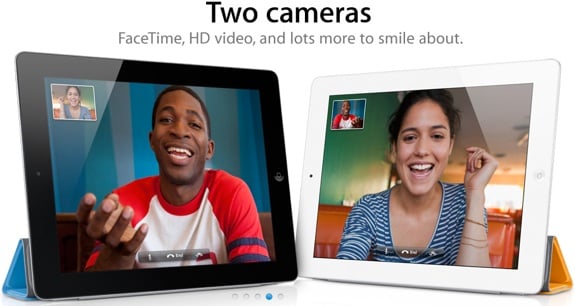
Wanna win a 32 GB Apple iPad 2? We'll we've got a few to give away to our readers across the network of Gear Live sites, starting right here on the flagship. We've teamed up with Vonage to offer the giveaway of the iPad 2 (or a $700 Apple gift card, if you prefer) along with $15 in iTunes credit that can be used with the new Vonage Time to Call app. We've got a few ways for you to enter, allowing up to four entries per person.
Here are the ways to enter:
- Follow the Gear Live Twitter account and post this tweet: “Hey @gearlive hook me up with that iPad 2! http://gear.lv/e-ipad2contest” (Click here to tweet this now)
- Like Gear Live on Facebook and leave a comment on our wall
- Subscribe to the Gear Live YouTube Channel
- Leave a comment on this post
- Do all four, and your entries are doubled!
Timeframe: The contest ends on September 2nd, 2011. A winner chosen using Random.org.
Eligibility: The contest is open to residents of the US and Canada.
Prize: The one winner will receive a 32 GB Apple iPad 2 (or a $700 Apple Gift Card) and $15 iTunes credit.
Click to continue reading Giveaway: Apple iPad 2 32 GB!
Gallery: Giveaway: Apple iPad 2 32 GB!






Advertisement
Mac OS X Lion: Has the OS become just another app?

Posted by Andru Edwards Categories: Apple, Editorial, Features, Software,

I upgraded my MacBook Pro to Apple OS X Lion in a lunch hour. Okay, it wasn't a lunch hour—I couldn't wait that long—but even more astonishing than the expediency (30 minutes to download and 35 to upgrade) was the effortlessness of the process.
At 9am yesterday morning, I opened the Mac App Store, clicked purchase, and let the installer work its magic. When I returned to my machine, it donned a fresh new log-in screen and a new OS. As tech journalist, this ought to have delighted me. Instead, I was left hungering for more.
It's not that Lion isn't a graceful creature; Apple's latest OS adds poise to an already agile predecessor. The 250 new features—Mission Control has already changed how I work—touch every corner of the OS and surpass the 150 additions of the refinement-focused Snow Leopard. Yet I can't help feel that something important is happening—has already happened—to very concept of the OS.
Click to continue reading Mac OS X Lion: Has the OS become just another app?
Gallery: Mac OS X Lion: Has the OS become just another app?
We’re giving away 50 Spotify invites - win one here!
Posted by Andru Edwards Categories: Features, Internet, Music,
Spotify launched in the US last week to much fanfare, but the problem is that it's currently an invite-only service if you wanna use the free music streaming part of it. If you've been crestfallen while watching your friends get their jam on while you've been left out, there's hope! We've got fifty (that's 5-0) Spotify invites to hand out, and we're hooking our Twitter followers up. Do you wanna win one? Of course! Here's how:
- Follow the Gear Live Twitter account
- On Twitter, post this tweet, supporting what we do in a contest: “Hey @DListMagazine I vote for @AndruEdwards of @GearLive and Seattle @MindCamp as Trailblazer for #dlistyoungnorthwest!” (Click here to tweet this now)
We'll DM the first 50 people who get that tweet out there with a Spotify invite code, so watch your inboxes!
Gallery: We’re giving away 50 Spotify invites - win one here!
Here’s how Apple uses its massive amount of cash to its advantage
Posted by Andru Edwards Categories: Apple, Editorial, Features, Handhelds, PC / Laptop,
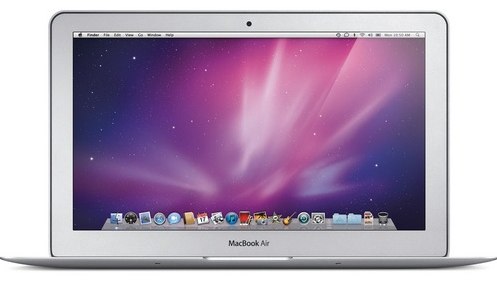
Over the last few years, Apple has stockpiled cash in such huge amounts that investors often question Apple about its strategy of keeping so much money around. When asked about it, Steve Jobs and team always points out that the market is unstable and they need to have cash in place for good times and bad, as well as have money available for major acquisitions, as part of its growth strategy.
And even though this answer normally keeps its investors at bay, as Apple continues to grow its cash reserves, which currently sits somewhere around $70 billion, investors and media alike continue to tell Apple that perhaps it's time to release a dividend to shareholders. But Apple is steadfast about its position. An interesting post from an anonymous writer on Quora recently shared a fascinating view of why Apple keeps so much cash around.
Click to continue reading Here’s how Apple uses its massive amount of cash to its advantage
Gallery: Here’s how Apple uses its massive amount of cash to its advantage
Wanna become a top DJ on Turntable.fm? Here’s how
Posted by Andru Edwards Categories: Features, Internet, Music,
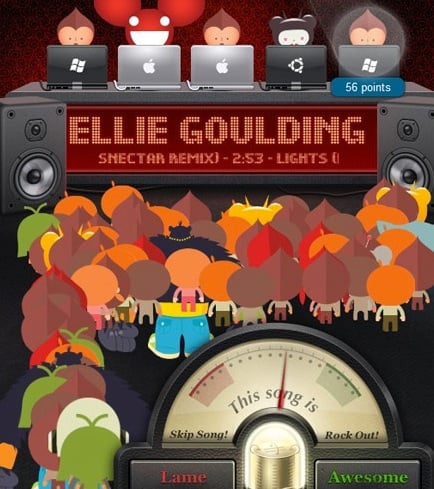
Anyone who's been around the Web might be familiar with a little site called turntable.fm. Many are unfamiliar with how the site works, and others want to become top DJ's. While you wait for your Spotify invite, here's a guide to becoming a top DJ in the latest Web craze.
The site's currently in a semi-private beta. If one of your Facebook friends is in, you can get in, too. Once you're in, you start with 0 points, 0 fans, a long list of rooms to enter, and the option to create your own room. Here's our introduction to turntable.fm.
In my time on turntable, I've found that there have been a number of approaches to getting on the deck. The deck is the panel of five DJ slots. Some rooms don't have any regulations for getting a spot. Once there's an open slot, it becomes a massive click-fest. Other rooms, like the Chillout Tent, have a queue to which users can add their names. Some rooms have a queue with a song limit per DJ.
One of the best ways to earn points is to play to the room. If you're in an Alternative Rock room, do not play Justin Bieber. You probably shouldn't play Bieber in any room, even a Bieber room. If you're in the Chillout Tent, do not play Bob Dylan. It's happened before.
Don't be silent. The chat window is there for a reason. Engage your fellow DJs and listeners in conversation. Topics can range from the band playing to politics to the insanity of DJ Wooooo's room. If you're silent while spinning some tracks, others will assume you're away from the keyboard. AFK DJ-ing is not favored in any room. Step down from the deck if you're going to be gone for a while.
Click to continue reading Wanna become a top DJ on Turntable.fm? Here’s how
Gallery: Wanna become a top DJ on Turntable.fm? Here’s how
Will Google+ survive its own hype?
Posted by Andru Edwards Categories: Editorial, Features, Google, Internet,
Google+, the presumptive Facebook killer, shows tremendous potential. As someone who warms up to any social network with the alacrity of a Galápagos tortoise, this, for me, is saying something.
Yes, I'm one of the lucky ones who got a pre-over-capacity invite. I've tried to share a couple, but new Google+ users are only gaining entrance at a halting pace.
The service, which initially stuck me as a blatant Facebook rip-off, actually has many of its own charms, not the least of which is the useful, somewhat addictive Circles. I know this topic divides Google+ users. Some people do not like to spend time organizing their social contacts. I'm not sure I do either, but the method that Circles employs for discovery and organization (dragging and dropping people into actual circle graphics, for instance) is addictive and easily blows away anything Facebook ever developed.
Click to continue reading Will Google+ survive its own hype?
Gallery: Will Google+ survive its own hype?

Being that it's Independence Day here in the USA, fireworks displays are gonna be starting in a few hours and we thought we could point you to some tips on how to capture some breathtaking fireworks photos. Here are teh top 10 fireworks photography tips to help you start thinking about your setup for tonight, and years to come:
- Use a tripod to keep things steady
- Use a camera with a remote shutter release (again, to keep things steady)
- Frame your shot to anticipate where the fireworks will be
- Shoot at a wider focal length
- Set your aperture to somewhere between f/8 and f/16
- Set your shutter to a long exposure
- Shoot at a low ISO. Set it at ISO 100.
- Turn off your flash
- Shoot in manual mode rather than auto focus
- Check on your results during the fireworks display so you can tweak as necessary
That's it! Of course, if you want to go more in-depth on those tips, you can head over to Digital Photography School to get more details on each of the ten tips listed here. Good luck!
Gallery: How to take amazing pictures of fireworks
We’re giving away 10 Slacker Premium Radio 1-year subscriptions!
Posted by Andru Edwards Categories: Announcements, Features, Internet, Music,
.jpg)
Here at Gear Live, we love us some Slacker. If you don’t know, Slacker is a fantastic streaming music service. It has millions of songs in its catalogue, and real DJs actually control their channels, which means you get a great mix of songs that go well together, rather than something put together by an algorithm. While Slacker is free, they also have a couple of upgraded services - Slacker Radio Plus, and the newly released Slacker Premium Radio. This typically costs $10 a month:
- Play songs, artists, albums on-demand
- Custom playlists
- Unlimited Skips
- Unlimited Song Requests
- No Audio or Banner Ads
- Complete Lyrics
- Over 2 Million Songs
- Cache stations to smartphones for offline listening
- ABC News and headline news updates for any station
- "Peek Ahead" artist and album previews
We said this would be big, so here’s what we're gonna do - we are going to give away 10 one-year subscriptions to Slacker Premium Radio. How do you enter? Easy:
- Follow the Gear Live Twitter account
- On Twitter, post this tweet about our contest: “Hey @gearlive hook me up with @SlackerRadio Premium! http://gear.lv/slackerpremium” (Click here to tweet this now)
Want a bonus entry? Subscribe to Gear Live on YouTube! We will select ten random entrants on July 1 - good luck!
Gallery: We’re giving away 10 Slacker Premium Radio 1-year subscriptions!
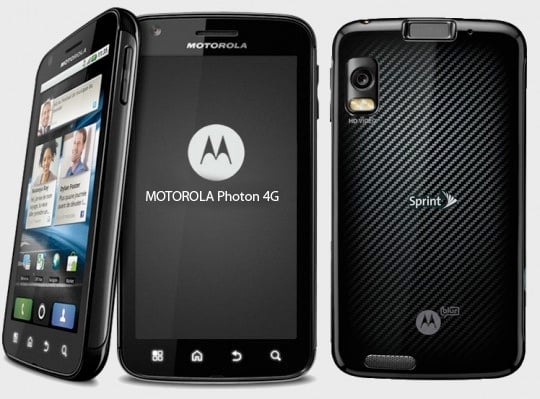
It's big, it's businesslike, and it might turn into a laptop like the groundbreaking Motorola Atrix 4G. Sprint's brand-new Motorola Photon 4G will face down the HTC EVO 3D this summer in a battle of the high-end Android super-phones. We got some time with it just before today's announcement, to check out the new device.
The new Photon 4G is one of 10 Motorola phones that Sprint plans to introduce in 2011, including the Triumph for Virgin Mobile, the Xoom tablet, and the XPRT and Titanium for Sprint. The two companies introduced the Photon and Triumph today at an event in New York City.
The Motorola Photon 4G is a huge 5.6-ounce, 2.6 by 5 by 0.5-inch smartphone with a downright gorgeous 4.3-inch, 960-by-540 screen. There's something very rich and deep about this screen; it may just be the wallpapers that Sprint and Motorola chose, but everything looked very sharp. The phone is fast, too, with a dual-core Nvidia Tegra 2 processor running Android 2.3. There's an 8-megapixel camera on the back, a 1-megapixel camera on the front, an HDMI out port, a kickstand on the back, and 16GB of on-board storage.
How does the Photon feel? Big. Solid. Glossy. The Photon feels a lot like Verizon's Motorola Droid X2, although it's rounded rather than squarish; this is a large, heavy slab of power with a whole lot of customized Android icons. The few apps I sampled ran smoothly. I asked the Sprint and Motorola reps whether the Photon would be more stable than the notoriously buggy Atrix, but they dodged the question.
Click to continue reading Motorola Photon 4G: Hands-on
Gallery: Motorola Photon 4G: Hands-on
Feature Breakdown: Apple iCloud, Amazon Cloud Player, Google Music Beta
Posted by Andru Edwards Categories: Apple, Features, Google, Music,
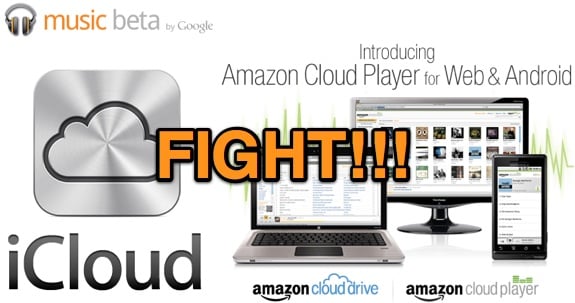
The biggest player in digital music has finally vaporized its content. Starting this fall, you'll be able to store your digital music library on Apple's internet servers. We've already seen Amazon and Google's attempts at a Web-based music service, with the former's Cloud Player and the latter's Google Music Beta, but with iTunes' dominance in digital music, Apple's iCloud could eclipse both of them. Apple's offering differs from those of Amazon and Google in some big ways, though. Here's a rundown of the three services' differences and similarities.
A central difference of Apple's iCloud versus the others is that it's not just for music: It takes over all the former MobileMe's functions—email, contacts, calendar—along with backing up and syncing iOS device photos, app data, and iWork documents. Thus ends the stormy story of the MobileMe service, which even Steve Jobs noted at WWDC was "not our finest hour." This comparison, though will concern itself primarily with the music aspect of iCloud, iTunes in the Cloud. This piece is available as a beta by downloading iTunes 10.3.
A huge difference of iCloud's music capabilities is that you can't play songs from within a Web browser (at least as far as we have seen so far) as you can with both Amazon and Google's offerings. You'll either need an iOS device or iTunes running on a computer. True, this does include Windows PCs running iTunes, but forget any non-Apple tablets or phones. This lack of Web access is just less flexible. Nor can you stream music from its online storage—the music must be fully downloaded to play.
Click to continue reading Feature Breakdown: Apple iCloud, Amazon Cloud Player, Google Music Beta








