

Wednesday September 23, 2026 8:56 pm
YouTube Is Putting a Gemini Editor in Shorts That Trims Your Pauses for You

Posted by Andru Edwards Categories: Google, Artificial Intelligence
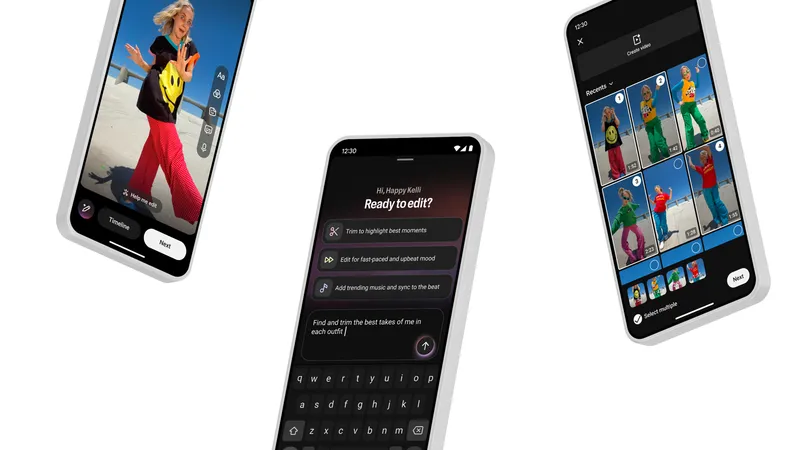
Most of editing a Short is grunt work. You scrub through a clip to find where you stopped saying "um," you nudge a cut until it lands on the beat, and you shuffle clips around until the thing moves fast enough that nobody swipes away. YouTube wants a chatbot to do that part.
At Made on YouTube today, YouTube announced a conversational editing assistant built on Gemini for Shorts and the YouTube Create app. You start with one of its suggested prompts or type your own, and it builds a first draft. From there you keep chatting, and it offers personalized suggestions: trim the pauses, reorder clips for better pacing, reorder frames, and trim music and sync it to the beat. You can jump out to the regular timeline and edit by hand at any point, then come back to the chat. YouTube didn't say when it ships or in which countries.
What it looks like
YouTube's screenshot shows a "Help me edit" button in the Shorts editor and a screen that asks "Ready to edit?" with three canned prompts: "Trim to highlight best moments," "Edit for fast-paced and upbeat mood," and "Add trending music and sync to the beat." In the text box, someone has typed "Find and trim the best takes of me in each outfit," which might be the most Shorts sentence ever written. If you remember last year's Edit with AI experiment, which turned camera-roll footage into a first draft with music and transitions, this is that idea with a chat box you can argue with.
The Gemini Omni numbers
YouTube has usage to point to. Gemini Omni, Google DeepMind's model for generating and editing video through conversation, arrived in Shorts Remix and the YouTube Create app in May, where you can remix an eligible Short with your own prompts and images. YouTube says hundreds of thousands of channels used it per day in August. It also cites its own GenAI trends report, which found that 72 percent of U.S. video posters ages 14 to 44 used AI to help create or edit in the past year. YouTube didn't announce any new generative video features for Shorts, Veo or otherwise, today.
Who this is for
This is for the person who shoots on a phone, posts from the phone, and has never opened a desktop editor. For that person, trimming dead air and matching cuts to a beat with your thumb is the slowest part of the job, and handing it off could mean posting more often. If you cut in Premiere or Resolve, you'd rather control every cut yourself than approve suggestions in a chat window, and the assistant only lives inside Shorts and YouTube Create anyway.
None of this is new territory. CapCut, ByteDance's editing app, already has a Remove Filler Words tool that auto-cuts pauses, repetitions, and filler words. TikTok's Smart Split, on TikTok Studio Web, chops longer videos into short clips with captions and reframing. YouTube's pitch is doing the same chores by conversation, inside the app where you were going to post anyway.
The sameness problem
My worry is those suggested prompts. If a big share of Shorts get cut with "fast-paced and upbeat mood" and "trending music synced to the beat," a lot of them will share the same pacing, the same beat-matched cuts, and the same sound. The awkward pause and the slightly late cut are part of why some creators feel like people instead of content. YouTube says you can take over the timeline whenever you want. How many creators do will decide how much of the Shorts feed ends up looking like one edit.