

Friday September 25, 2026 9:14 am
M5 Ultra Mac Studio Review: Huge Local AI Performance (for a Price!)

Posted by Andru Edwards Categories: Apple, PC / Laptop, Product Reviews, Artificial Intelligence
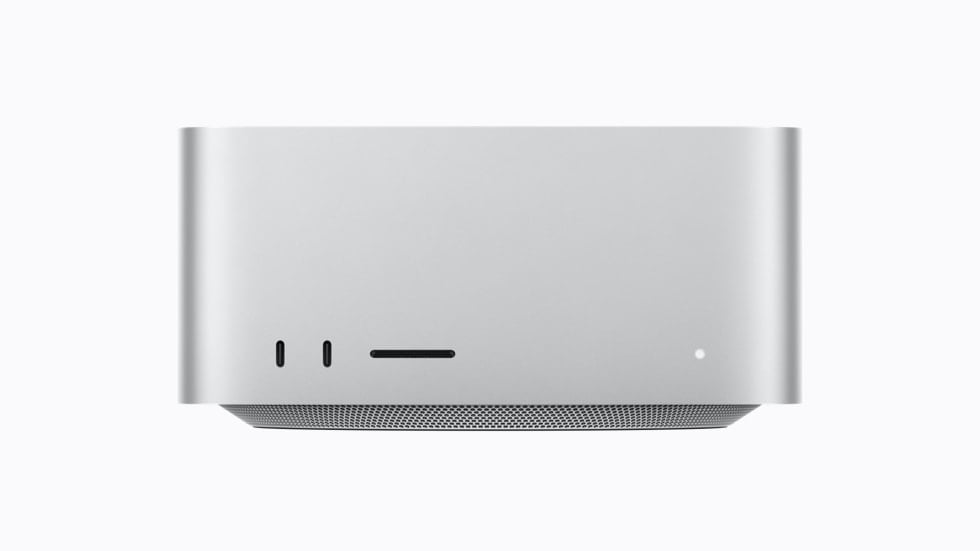
The M5 Ultra Mac Studio is the fastest computer Apple has ever sold, and after a couple of weeks with one on my desk, I can tell you immediately that it's shockingly good.
Apple sent me a near-top configuration: 36-core CPU, 80-core GPU, 256GB of unified memory, and an 8TB SSD. That's more computer than I've ever had in a box this size, and the numbers land about where Apple said they would back in August: 30% to 45% more CPU than the M3 Ultra depending on the benchmark, anywhere from 20% to 60% on the GPU depending on the test, and storage that runs two to three times as fast. The bigger change is who this machine is for. It used to be the video editor's Mac. Now it's the Mac for anyone who wants to run a 150GB language model on their desk without paying anyone a monthly fee, and Apple has priced it for exactly that person.
What you get for $5,499, and what I got for $14,299
The base M5 Ultra is $5,499: a 30-core CPU, a 64-core GPU, 96GB of memory, and a 1TB SSD. That's $1,500 more than the M3 Ultra started at last year. The chip in my unit (36 CPU cores, 80 GPU cores) costs another $1,300. Going from 96GB to 256GB of memory is a $4,000 line item on its own. Add the jump to 4TB of storage and the 256GB, 4TB configuration lands at $12,299. Mine has 8TB, which brings it to $14,299. A 512GB memory option arrives in late October and Apple hasn't said what it'll cost. The current top configuration, with 256GB and 16TB of storage, is already $18,299.
The box didn't change, and I'm fine with that. Same 7.7-inch-square footprint, same 3.7-inch height, same silver aluminum that has been sitting under my monitor in one form or another since 2022. The Ultra weighs about eight pounds, two more than the M5 Max version, because it gets a copper vapor chamber and fin stack where the Max makes do with aluminum and a heat pipe. You get six Thunderbolt 5 ports (two up front next to the SD slot, four in back), two USB-A, HDMI 2.1, 10Gb Ethernet, a headphone jack, and, for the first time on a Mac Studio, Wi-Fi 7 and Bluetooth 6. It drives up to eight displays.
The CPU and GPU numbers
Apple never shipped an M4 Ultra, so anyone upgrading is coming from an M3 Ultra or older. My Geekbench 6 multi-core run came in at 37,870, against 28,376 for the M3 Ultra, right at Apple's claimed 1.3x. Cinebench 2026 multi-core hit 17,960, 47% ahead and well past Apple's claim. On the GPU side, Cinebench's GPU test jumped 63%, though Geekbench Metal moved a more modest 18%, from 208,163 to 246,680. I ran Cinebench ten times back to back to see if it would throttle, and it didn't: the lowest score was 17,825 on the first pass and the highest was 18,069, with the CPU averaging about 78 degrees Celsius. The fan never got loud enough to hear over my air purifier.
Against a high-end PC, the picture is more mixed than Apple's charts suggest. A 64-core Threadripper 9980X lost a 4K-to-1080p HandBrake transcode to this machine by eight seconds (1:04 for the Mac, 1:12 for the Threadripper). In Blender's CPU renderer, the Threadripper pulled ahead. The Mac Studio's power supply is rated at 480 watts and the Threadripper can draw hundreds of watts by itself, so losing that one is no shock. It does put a ceiling on any claim that this is the fastest desktop on earth. It is the fastest Mac. It is not the fastest computer.
Local AI is the entire pitch
Apple's press release called this "the ultimate desktop for on-device AI" before it got around to pro workflows, and after using it, I think that ordering is right. Every GPU core on the M5 Ultra now carries a Neural Accelerator, which is what Apple means when it claims 4.3x the peak AI compute of the M3 Ultra. Memory bandwidth went from 819GB/s to 1.2TB/s, and bandwidth is what decides how fast a big model can spit out words.
I spent most of my time with this machine in LM Studio and oMLX running Qwen 3.8 and GLM models, the kind of thing my M5 Max MacBook Pro can load but not comfortably live in. Prompt processing, the part where the model reads whatever you gave it, ran between 2,057 and 2,771 tokens per second depending on context length, against 861 to 1,112 on an M3 Ultra. That's roughly 2.5x. Apple's prompt-processing claim is 4x. Text generation went up about 70% on average, and at a 256K-token context Qwen 3.8 Flash-Next still wrote at 74.7 tokens per second where the M3 Ultra sagged to 38.6, nearly double. Time to first token on a 64K prompt dropped from 59 seconds to 24. On a dense 27B Qwen model I saw around 55 tokens per second with first-token latency of about half a second, which is fast enough that the local model stopped feeling like a compromise and started feeling like the default.
The practical version of that: I loaded DeepSeek V4 Flash, all 156GB of it, and had it building a small game within a few minutes. I pointed a local Qwen model at a folder of podcast transcripts and had it pull quotes for a Geared Up episode while Final Cut was exporting in the background. None of that touched a cloud API. None of it cost anything after the purchase price. And the machine stayed cool and quiet the entire time, which is the part I keep coming back to, because I've run comparable workloads on a gaming PC and it sounds like a hair dryer and heats the room.
On a model that fits in its 32GB of VRAM, an RTX 5090 processes prompts about 1.8x faster than this Mac and generates around 1.2x faster, because dedicated tensor cores are still better at this than Apple's accelerators. Load something bigger and the 5090 spills into system memory over PCIe, and generation collapses to somewhere between 1.5 and 4.6 tokens per second at long context. The Mac keeps going, because all 156GB of DeepSeek V4 Flash lives in unified memory. If your model fits in 32GB, buy the GPU. If it doesn't, no single consumer GPU does what this Mac does.
The SSD is the sleeper
I didn't expect storage to be the upgrade I noticed most, and it is. Blackmagic Disk Speed Test showed 14,867MB/s sustained reads on my 8TB drive, against roughly 5,100 on an M4 Max Studio. That's close to triple. For an 8K ProRes timeline, or a 180GB model that has to load before you can type anything, that's the difference you feel. A model load that used to mean waiting around now finishes in seconds. This helps you whether or not you care about AI, and the M5 Max Studio gets the same fast storage, which matters for where this review is headed.
Video, and a surprising amount of gaming
The video results are what you'd expect, because the Mac Studio has been embarrassing laptops on export times for four years. A nine-minute 4K timeline built mostly from 8K H.265 footage exported in 1 minute 13 seconds; the same timeline on a MacBook Pro with an M3 Pro takes over eight minutes. A 4K Premiere export finished in 40 seconds. Blender's classroom scene rendered in 11 seconds. I stacked eight 8K ProRes streams and four 7K RAW streams with color correction applied and scrubbed through them in real time without a dropped frame. A 70-minute podcast transcribed in MacWhisper in 18 seconds.
Gaming is where the M5 Ultra surprised me. Cyberpunk 2077 at 1080p with ray tracing on Ultra averaged 66fps, which lands next to an RTX 5070 desktop, and 3DMark Steel Nomad beat that same card outright. Baldur's Gate 3 at 4K Ultra averaged over 80fps and never dipped below 60. Cyberpunk at 4K wasn't playable, and an RTX 5090 still wins everything by a wide margin. Nobody should spend this kind of money to play games on a Mac. But a machine that renders all day and runs Cyberpunk at night, with no second box under the desk, is new for a Mac.
The Max problem
The M5 Max version of the same computer is where this review gets uncomfortable. The Ultra is 20% to 30% faster than the M5 Max Studio on multi-core CPU and GPU, and only about 10% faster on synthetic AI tests, for close to double the money when you compare the 256GB Ultra with a fully loaded Max. The M5 Max holds its own against last year's M3 Ultra despite having half the GPU cores. An M5 Max Studio with its top chip, 128GB, and 4TB is $6,899.
The Ultra's advantage is memory. The Max tops out at 128GB. If the model you want is a 4-bit quant of something in the 27B to 120B range, the Max runs it. If you want DeepSeek V4 Flash at 156GB or a 5-bit Qwen 3.8 at 179GB, the Ultra is the only Mac that fits it. It also scales better under load: I measured a 23% throughput gain running three requests in parallel, where the M3 Ultra barely moves. Whether your model fits in 128GB is the whole decision.
What's wrong with it
The price went up about 50% on a like-for-like build: a 256GB, 2TB M3 Ultra was $7,499 last year, and the same M5 Ultra configuration is $11,299 now, partly thanks to memory prices that have climbed all year. Nothing inside is upgradeable, so the $4,000 you spend on RAM is a decision you make once. Lead times on the Apple Store are already stretching into months. The 512GB configuration that would let you run 8-bit quants of the biggest models without spilling to SSD isn't shipping until late October.
And the local-AI workflow that justifies this machine is fiddly. It's oMLX and LM Studio and quantization tables, and none of it is one click. If you're happy paying $20 a month for Claude or ChatGPT and never think about tokens per second, this machine solves a problem you don't have.
Should you buy it?
If you're an AI developer, a small studio running agents for clients, or a research shop that wants a frontier-sized model on-premises with no cloud bill and no rack, yes, and there's nothing else in this form factor to cross-shop it against. If you edit video for a living and were about to order an Ultra out of habit, order the M5 Max instead. Compared with a 256GB, 4TB Ultra, that's about $5,400 you can put toward a Studio Display XDR. If you're on an M3 Ultra and your models already fit, the 2.5x prompt speed is tempting and the price is not. Keep what you have. If they don't fit, wait for the 512GB model and decide then.
The one on my desk right now is a local AI beast that also happens to edit video faster than anything else Apple makes. If local AI agents are part of your workflow, and you're looking for the best Mac to do it, your search is over.