

Latest Andru Edwards Videos
Bing: We will be this sort of thread that runs through almost everything Microsoft is doing

Posted by John Kilhefner Categories: Corporate News, Internet, Microsoft, Video Games,

The future of search, according to Microsoft, is outside of the white search bar. "Now the way for human beings to express their interest or needs goes way beyond a browser search typing in keywords," said Microsoft's Bing chief, Qi Lu. "You can use voice to have a conversation, you can use gestures to express yourself."
Moving forward, Bing will fit into all of Microsoft's products, providing information access from physical objects to expand the context of its search.
"The battle between us and Google is going to be over who can build understanding more quickly to serve people in a much more anticipatory way," says Microsoft's Adam Sohn. "Google's going to understand every entity on the planet, we're gonna understand every entity on the planet, but the question will be what do you do with that information?"
Read More  | The Verge
Advertisement
RIAA Google takedown requests near 10 million
Posted by John Kilhefner Categories: Corporate News, Google, Internet, Music,
 Thanks to Google's Transparency Report, we can see just how many copyright takedown requests it gets, and who issues such requests. The RIAA tops the list with nearly 10 million takedown requests issued. The RIAA issues hundreds of thousands of notices every week in regards to piracy sites, and has topped the most recent monthly requests. This goes to show just how severe the piracy network is, or even perhaps, how futile the RIAA's attempts are at squashing it.
Read More | Google Transparency Report via Engadget
Google Search iOS app updated with Siri-like Google Voice Search functionality (video!)

Posted by Jason Diaz Categories: Reference, Utilities, App Updates, Google, Free Apps,


Just like that, Google has updated its Google Search app for iOS with the Google Voice Search functionality that mimics Apple's Siri, first seen on Android devices. For those using iOS, now you have the best of both worlds. The update went live yesterday, and is a universal iOS app update for all iDevices, which also includes the new iPhone 5, iPod touch, and iPad mini. Users must be running at least iOS 4.2 to use the new app. My initial impressions of the Google Now voice feature is that it is quick, fairly accurate, and I like how it composes voice to text in real time. What are you waiting for? Go update and ask Google where to hide the body.
Read More | Google Search app
Enhanced Bing voice search for Xbox to debut this fall

Posted by Andru Edwards Categories: Microsoft, Video Games,

Earlier this week during the Microsoft E3 Media Briefing, the next version of Bing voice search for Xbox 360 was shown off. We were able to see searches performed in both English and Spanish in order to find video content to watch. You are able to use your voice to search for genres (like comedies, horror, etc.) as well as for specific titles. Bing will then search across all video services, showing you the results that it finds in a grid. So if you look for Rango, it'll show you that you can rent it, but also that you can watch it for free as part of your Netflix subscription. Bing search will also allow you to search for YouTube content as well. This will all come as part of the fall 2012 dashboard update, supporting six languages in the US, and hitting dozens of other countries as well.
How to export files from an iPhone using iExplorer

Posted by Andrey Malskiy Categories: Smartphones, Features, Software,

As we've told you previously, iExplorer is a piece of free software allows you to browse the contents of your iPhone for select files. The nice thing is that iExplorer even lets you export files that were created and saved in third-party apps. In this tutorial, we show you how to do that yourself. As a point of reference we’ll be using MusicBox, a Rhapsody-type of serivce. Follow these few steps, and you’ll be on your way to moving files to and from your iPhone with ease.
Click to continue reading How to export files from an iPhone using iExplorer
Using iExplorer to search your iPhone, iPad, and iPod touch
Posted by Andrey Malskiy Categories: Apple, Software,

The iPhone has been a game changer from the beginning, but many nay-sayers complain about the lack of user control that iOS devices suffer from. With many phones
Normally when you connect a storage device to a computer, you’re given the option of managing its files. You’re able to locate individual files for exporting and editing purposes. However, trying to attempt this with an Apple iOS device is a different story, since they aren't recognized as a mass storage device over USB. There are roundabout ways of bypassing this, but who really wants to mess around with that? We’d rather connect the iPhone and search our files through a Finder- or Explorer-like UI. Thanks to the guys over at Macroplant, you can now search your files on an iPhone.
Click to continue reading Using iExplorer to search your iPhone, iPad, and iPod touch
Microsoft and Twitter working on new deal for Bing integration
Posted by Andru Edwards Categories: Corporate News, Internet, Microsoft,
Having recently lost a Google contract that added tweets to the company's search results, Twitter is treading shaky waters in ongoing negotiations with Microsoft over a similar use arrangement.
According to All Things D's Liz Gannes, there are a few pain points over which the two companies are currently chatting. But, if successfully negotiated, Microsoft could ultimately land the keys to the real-time kingdom: long-term access to the real-time updates provided by both Facebook and Twitter, which would accompany the site's standard search results.
The two companies have six extra months to hammer out the details—Twitter signed real-time search contracts with Google and Microsoft in the fall of 2009, but Microsoft got a slightly longer timeframe than its big competition. Twitter is allegedly asking for an increased licensing fee for use of its real-time information: $30 million, or double the cost of the company's original contract with Microsoft.
Click to continue reading Microsoft and Twitter working on new deal for Bing integration
Bing launches magazine-like iPad app
Posted by Andru Edwards Categories: Reference, iPad Apps, New Apps, Free Apps,
Microsoft knows the importance of the mobile audience, even when it means taking advantage of a competitor's mobile platform—in this case, Apple's. Since late 2009, iPhone users have been able to download a Bing app that offers voice search, local shopping, scrolling image search, maps and directions. Now iPad owners get a Bing app that adds a new trends feature, which lets them explore the trending search topics of the week.
The new app, which is available in the iTunes App Store starting today, sports a homepage featuring the trademark (and often stunning) Bing photo of the day, along with tiles showing local weather, news, maps, movies, and trends. The interface makes a lot of use of the swipe touch gesture, especially in image search. A dropdown menu offers all these choices plus Images, Videos, Shopping and History—that is, your search history, not the school topic.
Trends shows tiled images for the week's major current events. It can almost be thought of as a lightweight replacement for an app like The Daily or Flipboard. Touching one of its images opens a search page showing news and images about the topic, like MLB Opening Day. Some topics get a slicker treatment rather than just a Bing search results page: touching through an entry about "30 Rock's" Tina Fey labled "Ms. Bossypants" displayed a grid of stories that somewhat resembled the New York Times' Web site layout. After reading a result page, you can swipe left-to-right to get back to the trends page.
Click to continue reading Bing launches magazine-like iPad app
Google throws hidden Easter egg into iOS search
Posted by Andru Edwards Categories: Apple, Google, Internet,

Google has thrown an Easter egg into their iPhone and iPod touch search. To see it, launch Safari, and top on the Google search box. Now type the word "tilt" or the word "askew" and hit search. Enjoy.
Google brings Recipe View to search results
Posted by Andru Edwards Categories: Google, Internet,
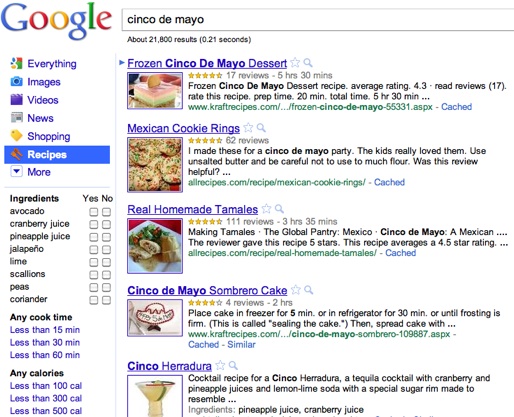
Today Google unveiled an appetizing new search option for cooks and wannabe chefs: Recipe View.
The new search option will be a choice in the left rail that appears after entering a Google search. You can search for recipes by entering the name of a dish or food type, an ingredient, or just an occasion, such as Cinco de Mayo. The results can be further filtered by preparation time, ingredients, or calories. Result recipes also sport star ratings and user reviews, so you can see which ones have been hits.
The feature is more than a taste-bud pleaser, though. In order to implement it, Google engineers made use of rich snippet data. Google product mangaer Kavi Goel said in a blog post that the technology was introduced at the Searchology conference in 2009.
Click to continue reading Google brings Recipe View to search results