

Latest Gear Live Videos
Ask Andru: How can I make my iPad louder?
In today's Ask Andru column, we get a question about an issue with the iPad that we've actually experienced ourselves for years. Ever since the release of the original iPad, it's been painfully obvious that the speaker on the Apple tablet isn't exactly up to snuff. It's fine if you're somewhere quiet, but go somewhere that has any ambient noise, and all of a sudden it's a challenge to enjoy any audio-based entertainment. So, on to the submitted question:
I love my new iPad, but I wish it were louder. It seems that everything about the new iPad is high-quality, with the exception of the speaker! Is there any way I can get more volume out of this thing?
I hear you! As I said earlier, the low volume issue has been around since the very first iPad. When the iPad 2 was released, the speaker grille was larger, and many assumed that this meant that the device would be louder. Unfortunately, despite the visual cue, the iPad 2 suffered from the same issue, and the new third-generation model (see our new iPad review) seems to have the exact same speaker as its predecessor. Luckily, there are a few things you can do to alleviate the frustration.
Click to continue reading Ask Andru: How can I make my iPad louder?
Advertisement
AT&T will start unlocking out-of-contract iPhones this Sunday

Posted by Andru Edwards Categories: Apple, Smartphones, Corporate News,
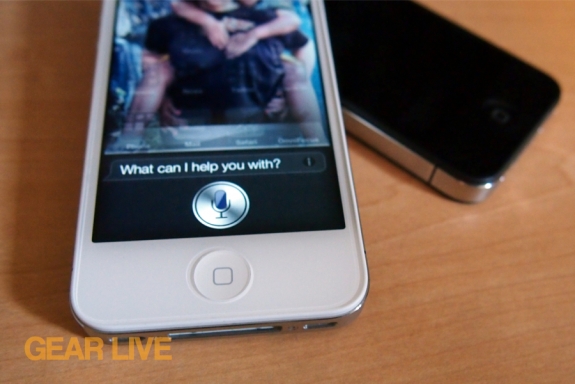
Are you rolling with an out-of-contract AT&T iPhone? If so, there's no reason to keep it locked to the AT&T network as of this weekend. Starting on Easter Sunday, AT&T will unlock any out-of-contract iPhone at the request of the customer. This means you can swap out the SIM for that of any other GSM carrier. This makes it super-easy when traveling abroad. In order to get the unlock, your account needs to be in good standing, so make sure you're all paid up.
Read More  | Engadget
Bleeding Edge TV 445: MyStream iOS app shares music wirelessly between devices
Posted by Andru Edwards Categories: Apple, Features, Music, Podcasts, Software, Videocasts, Videos, Wireless / WiFi,
In this episode we give you a look at MyStream, an iOS (and soon, Android) app that lets you share your music with multiple devices, eliminating the need to share headphones. Sharing of content happens over Bluetooth, streaming to up to 5 devices, or Wi-Fi, which will stream to up to 30 separate devices.
Big thank you to GoToMeeting for sponsoring Bleeding Edge TV. GoToMeeting provides rich, super-simple collaborative virtual meetings - be sure to check them out!
Zynga acquires OMGPOP, picks up Draw Something and other social games

Posted by Andrey Malskiy Categories: Corporate News, Software, Video Games,
For those on the go, iPhone and Android smartphones have been a lifesaver for mobile entertainment and keeping in contact with friends on the go. Once in a while, an app comes along that even uses your social network as the basis for an entertainment experience with something so addicting that even its competitors are threatened by it.
We’re taking about the game Draw Something, made by OMGPOP. It climbed its way to the top of the App Store and Android App Market and stayed there, out growing Zynga’s Words with Friends in popularity. Zynga wasn’t having any of this, so only one option remained—Zynga acquired Draw Something for a rumored $180 million, plus another $30 million for employee retention payouts, in an insanely smart move. Zynga is also acquiring a portfolio of over 35 social games aside from Draw Something, and the takeover is effective immediately. Current OMGPOP CEO Dan Porter is now Vice President and General Manager of Zynga New York.
Read More | Yahoo! Finance
Bleeding Edge TV 443: Third Rail Smart Case for iPhone 4S
Posted by Andru Edwards Categories: Accessories, Apple, CES, CES 2012, Features, Podcasts, Videocasts, Videos,
We show you the awesome Third Rail Slim Case and Smart Battery for iPhone 4 and iPhone 4S in this episode. The design of the Third Rail system is brilliant. The case itself protects the iPhone, but is super slim because of the fact that the battery is removable. When you need power, you just slide a Smart Battery into place, and your phone is charging. Even cooler, the Smart Battery can charge other USB devices on its own, not just iPhones. During SXSW last week, I found out just how awesome the concept behind the Third Rail Smart Case was. I had three Smart Batteries with me, which was way less bulky (and way less expensive!) then carrying three separate case chargers, like the Mophie Juice Pack Air or something similar, and the fact that I could use the Smart Batteries to charge my other USB devices was a fantastic bonus. You can find the Third Rail Smart Case on Amazon.
Big thank you to GoToMeeting for sponsoring Bleeding Edge TV. GoToMeeting provides rich, super-simple collaborative virtual meetings - be sure to check them out!
Spotify Apps are a success, change the way we enjoy music
Posted by Andrey Malskiy Categories: Corporate News, Music, Software,

When Spotify launched in Europe, social music sharing officially arrived, and many services soon folllowed. However, the company soon realized that releasing an API that allowed third-parties to tap into the spotify catalog would mean new features and new ways for its users to interact and enjoy music, and with that came the release of Spotify Apps.
Spotify has shared info on the success of four of these apps. Truth be told, some of them are a runaway success. Each app is unique in its own way in changing the way we do music.
Soundrop, “let’s you discover, listen to, and share music with friends in ‘rooms’ created by genre or theme,” Spotify says. According to the company, Soundrop users in Feburary listened to 15 million songs or the equivalent of 100 years’ of music.
The second app, Tunewiki, lets you sing along to the lyrics of the song you’re listening too. Though we can’t guarantee this will make you a better singer, it's certainly cool to be able to see the lyrics in real-time while playing a track.
Moodagent, plays music according to how you're feeling, which is fantastic time saver. No longer are you a slave to searching your library for the music you wanna listen too when you're 'Angry' or 'Happy', as you can now have Moodagent handle that for you.
The final app, SpotOn Radio, which was built into the mobile version of the app, hit number six on the Swedish iPhone app store.
The success of Spotify and the widespread use and development of its apps should continue to result in new, refreshing ways to both listen to and share music, with Spotify living on the back end. All Spotify apps are free to use, but require a Spotify account (also free!)
Read More | Spotify
How to fix: Apps Installed on the iPhone could not be Determined
Posted by Andru Edwards Categories: Apple, Features, PC / Laptop, Software,
I've been putting up with an annoying iTunes error when trying to sync my iPhone 4S. The sync always fails, telling me that it's because "Apps installed on the iPhone could not be determined" - We figured there were others out there receiving the same message, so we wanted to share how we fixed it. The problem would always start with iTunes attempting to transfer apps from the iPhone that it says weren't in the iTunes library - however, this is incorrect, as each time it wanted to transfer over all 153 apps from the iPhone. After the transfer started, the error would appear. Here are some things you can try if you're experiencing the same problem:
First, make sure you're running the latest version of iOS and iTunes. Restart your iPhone (or other iOS device) by holding down the home button and the sleep/wake button at the same time until the Apple logo appears. While it's rebooting, quit and restart iTunes. For some, this will usually fix the problem, but for us it didn't.
The next step is to reboot your computer. When it's back up, launch iTunes and update all apps in iTunes and do the same on your iPhone. Once this is done and both devices have the latest version of the apps that you own, connect your iPhone (and be sure you're using a first-party Apple sync cable) and attempt to sync. This will fix the issue if your iPhone and iTunes each have different versions of an app that might be corrupt. However, in our case, things were still failing. In this case, I had to watch the iTunes status during the sync and noticed that the error came up when it attempted to sync the Price is Right app. I manually deleted it from my phone, synced again, and it worked just fine.
Hope this saves some of you guys out there some frustration!
Unboxing Live 089: Nest Learning Thermostat
Posted by Andru Edwards Categories: Accessories, Features, Household, Internet, Video Games, Videocasts,
In this episode we open up the Nest Learning Thermostat. If you are unfamiliar, check out our video demo of Nest. Nest aims to manage the heating and cooling in your house by learning your usage patterns alongside built-in motion sensors that are used to tell when you are and aren't home. You can control Nest directly from the unit, as well as from anywhere that you have an Internet connection through the browser. It also has smartphone apps that allow you to control it directly from your mobile device. The more you interact with Nest, the more it learns about your preferences, and it will continually tune itself to your preferences and schedule. Nest is currently backordered by about two months from the company, but you can pick up Nest on Amazon.
Big thank you to GoToMeeting and JackThreads for sponsoring the show - be sure to check them out! GoToMeeting with HDFaces provides rich, super-simple collaborative virtual meetings. As for JackThreads, we've got exclusive invite codes that give you $5 to use towards anything you'd like on the site.
GarageBand for iPad update brings Smart Strings, note editor, iCloud sharing, Jam Sessions
Posted by Andru Edwards Categories: Music, App Updates, Apple, $4.99,
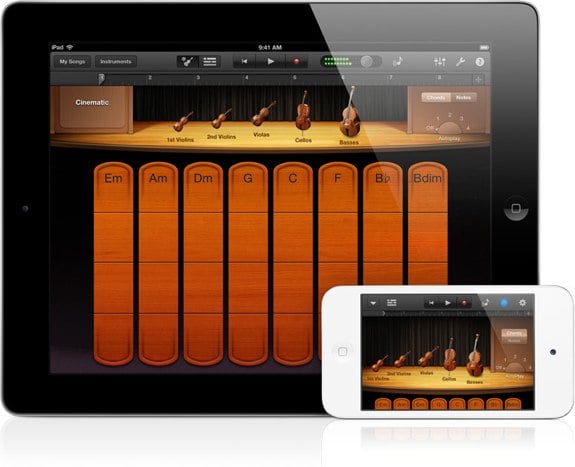
Yesterday, after its iPad event, Apple released an updated version of GarageBand for iOS that includes a few new features. First is Smart Strings. Similar to the other smart modes, Smart Strings makes it easy to control a set of string instruments and to have them work together to create music on the fly. There's also a new note editor, as well as iCloud integration that allows you to push a track to iCloud so you can then access it from your other iOS devices. Lastly, Jam Sessions allows multiple iOS devices to all play together, mimicking a live jam session. Pretty neat. You can download the update now from the App Store, or buy it for $4.99.
iOS 5.1 now available for iPhone, iPad, iPod touch
Posted by Andru Edwards Categories: Apple, Smartphones, Handhelds, Software,
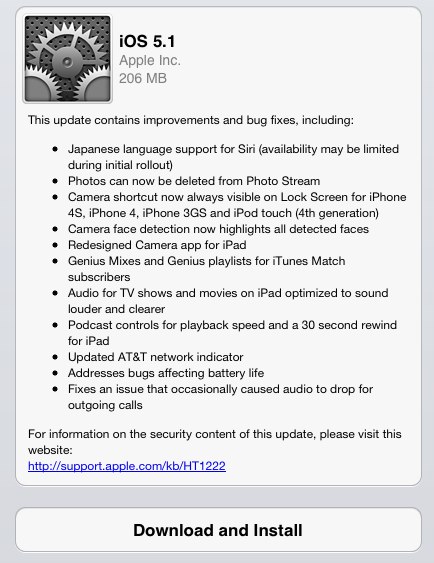
As Apple promised this morning during its iPad event, iOS 5.1 is now available for download. What's new? Well the major items include the fact that Siri can now speak to you in Japanese, photos can be deleted from Photo Stream (finally!), and a camera shortcut is now always visible on the lock screen of the iPhone and iPod touch. Other additions include a 4G indicator on the AT&T iPhone 4S, and optimized audio for iTunes TV and movies to make the audio louder and clearer when watching on an iPad. Download it now!








