

Latest Gear Live Videos
Apple has sold 352 million iOS devices

Posted by Andru Edwards Categories: Apple, Smartphones, Corporate News, Handhelds,

This morning at its iPad event, Apple CEO Tim Cook announced that the company has sold 352 million iOS devices. That includes iPhone, iPad, and iPod touch, and is absolutely astounding when you really think about it. Also announced, iOS 5.1 will be available later today.
Advertisement
Bleeding Edge TV 440: Lifeproof iPhone 4/4S cases
Posted by Andru Edwards Categories: Accessories, Apple, Cell Phones, CES, CES 2012, Features, Podcasts, Videocasts, Videos,
Check out the Lifeproof cases and accessories for iPhone 4 and iPhone 4S in this video. The Lifeproof case is waterproof, snowproof, shockproof, dropproof, dirtproof...you get the idea. The company wants this to be the once case you'll ever need to protect your Apple smartphone. We demo the Lifeproof case in this episode by dropping an iPhone 4S in water and on the floor. We also give you a look at other Lifeproof accessories as well. You can pick up a Lifeproof case on Amazon. This video was recorded at CES 2012.
Big thank you to GoToMeeting for sponsoring Bleeding Edge TV. GoToMeeting provides rich, super-simple collaborative virtual meetings - be sure to check them out!
How to export files from an iPhone using iExplorer

Posted by Andrey Malskiy Categories: Smartphones, Features, Software,
As we've told you previously, iExplorer is a piece of free software allows you to browse the contents of your iPhone for select files. The nice thing is that iExplorer even lets you export files that were created and saved in third-party apps. In this tutorial, we show you how to do that yourself. As a point of reference we’ll be using MusicBox, a Rhapsody-type of serivce. Follow these few steps, and you’ll be on your way to moving files to and from your iPhone with ease.
Click to continue reading How to export files from an iPhone using iExplorer
Using iExplorer to search your iPhone, iPad, and iPod touch
Posted by Andrey Malskiy Categories: Apple, Software,

The iPhone has been a game changer from the beginning, but many nay-sayers complain about the lack of user control that iOS devices suffer from. With many phones
Normally when you connect a storage device to a computer, you’re given the option of managing its files. You’re able to locate individual files for exporting and editing purposes. However, trying to attempt this with an Apple iOS device is a different story, since they aren't recognized as a mass storage device over USB. There are roundabout ways of bypassing this, but who really wants to mess around with that? We’d rather connect the iPhone and search our files through a Finder- or Explorer-like UI. Thanks to the guys over at Macroplant, you can now search your files on an iPhone.
Click to continue reading Using iExplorer to search your iPhone, iPad, and iPod touch
Hub Innovations Couture iPhone 4S case review

Posted by Taylor Peterson Categories: Accessories, Apple, Product Reviews,
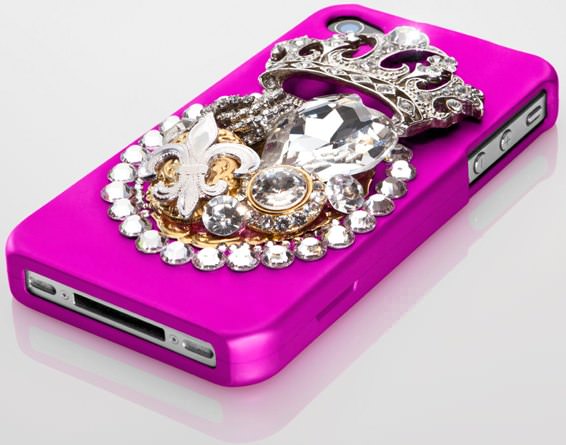
We recently got a chance to check out the Hub Innovations Couture Case for iPhone 4 and iPhone 4S. What sets this case apart from just about anything else out there is that it's decked out in Swarovski crystals, and in turn, definitely makes you stand out when you've got your iPhone in-hand or against your ear. We tried out the Punx Not Dead model in hot pink, but the cases are also available in black and white, with different crystal designs on each.
The pink Punx Not Dead Couture case was a super-girly attention-getter, and started more conversations than any accessory, hair, or makeup I've ever had. I loved the bright pink color and the big heart and crown on the case. Visually, the pink, Swarovski crystal-encrusted Hub Innovations Couture case that wrapped my white iPhone 4S looked fantastic.
Unfortunately, all of the bling made the case feel pretty heavy, and by looking at it, we're sure you can tell that it was extremely hard (read: uncomfortable) to put in a pocket. I also felt concerned about putting the case in my purse because I thought that some of the decorative pieces might fall off inside my bag or get caught on something. In fact, after just a few days, the first few items came off of the case. I left the Couture case on my phone for over 2 weeks, certainly nowhere near the length of time that you'd think a case would start falling apart.
Click to continue reading Hub Innovations Couture iPhone 4S case review
Bleeding Edge TV 431: Vonage Mobile vs. Skype
Posted by Andru Edwards Categories: Apple, Cell Phones, Features, Internet, Podcasts, Product Reviews, Software, Videocasts, Videos,
We compare the new Vonage Mobile free calling and free texting app against the Skype app for iOS and Android in this episode. Both Vonage and Skype offer apps for smartphones that enable you to communicate with others using voice or text for free, yet the apps also have some key differences. For example, Vonage Mobile uses your existing contacts and address book, rather than requiring you to set up a new username, get a new phone number, and set up a whole new buddy list like Skype requires you to do. Also, Vonage Mobile doesn't require you to set up an account with them to pay for any off-network minutes like Skype, instead you just add your minutes right from the App Store or Android Market! Another big difference is that Skype offers video chat, while Vonage Mobile is strictly for free phone calls and free texts in its current form. Check out the video for the full comparison and rundown!
Big thank you to MozyPro and JackThreads for sponsoring the show - be sure to check them out! MozyPro provides simple, automatic, and secure data backup. As for JackThreads, we've got exclusive invite codes that give you $5 to use towards anything you'd like on the site.
Unboxing Live 085: Third Rail Slim Case and Smart Battery for iPhone 4, iPhone 4S
Posted by Andru Edwards Categories: Accessories, Apple, Cell Phones, Features, Videocasts,
We show you the awesome Third Rail Slim Case and Smart Battery for iPhone 4 and iPhone 4S in this episode. The design of the Third Rail system is brilliant. The case itself protects the iPhone, but is super slim because of the fact that the battery is removable. When you need power, you just slide a Smart Battery into place, and your phone is charging. Even cooler, the Smart Battery can charge other USB devices on its own, not just iPhones. So if you have an Android device, a Kindle, or anything else, you can use the Smart Battery to charge it. The batteries are also stackable, and you can have up to 6 Smart Batteries giving power to a device, or being recharged, all at once. You can pick up a Third Rail Slim Case on Amazon for $74.
Big thank you to GoToMeeting and JackThreads for sponsoring the show - be sure to check them out! GoToMeeting with HDFaces provides rich, super-simple collaborative virtual meetings. As for JackThreads, we've got exclusive invite codes that give you $5 to use towards anything you'd like on the site.
Unboxing Live 084: MediaDevil Magicwand iPad stylus
Posted by Andru Edwards Categories: Accessories, Apple, Cell Phones, Features, Videocasts,
We open up and demo the MediaDevil Magicwand capacitive touch screen stylus in this episode! Not many people find that they are in need of a stylus for their iOS, Android, and other devices, but we've definitely found that, in some instances, it's pretty convenient. The Magicwand lets you use your devices in the cold when you have gloves on, lets you sign documents with your signature, and have a removable lanyard that plugs into the headphone jack so that you don't lose it. Check out the video to see how it works, as we demo the product with an iPad 2. You can pick up the Magicwand on Amazon for $9.
Big thank you to MozyPro and JackThreads for sponsoring the show - be sure to check them out! MozyPro provides simple, automatic, and secure data backup. As for JackThreads, we've got exclusive invite codes that give you $5 to use towards anything you'd like on the site.
Bleeding Edge TV 429: Vonage Mobile review
Posted by Andru Edwards Categories: Full Episodes, Cell Phones, CES, CES 2012, Features, Internet, Podcasts, Product Reviews, Software, Videocasts, Videos,
We give you a look at Vonage Mobile and explain how you can win one of twenty $25 iTunes gift cards in this episode! Vonage Mobile allows you to make free phone calls to other users of the app (which is currently available for iOS and Android.) In addition, you can also send free text messages as well to other users of the app, cross platform. Even better, you can call any phone number, the rate is much lower than what your mobile carrier would charge, and is even 30% less than what Skype would charge you as well.
The app works over both Wi-Fi and cell service (3G and 4G) and it uses your existing contacts and address book, rather than requiring you to set up a new username, get a new phone number, etc. Even cooler, you don't need a Vonage account to pay for your calls - instead, you just add your minutes right from the App Store or Android Market! As we said, the video also explain how you can win one of the 20 $25 iTunes gift cards we will be giving away as well!
Big thank you to MozyPro and JackThreads for sponsoring the show - be sure to check them out! MozyPro provides simple, automatic, and secure data backup. As for JackThreads, we've got exclusive invite codes that give you $5 to use towards anything you'd like on the site.
Enter to win 1 of 20 $25 iTunes gift cards in our Vonage Mobile giveaway!
Posted by Andru Edwards Categories: Announcements, Smartphones, Features, Software,

Vonage Mobile has launched, and we're giving away 20 iTunes gift cards to our readers to celebrate! In case you're unaware, Vonage Mobile allows you to make free phone calls to other users of the app (which is currently available for iOS and Android,) anywhere in the world. In addition, you can also send free text messages as well to other users of the app, cross platform, anywhere in the world. Even better, you can call any phone number, and if that other person doesn't have Vonage Mobile, then the rate is much lower than what your mobile carrier would charge, and is even 30% less than what Skype would charge you as well.
The app works over both Wi-Fi and cell service (3G and 4G) and it uses your existing contacts and address book, rather than requiring you to set up a new username, get a new phone number, etc. Even cooler, you don't need a Vonage account to pay for your calls - instead, you just add your minutes right from the App Store or Android Market!
So, how do you enter to win one of the $25 iTunes credits? We've got a few different ways for you to enter. You only need to enter once, but for each method of entry, you gain an additional entry in the contest. Here's how you enter:
- Download the Vonage Mobile app (it's free!)
- TWITTER ENTRY: Follow the Gear Live Twitter account and take a picture of the app on your phone. Include that image in a post with this tweet exactly as written: “Hey @GearLive I got @Vonage Mobile! Hook me up with that prize! http://gear.lv/vonagecontest” (Click here to tweet this now)
- FACEBOOK ENTRY: Like the Gear Live Facebook page, and take a picture of the Vonage Mobile app on your phone. Leave a post on our wall and include that photo.
- YOUTUBE ENTRY: Subscribe to Gear Live on YouTube and leave us a video response on this video showing us that you downloaded the Vonage Mobile app.
That's it! Again, there is no requirement for you to perform all three methods of entry, but you do get a point for each entry that you do. At the end of the week, we'll choose twenty winners at random who followed the rules!
Click to continue reading Enter to win 1 of 20 $25 iTunes gift cards in our Vonage Mobile giveaway!








