

Find Our Latest Video Reviews on YouTube!
If you want to stay on top of all of our video reviews of the latest tech, be sure to check out and subscribe to the Gear Live YouTube channel, hosted by Andru Edwards! It’s free!
Latest Gear Live Videos
How Google can learn from the iPad 2

Posted by Andru Edwards Categories: Apple, Editorial, Features, Google, Handhelds, Software,
Apple's March 2 event is all but guaranteed to bring us the iPad 2, most likely with dual cameras and a revamped OS. It arrives two months after CES 2011, to a landscape littered with tablets from scores of manufacturers, most of them with one thing in common: they are running Google's Android OS. But only a handful of them run Android 3.0 (Honeycomb), the first Android tablet OS. Can tablets like the Motorola Xoom—the first Honeycomb device—take on the iPad?
If the past is any indicator, it doesn't look good. This has less to do with quality of product, however, and more to do with the manner in which the product is brought to the public.
The clear advantage Apple has over just about every competitor—except perhaps for RIM—is that it relies on no external manufacturers for its products. To clarify: of course Apple needs to farm out production of the components that make up its devices to OEMs, but when you see a new iPad, it is from Apple, running an Apple OS, for sale at the Apple store. The closest Apple comes to working with other companies is its partnerships with Verizon and AT&T for the iPhone and iPad. For the most part, however, Apple is its own, self-controlling entity. With no company—other than the carriers and OEMs— with which to coordinate, Apple can create a realistic product release timeline and stick to it.
Click to continue reading How Google can learn from the iPad 2
Gallery: How Google can learn from the iPad 2






Advertisement
10 features we’d love to see in the next iPad
Posted by Andru Edwards Categories: Apple, Editorial, Features, Handhelds,
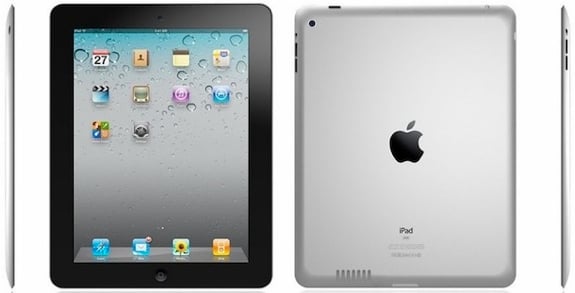
It's been a year since Apple took the wraps off its first tablet. In those past 12 months, the iPad hasn't had too much serious competition, and has easily dominated the tablet market. But with the recent introduction of Google's tablet-specific Honeycomb Android OS on devices like the Motorola Xoom, the tablet space is finally starting to get interesting.
And while other companies like HP, Motorola, and RIM are releasing first-generation tablets, Apple is set to unveil its second-gen iPad tomorrow. The invites have been sent, and the blogosphere is bursting with all sorts of ideas about what the 'iPad 2' might look like. But as anyone who follows Apple knows, nothing is certain until it's unveiled on stage in San Francisco. Here are 11 ways Apple could knock it out of the park with its next iPad:
Add a Verizon 3G iPad
The fact that Verizon started selling the Wi-Fi-Only iPad with a Mi-Fi bundle back in October, and since the iPhone 4 landed at Verizon last month, we can't see a reason why the next iPad wouldn't be available on both AT&T and Verizon. There could be an existing exclusivity agreement where AT&T would get the iPad 2 first, and then Verizon would follow sometime later, but my fingers are crossed that this won't happen.
Even Better, Make it a 4G Verizon iPad
Verizon's 4G network has been up and running since December, and the first LTE phones are expected any day now. Also, if you buy a Motorola Xoom, it comes with the promise of a free future 4G upgrade. Why not the iPad 2? Hopefully, the accompanying data plan wouldn't be prohibitively expensive.
Click to continue reading 10 features we’d love to see in the next iPad
Gallery: 10 features we’d love to see in the next iPad
Mac OS X Lion: A look at the Developer Preview
Posted by Andru Edwards Categories: Apple, Features, PC / Laptop, Software,
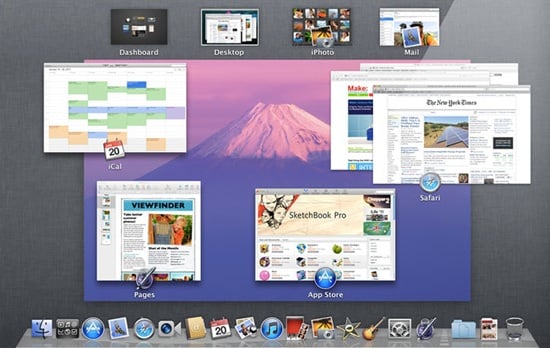
Today I was given a sneak peak at the current state of OS X Lion. It's now looking smoother, though it's still a work in progress.
A few nifty features have arrived since my first viewing of the nascent operating system. As has been mentioned, Lion borrows a lot from iOS, but don't forget that iOS started out as a whittled down version of Mac OS X, so the tides have turned.
Never-before seen features announced today include AirDrop, a wireless file-sharing utility; a redesigned Mail app; Resume, which presents the OS and Apps in the exact state at shutdown; Versions, which allows app developers to implement a feature that saves multiple snapshots of any document being worked on; and AutoSave, which does what its name suggests, saving documents automatically.
Apple also announced today that FaceTime for Mac is no longer beta, and is available in the Mac App Store for $0.99.
I also got a closer look at some of OS X Lion's major new interface tools: LaunchPad, Mission Control, and multitouch support, which works across the other two. Before delving into the previously unknown features, I'll share some impressions of these, which will change the way we interact with our Macs in significant ways.
Click to continue reading Mac OS X Lion: A look at the Developer Preview
Gallery: Mac OS X Lion: A look at the Developer Preview
Are the Steve Jobs death watch fears unwarranted?
Posted by Andru Edwards Categories: Apple, Editorial, Features, Rumors,
 A story broke late yesterday about Steve Jobs being seen attending the Stanford Cancer Center in Palo Alto, California, the same center where actor Patrick Swayze sought treatment before his death. The source: The National Enquirer.
Given the source, the claim is questionable, though the Enquirer has been right about matters surrounding secretive public figures before (as former presidential candidate John Edwards can attest). Radar Online says it has confirmed the story, but it didn't say how.
Given that we know Jobs is currently on medical leave from Apple, and that he's had cancer before, the report that Jobs may be seeking treatment at a cancer center isn't surprising. The Enquirer even has photos of what it says is Jobs, supposedly looking extremely thin. A few sites have posted some of the photos, though it's hard to tell how thin the person is, or if he's just wearing baggy clothing.
The Enquirer report takes some big leaps, however, on the scant evidence. Enlisting two doctors, who have never even met Jobs, to make a diagnosis based on what's in the photos, the Enquirer says Jobs may have lost large portion of his muscle mass and probably has just "weeks to live."
Click to continue reading Are the Steve Jobs death watch fears unwarranted?
Gallery: Are the Steve Jobs death watch fears unwarranted?
How To: Transfer your phone contacts to the Verizon iPhone 4
Posted by Andru Edwards Categories: Apple, Smartphones, Features,
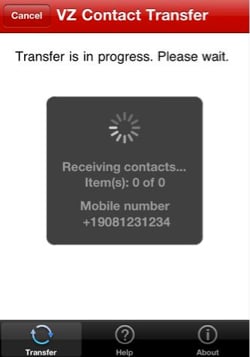
Dreading the hassle that comes with moving your contacts to a new phone? Don't despair. You can transfer your address book from your old phone into your new Verizon iPhone 4 in less than 10 minutes, you don't need a pen and paper, and in most cases, it's free.
Below are instructions for extracting your address book from most phones on the big four U.S. carriers—AT&T, Sprint, T-Mobile, and Verizon. There are only two things you need before diving in—active service on your current phone, and a Gmail account (unless you're already a Verizon Wireless subscriber).
Click to continue reading How To: Transfer your phone contacts to the Verizon iPhone 4
Gallery: How To: Transfer your phone contacts to the Verizon iPhone 4
Giveaway: HP Envy 100 e-All-in-One AirPrint printer
Posted by Andru Edwards Categories: Features, PC / Laptop, Peripherals,
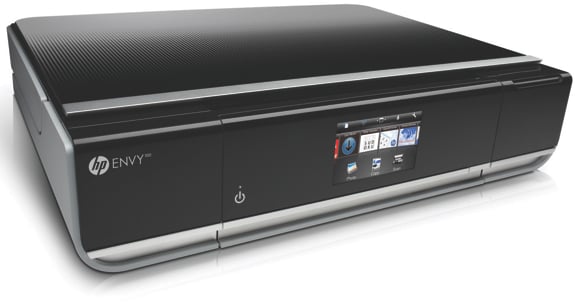
We know how much you guys love our giveaways, and now we're giving away an HP Envy 100 e-All-in-One printer. Wondering why you should be excited about this one? Well, if you own an iPhone, iPod touch, or iPad, you can print from those devices to this printer, as it supports Apple's AirPrint specification. It also prints up to 30 pages per minute for black, and 25 per minute for color. It's got Wi-Fi support built-in, you can email documents to be printed right to the printer from anywhere, and even two-sided printing. Oh, and it looks great as well, and does scanning and copying too.
Okay, now on to the details of the giveaway.
Here’s how to enter:
- Follow the Gear Live Twitter account
- On Twitter, post this tweet about our contest: “Hey @gearlive hook me up with that HP Envy 100 AirPrint printer! http://gear.lv/hp-envy-100” (Click here to tweet this now)
That's it! Do that, and you are entered. However, this time we're giving our bonus entries. All you have to do is head to the Gear Live Facebook page and Like us, then leave a comment on our wall. That gets you a second entry. The contest will run through Thursday February 17th, and is open to US residents. A winner will be chosen randomly from all eligible entrants.
Gallery: Giveaway: HP Envy 100 e-All-in-One AirPrint printer
Huge Slacker Radio Plus giveaway!
Posted by Andru Edwards Categories: Announcements, Features, Internet, Music,
 Here at Gear Live, we love us some Slacker. If you don’t know, Slacker is a fantastic radio’s streaming music service. It has millions of songs in its catalogue, and real DJs actually control their channels, which means you get a great mix of songs that go well together. While Slacker is free, they also have a service called Slacker Radio Plus, which adds the following perks:
- Unlimited Skips
- Unlimited Song Requests
- No Audio or Banner Ads
- Complete Lyrics
- Over 2 Million Songs
- Cache stations to smartphones for offline listening
- ABC News and headline news updates for any station
- "Peek Ahead" artist and album previews
We said this would be big, so here’s what we're gonna do - we are going to give away:
- FIVE one-year subscriptions to Slacker Radio Plus
- FIVE three-month subscriptions to Slacker Radio Plus
- FIVE one-month subscriptions to Slacker Radio Plus
We are going to make it ridiculously easy to enter as well. All you need to do is become a fan of Gear Live on Facebook, and leave a comment on our wall - feel free to enter as many times as you'd like. That’s it! On Friday we will select fifteen random entrants and hit them with the goods.
Gallery: Huge Slacker Radio Plus giveaway!
Hands-on with Sprint’s dual-screen Kyocera Echo
Posted by Andru Edwards Categories: Smartphones, Features, Handhelds,
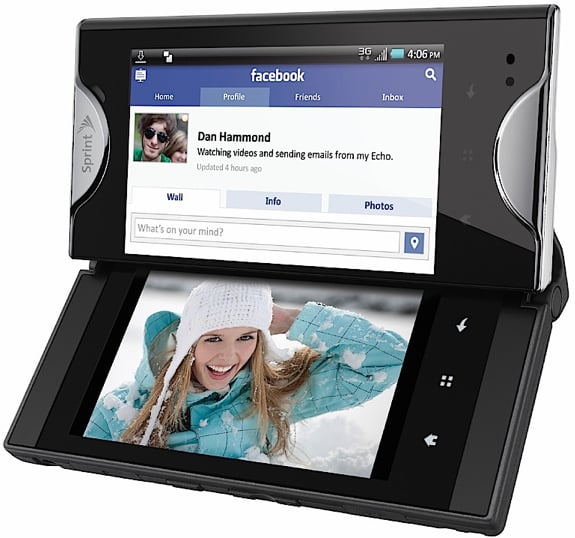
The dual-screen Kyocera Echo smartphone for Sprint lets you do two things at once, or look at the world through a 4.7-inch window. But it's only the vanguard of a legion of dual-screen devices that may be coming to American shelves, Sprint and Kyocera said today.
First, the phone itself: the Echo is a crazy device, but it thinks the way a lot of us do. It multitasks. The Echo starts out as a standard touch-screen Android 2.2 phone, and it works fine like that. But then you slide the 3.5-inch, 800-by-480 LCD screen, it does a strange hingey thing, and pow: the screen almost merges with another screen hidden under it. (Look at the slideshow below to understand.)
The Echo's unique hinge is made out of "liquid metal," Sprint's vice president for device operations Fared Adib said. It felt like plastic to me, but he said it was metal - and when tested, it was stiff and strong. The phone can survive a seven-foot drop test, he said.
Click to continue reading Hands-on with Sprint’s dual-screen Kyocera Echo
Gallery: Hands-on with Sprint’s dual-screen Kyocera Echo
The Verizon iPhone: 10 things you should know
Posted by Andru Edwards Categories: Apple, Editorial, Features, Handhelds,
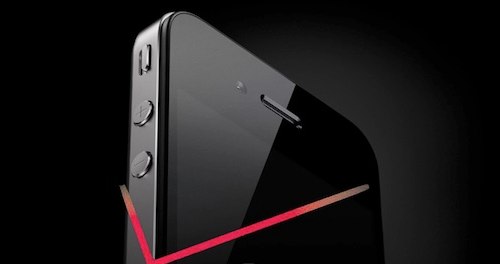
The arrival of the Verizon iPhone 4 has been cause for some celebration among Verizon customers and even some who are already using the phone on AT&T. In fact, virtually every smartphone customer is likely wondering if they should adopt one of the leading smartphones on the U.S.'s most reliable mobile network. These 12 facts may help you decide.
1. The Verizon iPhone is No Thicker or Heavier than the AT&T Model
Apple told me and my examination proves that these phones are like twins (more identical than fraternal). Both iPhones are 9.3 millimeters thick—still among the thinnest smartphones on the market.
2. The Antenna Design is Different for a Reason
It's no accident that the AT&T iPhone 4 and Verizon iPhone 4 antenna bands (around the phones) do not look exactly the same. The differences are hard to notice unless you hold the two phones side-by-side—as I did. The Verizon iPhone uses a CDMA network antenna. In fact, it uses two CDMA antennas (a necessary redundancy for the CDMA network). As a result, there are identical antenna band bar breaks on either side of the phone. By the way, Apple told me that, unlike GSM, the CDMA network actually works to give you a few more seconds of connectivity before the call breaks off completely. In other words, even on the worst connections, you may still be able to recover the call. I never had a bad enough connection to see this in action.
Click to continue reading The Verizon iPhone: 10 things you should know
Gallery: The Verizon iPhone: 10 things you should know
Aliph Jawbone Era review
Posted by Andru Edwards Categories: Accessories, Smartphones, Wearables, Features, Music,
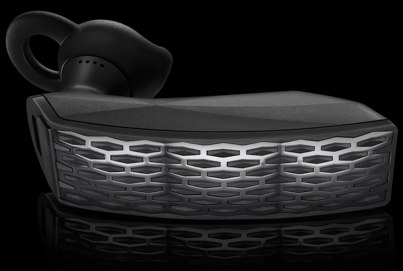
The Aliph Jawbone Era is the start of something new. It's the first Bluetooth headset with an accelerometer and a dedicated applications processor, which could turn it into anything from a game controller to a pedometer, or a navigation unit. Beyond that, though, it's just a top-notch Bluetooth headset, and fully worthy of our Editors' Choice.
Design and Call Performance
Like all Aliph products, the Jawbone Era is a sharp-looking headset. It's slimmer and slightly longer than the most-recent Jawbone Icon ($69), with a three-paneled, textured front; it actually looks more like the previous-gen Jawbone Prime. The Era comes in four colors, but they're all low-key: black, white, red and black-and-red. It comes with five different sets of ear tips (three that sit in your ear, and two that sit on your ear with a hook), an AC charger with a very short micro-USB cable, and a case. There's a single button on the butt end of the headset, and a power switch and pairing light on the inside face. Once you find the right ear tip, it's a secure fit; I wore the test unit comfortably for a three-hour conference call.
Click to continue reading Aliph Jawbone Era review








