

Saturday September 5, 2026 2:37 pm
Audacity 4.0 Looks Like a Different App, and Edits Like One Too

Posted by Andru Edwards Categories: Music, Software
If you have ever cut a podcast in Audacity, you know the routine. You get a clean take, you go to slide one clip a half second to the left, and the app makes you work for it. Audacity 4.0 shipped on September 3, and it is the first version in years that seems interested in making that part easier.
This is the largest update since version 3.0 in 2021, and it changes both how Audacity looks and what it can do. It is still free, still open source, still maintained by Muse Group.
A new look, with an escape hatch
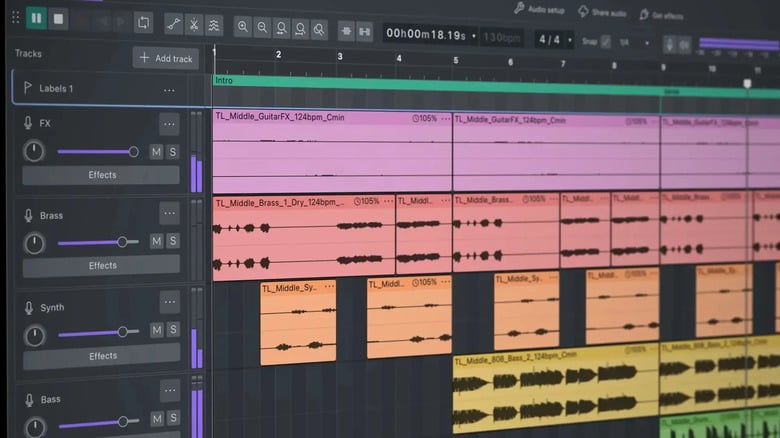
Start with the redesign. Audacity 4.0 has a dark mode, colored audio clips, and colorful accent elements throughout, which is a big swing for an app that has looked more or less the same for a very long time.
The colored clips are the part you notice while working. When every track is the same gray, you navigate by reading labels. When clips carry color, you can find your guest's audio in a crowded timeline without squinting at the track headers.
Muse also kept the classic interface as an option, which is the right call. Audacity users are not a crowd that enjoys having their layout moved, and a redesign with no way back would have started a fight on day one.
The editing changes that matter
Non-destructive editing got the biggest expansion. Clips can overlap now, you can trim several clips at once instead of one at a time, and you can group clips so they move together. If you have ever shifted an entire section of an interview and had the music bed stay behind, you know why grouping is worth something.
There is a new splitting tool that separates a clip in one click, and sample-level editing once you zoom in far enough, which is how you kill a single click or pop without touching anything around it.
The new envelope tool draws gain changes against a live waveform, so you see the effect as you make it instead of nudging a number and hitting play to find out. Per-track metering is the other quiet win: when something clips, you can tell which track did it. Anyone who has hunted a hot mic across a full session will take that trade.
What went away
Sync-lock is gone. Muse replaced it with keyboard shortcuts that cover the same behavior, which reads fine in release notes and less fine when it is your muscle memory. If sync-lock was part of how you work, check that before you update.
The DAW comparison
Plugin support has improved, and Muse Group is pitching Audacity as belonging in the same conversation as a professional DAW. Take that for what it is worth. Free software tends to get graded generously when it does the job, and it still has to survive a month of real sessions before anyone should agree with the pitch.
The company's history here is worth remembering too. Muse Group's stewardship has been rocky since it took over, and the 3.0 era was contentious enough that plenty of users still bring it up. One strong release does not settle that, and going by the feature list, this is a strong release.
The audience is podcasters, people recording a band in a bedroom, students, and anyone who wants a real multitrack editor without a subscription attached to it. If you already pay for a full DAW, 4.0 is not going to pull you over. If you have been putting up with Audacity because it is free, it is worth the download this time.