

Gear Live Business and Startup News: Articles Tagged Facebook Privacy
Latest Andru Edwards Videos
Facebook introduces Friendship Pages

Posted by Patrick Lambert Categories: News, Social Media,
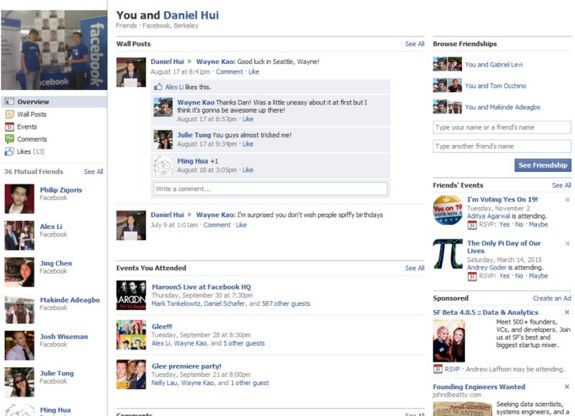
Today Facebook introduced yet another new feature of the popular social networking site: Friendship Pages. The way they describe it, this feature allows two people who've shared a bunch of common Facebook interactions to have their own dedicated page. With this new feature, a couple, friends, or any two people can see on a single page all their common wall posts, pictures they're both tagged in, events they've both gone to, and so on. This adds a layer of personalisation to the site, and makes it easier to follow the happenings of the ones you want, through the sometimes overwhelming amount of 'stuff' that can plague your stream of posts.
Of course, being Facebook, this will also most likely bring out questions about privacy and security. It remains to be seen if Friendship Pages become popular, but we bet they'll at least bring more embarrassing moments to the masses, for those who enjoy that kind of stuff.
Read More  | Facebook Blog
Gallery: Facebook introduces Friendship Pages






Advertisement
How to disable Facebook Places

Posted by Andru Edwards Categories: Features, Social Media,
So Facebook just launched Facebook Places, a feature that lets you check-in to local spots, and even lets others check you into those spots without your knowledge or approval by default. We figured some wouldn’t appreciate that, and would want to opt-out of some or all of the Facebook Places functionality, and we wanted to fill you in on just how to do it.
First, log in to Facebook and choose Privacy Settings from the Account menu at the top right. Click on Customize to get to where we need to go. The first area we want to check is called “Things I Share.” One of the categories is “Places I check in” - this is set to be visible to all your friends by default, and you can make that more or less restrictive in this area. Right below it is an option titled “Include me in ‘People Here Now’ after I check in” which is also on by default. This lets anyone know you are at a location if they are also there, or nearby.
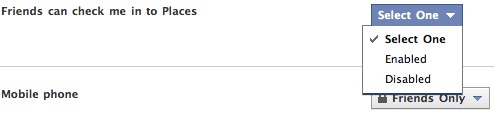
The last option is the one that lets others check you in against your will, and it’s enabled by default. Scroll down to the “Things Others Share” area, and you’ll see a Enable/Disable toggle for “Friends can check me in to Places.” If you don’t want others associating you with a location, you can turn that off here.
There you have it! We’re sure Places is going to be huge for Facebook, and that a lot of people will be joining in on the fun, but we also know there are a bunch of you that would rather not be involved, so we wanted to let you know how to shut it off.