

Gear Live App News and Reviews: Articles Tagged The Omni Group
Latest Andru Edwards Videos
OmniFocus for iPad finally released, worth the wait

Posted by Andru Edwards Categories: Productivity, iPad Apps, New Apps, Above $10,
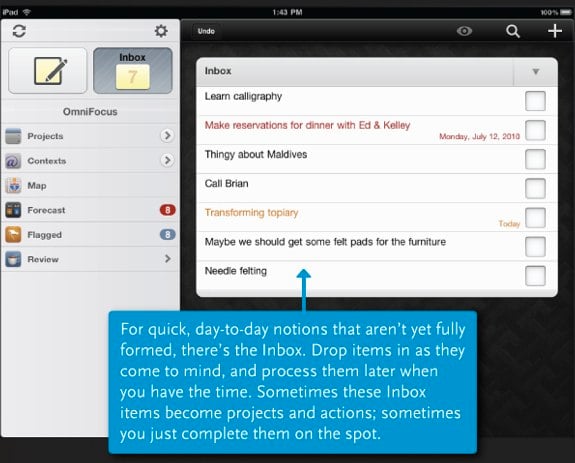
The good folks over at The Omni Group make what many consider to be the definitive GTD and task management app out there in OmniFocus. We use it with great regularity on the Mac desktop, and snapped it up immediately as soon as OmniFocus for iPhone was released. When the iPad launched, the one app that we knew we wanted was a native OmniFocus client. The Omni Group said they’d release it when it was done, opting to go feature complete rather than releasing a bare bones version and updating it incrementally with new features. Well, today OmniFocus for iPad launched, and we’ve gotta say, it’s impressive.
Like OmniFocus on iPhone, the app is location-aware, meaning that you can have it tell you what tasks on your list can be completed nearby, wherever you are. New to the app are a new streamlined task review mode, a Map feature, task forcasting, and more. Here’s the main feature list:
- Quick Entry for fast, easy task capture
- Task inbox where items can be stored for future processing
- Detailed task options like start and due dates, repeating schedules, and audio note and photo attachments
- Organize tasks into projects and folders, with as much hierarchy as is needed
- Categorize and view tasks by contexts, or work modes (ie, “Phone” for all phone call-related to-dos)
- Subtasks, for breaking large tasks into manageable steps
- Built-in search for locating any task in your database
- Cloud sync: synchronize with OmniFocus for Mac and OmniFocus for iPhone
- Location-based contexts: the Map makes it easy to generate and view tasks based on current or assigned locations
- Forecasts: see a weekly or daily view of all due tasks
- Built-in reviewing that helps you stay current on all your projects
The app sells for $39.99, so it definitely isn’t an impulse buy. However, if you are looking for an app that will keep you on top of everything in your work and home life, and sync between iPad, iPhone, and Mac desktop, we can’t recommend OmniFocus enough. It’s available now in the App Store.
Read More  | OmniFocus for iPad
Advertisement
OmniFocus for iPhone 1.2 released
Posted by Andru Edwards Categories: Productivity, App Updates, Above $10,
 We always have to give a shout when OmniFocus for iPhone, the one iPhone app that we truly could not live without, gets updated.
- The Nearby view now displays each context as soon as its distance is determined, rather than waiting to figure out the distance to each context before showing any results. It also scrolls much faster.
- Checkboxes are much easier to touch.
- When creating a new action, the keyboard appears immediately rather than sliding in after the screen.
- On the home screen, Settings have moved to the Info button in the bottom right corner.
- The Reset Database button in Settings will now reset the saved sync password in addition to the database, and will then take you back to the original welcome screen.
- Syncing automatically compacts the database on a regular basis, but when syncing is not enabled there’s now a Compact Database button in Settings. (There’s also some text there indicating how many tasks are stored in how many zip files, so you can tell whether your database could benefit from compacting.)
- Added underlying support for the new autocomplete settings for projects and groups which are coming in OmniFocus v1.6 for Mac.
- Actions without contexts are no longer considered unavailable.
The OmniFocus for iPhone 1.2 update is available now in the App Store. As with all OmniFocus updates, be sure to synchronize your data with MobileMe or your WebDAV server before updating, just in case anything goes awry.
Read More | OmniFocus for iPhone 1.2
OmniFocus 1.1.4 update released
Posted by Andru Edwards Categories: Productivity, App Updates, Above $10,
One of our favorite apps, OmniFocus, has been updated to version 1.1.4. It’s a minor upgrade, but it still brings a few welcome changes:
- Can now view attachments containing Microsoft Office, plain text, and web archive documents.
- Zoom in on attachment using the pinch gesture
- Added French, German, Spanish, Italian, Simplified Chinese, and Dutch to available languages.
If you want a tool that will keep your world (and your tasks) organized, look no further than OmniFocus.
Read More | OmniFocus
OmniFocus for iPhone gets updated to 1.1.2
Posted by Andru Edwards Categories: Productivity, App Updates, Above $10,

One of my absolute favorite iPhone apps, OmniFocus, just received a small update, meant to kill a few bugs. In case you have yet to give it a try, OmniFocus is an organizational tool solely meant to keep you on task, focused, while maintaining peace of mind that you aren’t forgetting anything. It’s configurable in so many ways, that just about anyone is able to fit it into their workflow. There is an iPhone version, as well as a desktop version for OS X, and the two can sync together. Anyhow, here are the details of the recent update for OmniFocus for iPhone:
Changes in the minor v1.1.1 update:
Fixed a bug which could leave the user at a blank screen after adding a new item.
Fixed a bug which caused the app to be unresponsive after converting an action to a project.
Fixed a few places where English was still visible in the Japanese translation.Changes in the minor v1.1.2 update (released November 13, 2008):
Updated the Settings icon to avoid potential confusion with the iPhone’s built-in Settings application.
As we said before, if you haven’t already, you owe it to yourself to check out OmniFocus.
Read More | OmniFocus via OmniGroup Forums