

Articles tagged Imessage
Latest Andru Edwards Videos
iOS 10 will be released on September 14th

Posted by Andru Edwards Categories: Apple, Smartphones, Corporate News, Handhelds, Software,

During today's iPhone 7 event, Apple announced that iOS 10 will join watchOS 3 by rolling out to users on September 14th. Apple's latest mobile OS packs a bunch of new features to look forward to, including a more intelligent Siri, much more useful Lock screen, tosn of improvements to iMessage, Apple Music refinements, a new home automation app, and more.
Also coming along in iOS 10 is an overhauled Maps app that pulls in appointments and locations from your email, copy/paste history, calendar, and more.
Get ready to download the new hotness with iOS 10 on September 14th!
Advertisement
Apple OS X Mavericks 10.9.2 now available, here’s what’s new
Posted by Andru Edwards Categories: Apple, PC / Laptop, Software,
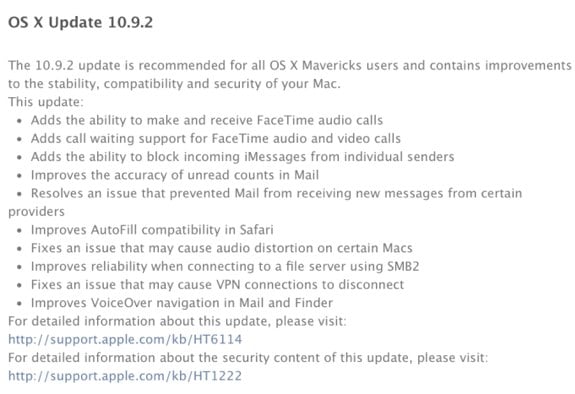
Apple has released OS X Mavericks 10.9.2 to the public following a lengthy developer beta, and with it comes quite a few new features and enhancements to the Mac desktop operating system:
- FaceTime Audio in the FaceTime and Messages apps
- Contact blocking for FaceTime and iMessage
- Mail app improvements
- Autofill fixes for Safari
- Audio fixes
- VPN fixes
- VoiceOver fixes
Also included is the SSL security vulnerability fix that Apple fixed in iOS last week, and earlier today on Apple TV. Many Mac apps were still at risk, including Safari and Mail. The company stated a few days ago that it planned to have a fix released "very soon," and four days later, this patch is included in OS X 10.9.2.
You can grab the OS X 10.9.2 update from the Mac App Store now.
Apple releases iOS 7.0.3 with iCloud Keychain, iMessage fix, Touch ID tweaks
Posted by Andru Edwards Categories: Apple, Smartphones, Handhelds, Software,
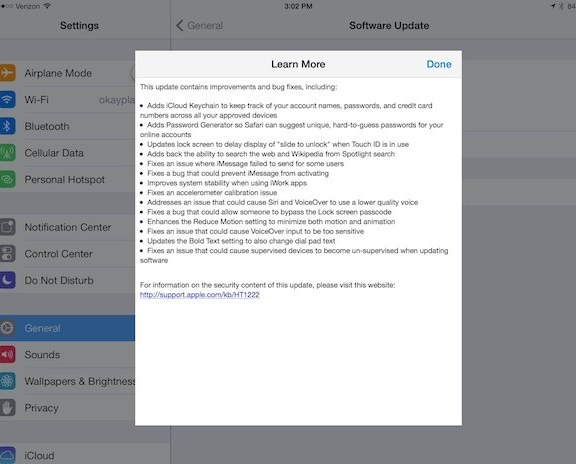
Alongside all the major news coming out of today's Apple iPad event, the company has also released an iOS update. iOS 7.0.3 bring a few new features to the platform, like iCloud Keychain, which works alongside the same feature in OS X Mavericks (which was also released today on the Mac App Store) to keep your account names, passwords, and credit cards synced across your devices, while protecting them with your Apple ID. Here is a rundown of all the changes in iOS 7.0.3:
- Adds iCloud Keychain to keep track of your on account names passwords and credit card numbers across all your devices
- Adds Password Generator so Safari can suggest unique hard to guess passwords for your online accounts
- Updates lock screen to delay display of "slide to unlock" went Touch ID is in use
- Adds back the ability to search the web and Wikipedia from Spotlight search
- Fixes an issue where iMessage failed to send for some users
- Fixes a bug that could prevent iMessage from activating
- Improves system stability when using iWork apps
- Fixes an accelerometer calibration issue
- Address is an issue that could cause Siri and VoiceOver to use a lower quality voice
- Fixes a bug that could allow someone to bypass the lock screen passcode
- Enhances the Reduce Motion setting to minimize both motion and animation
- Fix is an issue that could cause VoiceOver input to be too sensitive
- Updates the Bold Text setting to also change dial pad text
- Fix is an issue that could cause supervise devices to become unsupervised when updating software
You should be able to check the Software Update area on your iPhone, iPad, or iPod touch to grab the update now.
Apple releases major OS X Mountain Lion 10.8.2 update
Posted by Andru Edwards Categories: Apple, Corporate News, PC / Laptop, Software,

Alongside the release of iOS 6, Apple has just released OS X Mountain Lion 10.8.2. As we reported previously, this is a pretty substantial update. Sure, there will be the typical bug fixes and optimizations, but you will also find the long-awaited Facebook single sign on functionality, bringing sharing to (and notifications from) the social network built right in to OS X. The update also brings the Power Nap feature to Late 2010 MacBook Air notebooks, phone number support to Messages, shared Reminders lists, the ability to add cards to iOS Passbook from your Mac, and plenty more. We've got the full list of 10.8.2 changes here. You can download Mountain Lion from the Mac App Store.
OS X Mountain Lion 10.8.2 looking to be a substantial update, here’s the feature list
Posted by Andru Edwards Categories: Apple, PC / Laptop, Software,
Apple is set to release OS X Mountain Lion 10.8.2 soon, and it's shaping up to be a pretty substantial update. Sure, there will be the typical bug fixes and optimizations, but we can also expect the long-awaited Facebook single sign on functionality, bringing sharing to (and notifications from) the social network built right in to OS X. The update will also bring the Power Nap feature to Late 2010 MacBook Air notebooks, phone number support to Messages, shared Reminders lists, the ability to add cards to iOS Passbook from your Mac, and plenty more. We've got the list right here:
- Single sign on for Facebook
- Facebook as an option when sharing links and photos
- Facebook friends' contact information and profile pictures in Contacts
- Facebook notifications in Notification Center
There's plenty more, so hit the jump for the rest of the updates!
How iMessage phone number merging will work in OS X 10.8.2
Posted by Andru Edwards Categories: Apple, Smartphones, Software,
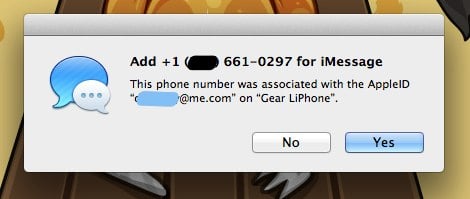
Aside from built-in Facebook integration, another major feature coming to OS X 10.8.2 is iMessage phone number merging. This functionality will allow you to receive any iMessages sent to your iPhone phone number on any approved iOS devices or Mac of your choice. In other words, if someone has your phone number and sends you an iMessage to that number (rather than your Apple ID email address,) Mountain Lion 10.8.2 will be able to receive and display them in the Messages app, and you'll be able to respond to them from there as well. It's the final missing piece in making iMessage device agnostic (well, as long as it's an Apple device.)
To merge your phone number with your Apple ID after you update to OS X 10.8.2, simply launch Messages and log in to iMessage. You'll then get a prompt that asks if you'd like to associate your phone number with your Apple ID. If so, just select Yes, and you're done! OS X 10.8.2 is set to be released this fall.
OS X Mountain Lion 10.8.2 to bring Facebook integration, iMessage phone number merging
Posted by Andru Edwards Categories: Apple, PC / Laptop, Software,
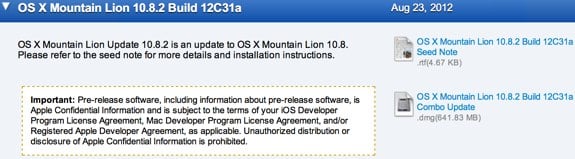
Hot on the heels of the release of OS X Mountain Lion 10.8.1, Apple has seeded 10.8.2 to developers, and it includes a couple of interesting features. With 10.8.2 should come the built-in Facebook integration that Apple promises will come to Mountain Lion this fall. In addition, iMessage phone number merging appears in 10.8.2 as well, a feature that will allow users to receive iMessages sent to their phone numbers on their Macs, iPads, and iPod touch devices. Apple asks developers to also focus on Game Center and Reminders in the first 10.8.2 build 12C31a.
Apple releases OS X Mountain Lion 10.8.1
Posted by Andru Edwards Categories: Apple, PC / Laptop, Software,
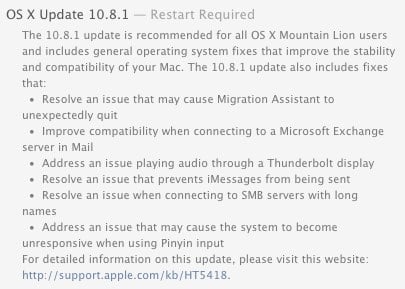
This morning Apple publicly released OS X Update 10.8.1, the first update for Mountain Lion. The release comes just two days shy of a month since the initial Mountain Lion release on July 25th. Here are the major changes and improvements included in the release:
Click to continue reading Apple releases OS X Mountain Lion 10.8.1
10 features that make Mountain Lion a steal at $19.99
Posted by Andru Edwards Categories: Apple, Features, PC / Laptop, Software,
Mountain Lion has been out for a couple of days, available for just $19.99 on the Mac App Store. Judging by our server logs, many of you have already upgraded to the latest Apple OS. For those still on the fence about what exactly you're getting for your Jackson, we figured we'd explain the top user-facing features of OS X 10.8. Sure, Apple is touting that Mountain Lion includes over 200 new features, but redesigned scroll bars are hardly anything to get excited about. Here are the Mountain Lion features that prove that $19.99 is a steal.
Click to continue reading 10 features that make Mountain Lion a steal at $19.99
iPhoto 9.3.2 released with Mountain Lion support
Posted by Andru Edwards Categories: Apple, Software,

A bunch of Mac apps are being updated today (like Rdio and Fantastical) to support today's release of OS X Mountain Lion, now available on the Mac App Store. iPhoto joins the list with release 9.3.2, which includes support for Mountain Lion and adds sharing options for Messages and Twitter alongside other performance and stability improvements. You can download the update now.