

Find Our Latest Video Reviews on YouTube!
If you want to stay on top of all of our video reviews of the latest tech, be sure to check out and subscribe to the Gear Live YouTube channel, hosted by Andru Edwards! It’s free!
Latest Gear Live Videos
TikTok’s Bold Glamour Filter Sparks Controversy Over AI & Unrealistic Beauty Standards

Posted by Andru Edwards Categories: Internet, Software,

TikTok is known for its fun and creative filters and effects that allow users to transform their appearance and express themselves. However, one of its filters has been causing a lot of backlash for its unrealistic and potentially harmful effects on users’ self-esteem and body image.
The filter in question is called Bold Glamour, which applies light makeup, smooths skin, enlarges lips, and tweaks bone structures to create a more “glamorous” look. However, many users have pointed out that the filter also changes their eye color, nose shape, jawline, cheekbones, and even hairline, making them look like completely different people.
Some users have been using the filter to compare their before and after looks or to show how different they look from their friends or family members. Others have been using it to mock or criticize the filter for its unrealistic beauty standards or to make jokes about how they would look like celebrities with the filter on.
Gallery: TikTok’s Bold Glamour Filter Sparks Controversy Over AI & Unrealistic Beauty Standards






Advertisement
Soon You Can Buy an Instagram Verification Badge with Meta Verified
Posted by Andru Edwards Categories: Corporate News, Internet,
Meta has announced a new subscription service called Meta Verified, and it's causing a stir across social media. This feature is designed to increase authenticity and security on both Facebook and Instagram. Many are likening it to Twitter Blue, however, you get way more from Meta Verified, including actual "verification."
For $12 per month (or $15 per month if you subscribe through the App Store), users will get blue verification badges on their Facebook and Instagram account, additional impersonation protection, direct access to customer support, and 100 free stars to tip creators on Facebook. Meta Verified subscribers will also get access to exclusive stickers for Reels and Stories.
Click to continue reading Soon You Can Buy an Instagram Verification Badge with Meta Verified
Gallery: Soon You Can Buy an Instagram Verification Badge with Meta Verified
Bing’s New Chatbot Isn’t Conscious, Despite What You May Have Heard
Posted by Andru Edwards Categories: Features, Internet, Microsoft,
We're living in a time where AI anxiety is at an all-time high. Predictions about the AI singularity are being thrown around like confetti, and recent reports about Microsoft's new Bing search AI have some folks convinced that we're already living in a world of self-aware machines.
Now, don't get me wrong, I can see why people might think this. When most people hear the term "AI," they imagine Skynet or HAL 9000 – machines with human-like self-awareness, powered by complex processors that rival the human brain.
But the reality of AI is far different from the Hollywood versions we see on the big screen. AI tools like Midjourney, ChatGPT, and Google and Microsoft's search assistants are a far cry from the sentient machines we imagine. In fact, calling chatbots, art generators, or automated programming tools "AI" might be a misnomer – or more likely, a simple marketing tactic.
So, how do these "AI" tools actually work?
Click to continue reading Bing’s New Chatbot Isn’t Conscious, Despite What You May Have Heard
Gallery: Bing’s New Chatbot Isn’t Conscious, Despite What You May Have Heard
Microsoft unveils new AI-powered Bing and Edge browser with ChatGPT features
Posted by Andru Edwards Categories: Corporate News, Features, Internet, Microsoft,

I spent the day at Microsoft today for the unveiling of the new Bing: a chat-based search engine that can do more than just answer search queries.
Bing is now a conversational agent that can understand and communicate fluently in your language of choice. It can also do things like write poems and stories, generate code, create songs, do celebrity parodies, and more. Bing can even suggest relevant and interesting topics for you to chat about, or help you find helpful products or services based on your needs.
Gallery: Microsoft unveils new AI-powered Bing and Edge browser with ChatGPT features
Geared Up: Riding in Tesla’s Cybertruck, & Samsung Tech Day w/ Special Guests Ben Sullins & Jim Elliott
Posted by Andru Edwards Categories: Corporate News, Design, Features, Handhelds, Internet, Science, Storage, Transportation,

This week we talk about the newly-announced Tesla Cybertruck, Tesla’s take on what a modern (if not futuristic) pickup truck should be, along with thoughts on riding inside the vehicle. Joining us for that segment is Tesla expert Ben Sullins from Teslanomics. Ben and Jon were on-hand at the Cybertruck reveal event, while Andru watched from home, left out from the annals of history. We also have an interview with Samsung Semiconductor’s Senior Vice President of Sales & Marketing Jim Elliott, talking about the new tech we can expect in upcoming Samsung smartphones, as well as how 5G, autonomous driving, high-bandwidth memory, and more are changing the future!
LINKS MENTIONED IN THE SHOW
- Video: Riding in the Tesla Cybertruck
- Video: Samsung Tech Day Announcements
- Geared Up on YouTube
- Jon Rettinger on YouTube
- Andru Edwards on YouTube
SPONSOR: National Car Rental - skip the line with the Emerald Club. Go National. Go Like a Pro.
Listen to the episode in the player above or subscribe to Geared Up in your favorite podcast app to listen on the go:
Gallery: Geared Up: Riding in Tesla’s Cybertruck, & Samsung Tech Day w/ Special Guests Ben Sullins & Jim Elliott
Circle with Disney review: Easy management of family devices!
Posted by Andru Edwards Categories: Handhelds, Internet, Product Reviews,
Here in the middle of 2017, managing your content across your various devices is a problem that is pretty much solved, thanks to the various cloud services we can tap into. These basically allow you to access all of your most important content from any device, anywhere you are. However, a problem that has yet to be tackled is the management of who uses those devices. Circle with Disney is a brand-new product that wants to unify your family’s entire online experience. It allows you to set time limits for individual family members, block websites based on your child’s age, and even pause Internet access entirely when it’s time to log off.
Circle allows your family to manage all of your home's connected devices with ease. With Circle, parents can now filter content and limit screen time as well as set a bedtime for every device in the home. Circle can even pause the Internet and share what kids are up to online.
Click to continue reading Circle with Disney review: Easy management of family devices!
Gallery: Circle with Disney review: Easy management of family devices!
Grab one year of Backblaze unlimited online backup for $25!
Posted by Andru Edwards Categories: Hot Deals, Internet, PC / Laptop, Storage,
Backblaze not only allows access to data from all your devices, but it backs up automatically and continuously so there are zero tasks added to your plate. It’s a simple solution to a complex problem that can often end in disaster.Right now you can grab a one-year subscription for $24.99 from Gear Live Deals. That is half off the regular price!
- Back up all your photos, movies, music & documents automatically
- Retain all deleted files for 30 days
- Back up external drives (USB, Firewall & Thunderbolt)
- Secure your data in data centers w/ 24-hour staff, biometric security & redundant power
- Enjoy the security of native Mac & PC coding rather than Java (responsible for 91% of attacks)
- Back up at optimized speeds so you don’t waste precious hours
- Locate your lost computer to help recover it
This subscription covers one computer (and any connected external drives) with a year of unlimited backup for new customers at half price. Get this deal now!
Gallery: Grab one year of Backblaze unlimited online backup for $25!

Let’s talk about the art of buying gifts. These days, in our technology-filled world, lots of people end up wanting some sort of gadget or electronic device when it comes to birthdays, Christmas, anniversaries, and the like. It makes sense, what with everything seemingly able to connect to a smartphone, tablet, PR, or Mac right now—whether it’s a new smartphone or tablet themselves, a home thermometer, tea kettle, camera, game console, and everything in between. Still, it can be a challenge knowing what to get someone for a special day.
Click to continue reading Best Buy introduces Wish List feature
Gallery: Best Buy introduces Wish List feature
Sling TV now available on Xbox One with 1-month free trial, adds new channel packages
Posted by Andru Edwards Categories: Home Entertainment, Internet, Microsoft,
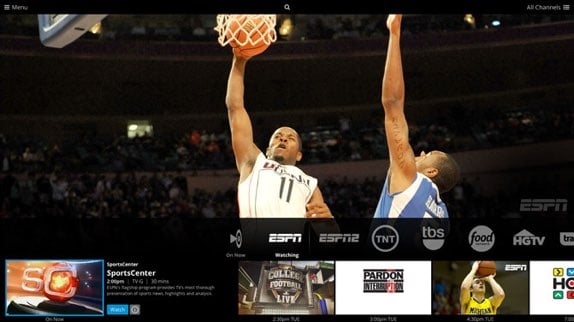
Sling TV, the service that streams live TV to customers, has launched on Xbox One this morning, making it the first game console to provide access to Sling TV subscribers. The Xbox One joins Roku and Fire TV devices, Android, iOS, Macs, and PCs in providing Sling TV support.
“Sling TV and Xbox are a natural pairing; two out of three millennials think of themselves as gamers, while nearly nine out of 10 watch live sports on TV,” said Roger Lynch, CEO of Sling TV. “Today’s Xbox One customers have been some of the most passionate about Sling TV since the beginning, and now we’re pleased to bring them live TV on their favorite gaming console.”
Specific Xbox One features for Sling TV include the ability to use Kinect gestures and voice commands to control the app, and the ability to Snap Sling TV besides other activities. Current Xbox One owners who download the app will receive one month of Sling TV for free. If you buy an Xbox One between March 17 and March 25, 2015, you'll get three free months of Sling TV service to try out.
In addition to the Xbox One news, Dish Network's streaming television service is also announcing a bunch of new channels that are now available to subscribers. Sling TV is adding A&E, History, H2 and Lifetime to the $20 core live TV package, and is also expanding its $5 extra channel packs, adding Lifestyle Extra (with TruTV, the Cooking Channel, DIY and WE TV) and World News Extra (with Bloomberg TV, Euro News, France 24, NDTV 24/7, News 18 and Russia Today).
Gallery: Sling TV now available on Xbox One with 1-month free trial, adds new channel packages
The Interview now available, $5.99 to rent, $14.99 to buy
Posted by Andru Edwards Categories: Google, Internet, Microsoft, Movies,

The Interview, the movie release that’s been at the center of media hysteria for the past week, is now available to stream from the comfort of your home after having its theatrical release pulled. You can still catch the movie in theaters starting tomorrow, Christmas Day, but you’ll only find it in 300 select independent theaters. In order to reach the masses, Sony decided to partner with Xbox Video, YouTube, and Google Play in conjunction with its own SeeTheInterview.com site on streaming the feature into the homes of potential viewers.
As far as pricing goes, you can rent The Interview for $5.99, or buy it for $14.99. Will you be watching?
Click to continue reading The Interview now available, $5.99 to rent, $14.99 to buy








