

Find Our Latest Video Reviews on YouTube!
If you want to stay on top of all of our video reviews of the latest tech, be sure to check out and subscribe to the Gear Live YouTube channel, hosted by Andru Edwards! It’s free!
Latest Gear Live Videos
Apple Time Capsule vs. Airport Extreme size comparison

Posted by Andru Edwards Categories: Apple, Features, PC / Laptop, Storage, Wireless / WiFi,

If our Time Capsule unboxing gallery wasn’t enough for you, we’ve got a bit more for you in term of images of Apple‘s new NAS wireless router. We know that images can be deceiving, so we thought we’d put the current Airport Express router up against the Time Capsule and snap some photos so that you can see the size difference. The Time Capsule is definitely larger - understandable, since it has to pack in a 500 GB or 1 TB hard drive. Aside from size, the only other really obvious difference between the two is that the Airport Extreme has a white Apple logo, while Time Capsule’s is silver. Check out the rest of the shots in our Time Capsule vs. Airport Extreme size comparison gallery.
Read More  | Time Capsule vs. Airport Extreme
Gallery: Apple Time Capsule vs. Airport Extreme size comparison






Advertisement
MacBook Air SSD review
Posted by Andru Edwards Categories: Apple, Features, PC / Laptop, Product Reviews, Wireless / WiFi,

First things first - the MacBook Air took no one by surprise. We all knew, based on the reports churning out of the rumor mill, that Apple had a subnotebook up their sleeve, and all signs were pointing at MacWorld 2008 for it’s introduction to the world. Heck, even the name of the product got out there before Steve got a chance to announce it at the event. Of course, that wasn’t the only thing that leaked before MacWorld 2008, as we got our hands on the iPhone 1.1.3 firmware weeks before it was officially announced.
What we didn’t know was how the Air would look. When Steve pulled the computer out of manila envelope, everyone was wowed. The MacBook Air is thin. T-H-I-N. At it’s smallest point, the Air is just 0.16 inches thin. That is thinner than both the iPhone and iPod touch. The larger side is just 0.76 inches. Again, tiny. See for yourself in our MacBook Air unboxing gallery.
As for the rest of the specs, the Air is the same brushed aluminum color that you will find on the MacBook Pro line, and is available in 1.6GHz and 1.8GHz Core 2 Duo speeds. Both models come with 2GB of non-upgradable RAM, 802.11a/b/g/n Wi-Fi, a 13.3-inch widescreen LED-backlit display, and Bluetooth 2.1. As far as ports go, you will only find one micro-DVI, one USB, and one audio out jack. That’s it. As for storage, this is where the major choice comes in. You can choose between an 80 GB 4200 RPM ATA hard drive, or a 64 GB SSD (solid-state flash drive). We got our hands on the SSD version of the MacBook Air.
We give you our thoughts on the SSD-based MacBook Air in our full review.
Click to continue reading MacBook Air SSD review
Gallery: MacBook Air SSD review
Follow Up: Verizon makes good on our FiOS privacy woes
Posted by Andru Edwards Categories: Broadband, Editorial, Features, Internet,

A little under two weeks ago, we made a long-standing issue that we had with Verizon public. The fact that they had ignored our request to fix a huge oversight that resulted in our private FiOS account info to fall into the wrong hands for over 8 months was starting to upset us just a tad. We knew that if we shared it with you, our readers, that Verizon would have no choice but to respond quickly. At least, that was the hope.
Well, sure enough, after the story was picked up on The Consumerist as well as made it to the front page of Digg, we received a phone call. Then an email. Then another phone call. Then a couple more emails. Verizon Damage Control had stepped in.
Click to continue reading Follow Up: Verizon makes good on our FiOS privacy woes
Gallery: Follow Up: Verizon makes good on our FiOS privacy woes
Our Verizon FiOS customer service nightmare: Why won’t they protect my private customer information?
Posted by Andru Edwards Categories: Broadband, Editorial, Features, Internet,
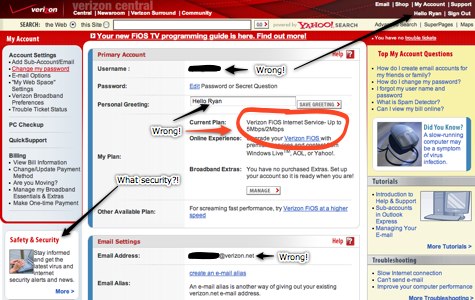
Seeing as we’ve been experiencing a ton of customer service issues with our Verizon FiOS service for the past 8 months, we figured it was time to put out a warning to you guys. After all, we typically hear that the FiOS Internet service is remarkably amazing, and people have been dumping cable in droves when FiOS becomes available in their area. Hey, there is good reason to. Where we are at, right outside Seattle, our choices are slow DSL, Comcast at 8.0 down and 768k up, or FiOS with a max speed of 30.0 down and 15.0 up (which is the plan we are on.)
Now let’s be clear here, we love the FiOS service. It works fantastically, it has never gone down in the 8 months we’ve been using it, and it’s, well, fast.
So what is the problem? To put it bluntly, Verizon has shown that they don’t care - at all - about protecting their users private, confidential information. Now, why would we make a statement like that? Check it.
Gallery: Our Verizon FiOS customer service nightmare: Why won’t they protect my private customer information?
iPhone 1.1.3 Q&A: Batch Two
Posted by Andru Edwards Categories: Apple, Smartphones, Features, Handhelds, Portable Audio / Video,

UPDATE: In case you thought this was fake, Steve Jobs just confirmed that our 1.1.3 coverage is real in his MacWorld 2008 keynote.
We’ve been getting hit with tons of iPhone 1.1.3 questions on our 1.1.3 forum thread. In case you missed it, check out our iPhone 1.1.3 video - if you have questions, check out our first batch of 1.1.3 answers. If you still have questions, read the rest of this post, as we answer even more of your questions. If we missed anything, let us know, okay? By the way, if you are looking for an excellent program to create custom ringtones for your iPhone, check out iPhone RingToneMaker.
I have 1.1.1. when i play a song on the ipod and start surfing using safari the music stops. i believe this is a bug. i tried this on a 1.1.2 iphone in the apple store and also experience the same behavior. can you please check if this is fixed in 1.1.3? (Asked here)
This isn’t so much a bug in 1.1.2 as it is a protection. The music will stop playing if the web page you are visiting consumes too much memory. When you load a page in Safari, if it needs more memory, it will unload pages in other tabs. If that isn’t enough, it talks to Springboard, which will start closing other applications, one of which is iPod.
That said, in our testing on 1.1.3, we were able to both listen to music and browse in Safari at the same time.
Do you have any idea how much of this is going to apply to the iPod touch? (Asked here)
I am sure the iPod touch will also gain the ability to move icons around. However, the touch doesn’t have the SMS or Maps apps, which is where a lot of the new features are found.
Click to continue reading iPhone 1.1.3 Q&A: Batch Two
Gallery: iPhone 1.1.3 Q&A: Batch Two
2007’s Ten Most Popular Episodes of Bleeding Edge TV
Posted by Andru Edwards Categories: Apple, Smartphones, CES, CES 2007, Features, Handhelds, Mods / Hacks, PC / Laptop, Product Reviews, Software, Transportation, Video Games, Videos, Wireless / WiFi,
We know we are a couple days late, but being the extreme hardcore rockers that we are, we weren’t coherent enough to push out our top 10 most popular episodes of Bleeding Edge TV, Gear Live’s technology video show. Or something like that. Anyhoo, click through to check out the ten videos that were viewed the most in 2007. If we’ve learned anything from compiling the list, it’s that you guys love yourselves some iPhone, Bluetooth, AMD, and video games. Exclusives also seem to strike your fancy.
Click to continue reading 2007’s Ten Most Popular Episodes of Bleeding Edge TV
Gallery: 2007’s Ten Most Popular Episodes of Bleeding Edge TV
iPhone 1.1.3 Q&A: Batch One
Posted by Andru Edwards Categories: Apple, Smartphones, Features, Handhelds, Portable Audio / Video,

EDIT: We have posted Batch Two of our iPhone 1.1.3 Q&A.
UPDATE: In case you thought this was fake, Steve Jobs just confirmed that our 1.1.3 coverage is real in his MacWorld 2008 keynote.
After posting our iPhone 1.1.3 coverage (if you missed it, here is our iPhone 1.1.3 firmware video and iPhone 1.1.3 photo gallery), we started asking you all to submit your questions to us. We set up a dedicated iPhone 1.1.3 Q&A thread on our forums, and got quite a response. We figured we’d better start pumping out some answers, so here goes. Meantime, leave us your 1.1.3 questions, mkay?:
Does 1.1.3 seem more stable than previous versions of the iPhone software? Also, can you please provide a more in-depth look at the new Google Maps? In addition, can you please explain how the iPhone creates an icon for the Safari bookmarks (for the home screen)? Does it automatically take a snapshot of the top-left corner of the website? (Asked here)
I guess you can say it feels more stable in some cases - but then again, it did crash once in our video. Certainly feels more complete.I am not sure how much more in-depth we can go with the Maps app, as we showed all the new functionality in the video. Lastly, the iPhone takes a snapshot of the left side of your screen to create the bookmark icon. So if you zoomed into the bottom-right of a website, the snapshot would be of the left side of the bottom right. Make sense?
Do you see these changes as a preview of what’s to come in February with the release of the SDK? (Asked here)
I am sure a lot of the changes that are in place in the 1.1.3 firmware are in preparation for the SDK. I am also sure there are under-the-hod changes that are less obvious that we don’t even know about yet.
Click to continue reading iPhone 1.1.3 Q&A: Batch One
Gallery: iPhone 1.1.3 Q&A: Batch One
iPhone 1.1.3 firmware feature gallery
Posted by Andru Edwards Categories: Accessories, Apple, Smartphones, Features, Software,
UPDATE: In case you thought this was fake, Steve Jobs just confirmed that our 1.1.3 coverage is real in his MacWorld 2008 keynote.
Looks like the soon-to-be-released iPhone firmware 1.1.3 has quite a few surprises. We were able to get a look at it, and here is what we found:
- The ability to send an SMS message to multiple people is now there
- Google Maps application can now pinpoint your location using cell tower triangulation
- Google Maps can now display the Hybrid map view
- You can now drag and drop application icons on your home screen
- The home screen supports pagination
- You can now add web bookmarks to your home screen
That is all we have found for now. We also know that is you used AnySIM to unlock your phone, you can expect the 1.1.3 update to brick it. Good times. Take a look at our iPhone Firmware 1.1.3 Gallery for a photo tour of the new stuff. By the way, if you are looking for an excellent program to create custom ringtones for your iPhone, check out iPhone RingToneMaker.
EDIT: We are answering your iPhone 1.1.3 questions! Check out our first batch of iPhone 1.1.3 answers here.
Read More | iPhone 1.1.3 Feature Gallery
Gallery: iPhone 1.1.3 firmware feature gallery

You know how much we love living vicariously through others, so we just HAVE to know - what did you guys get this year? What was waiting under the tree, ready to delight you with it’s awesome gadgety wonders? Let us know in the comments - we’re listening!
Gallery: Okay - what did you get?!
2007 Holiday Gift Guide: SanDisk Sansa Shaker
Posted by Andru Edwards Categories: Features, Music, Portable Audio / Video, Kids,
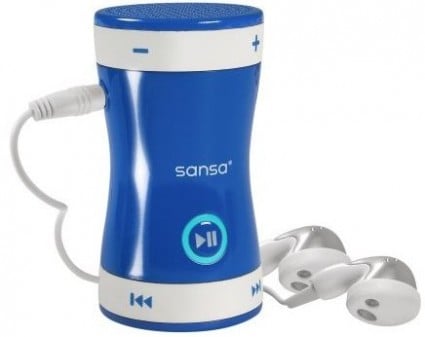
If your children are anything like my three-year old son, then chances are that they are just as familiar with your gadgets as you are. They want to hold them, use them, mimicking you every step of the way. The thing is, gadgets aren’t the most affordable things in the world, and children don’t seem to understand that. This is where the SanDisk Sansa Shaker comes in - it’s a fully-functional flash MP3 player that is meant for little kids. SanDisk did a good job with this one too - just holding it you can tell it’s durable. It has two built-in headphone jacks for tandem enjoyment, as well as a speaker if you prefer your children not put on headphones. It’s called the Shaker because, when you sake it, you advance it to another track, shuffle-style. It is shaped perfectly for little hands, and has a couple of job wheels for volume and track selection. The device runs on one AAA battery, which will last for about 8 hours of playback. You can pick one up for $30, which holds 512 MB of content (about 120 songs) or opt for the $40 1 GB player, which will hold about 240 tracks. They are available in pink and blue.
Compare prices on SanDisk Sansa Shaker.
Read More | SanDisk Sansa Shaker on Amazon








