

Find Our Latest Video Reviews on YouTube!
If you want to stay on top of all of our video reviews of the latest tech, be sure to check out and subscribe to the Gear Live YouTube channel, hosted by Andru Edwards! It’s free!
Latest Gear Live Videos
Nook 1.3 update boasts web browser, faster page turns, apps

Posted by Andru Edwards Categories: Handhelds, Software,
 Barnes & Noble has finally releases nook update 1.3, which brings a couple of welcome upgrades and features to the ereader. One notable change is the presence of a web browser, which in turn, makes Wi-Fi a bit more useful. How so? Well, if a Wi-Fi hotspot requires a login, you can now use the browser to do that and hop onto the network, whereas before, you were just out of luck with the nook. Pages will now turn faster, which is always nice, and they’ve also got some apps and games available for your enjoyment as well. If you want to take advantage of the in-store nook perks, you can now read any ebook for free for an hour when connected to a Barnes & Noble hotspot, and later, you’ll be able to read newspapers and magazines for 20 minutes per day. If you wanna get your nook updates immediately, you can download the update and manually install it over USB, or if you’re in no rush, it should auto-update over Wi-Fi sometime over the next few days.
Read More  | nook Update
Gallery: Nook 1.3 update boasts web browser, faster page turns, apps






Advertisement
McAfee pushes bad update, takes down Windows XP computers

Posted by Dan Hughes Categories: Corporate News, Editorial, Internet, PC / Laptop, Software,
 Yesterday, McAfee pushed out a DAT file for its Enterprise virus-scanning software that tracked down a core Windows XP system file and quarantined it as malware. Thousands, if not tens of thousands, of computer systems were damaged as a result. Windows XP cannot run without the quarantined file, SVCHOST.EXE, and as a result, automatically shut itself down. Other weird settings and symptoms were evident, such as taskbars disappearing, blue-screens-of-death, and other crash-related symptoms.
On one hand, relief simply did not come fast enough. On the other…what more could McAfee have done to repair the damage? McAfee rolled back the virus definition as quickly as it found out, and released an addendum file that could be manually applied to infected PCs. The servers hosting the offered file were strained by the demand, resulting in disconnect errors and failures to update the McAfee software.
“We believe that this incident has impacted less than one half of one percent of our enterprise accounts globally, and a fraction of that within the consumer base,” said Barry McPherson, on McAfee’s blog Wednesday. He goes on to identify the error in the update, stating that it was an attempt to detect a potentially damaging virus, and the update “clearly did more harm than good.”
“Having talked to literally hundreds of my colleagues around the world and emailed thousands to try and find the best way to correct these issues, let me say this has not been my favorite day. Not for me, or for McAfee. Not by a long shot.”
Click to continue reading McAfee pushes bad update, takes down Windows XP computers
Read More | McAfee SI Blog
Gallery: McAfee pushes bad update, takes down Windows XP computers
Microsoft Fuse Labs announces Docs for Facebook
Posted by Andru Edwards Categories: Corporate News, Internet, Microsoft, Software,

Microsoft’s Fusion Labs just announced a new product that they are doing in partnership with Facebook, called Docs for Facebook. Built on Microsoft Office 2010, Docs for Facebook is seemingly a play by Microsoft to take some of the cloud-based office suite share away from Google Docs. You’ll be able to create and share documents with friends on Facebook, control privacy settings, and with a click of a button, open the documents in your native Office software on your PC or Mac. That’s all well and good, but do you know many people who’ve been clamoring for the opportunity to add their boss and co-workers as Facebook friends, just so they can share documents with them on the popular social networking site? Yeah, us either.
If you want to get in on the action, hit the link below.
Read More | Docs for Facebook
Gallery: Microsoft Fuse Labs announces Docs for Facebook
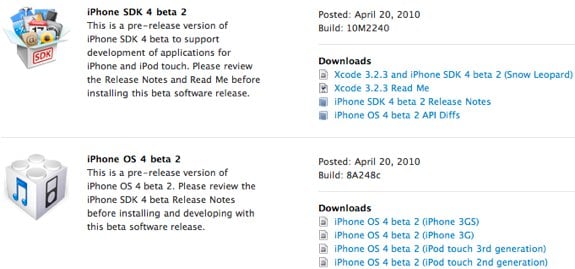
Hey, all you iPhone and iPad developers out there, Apple just released iPhone OS 4.0 Beta 2 software with the SDK. The software build is 8A248c, and the SDK build is 10M2240, and comes just about two weeks after the initial iPhone OS 4.0 beta was released. Grab it now in the iPhone Dev Center.
Gallery: iPhone OS 4.0 SDK beta 2 released
iPhone OS 4.0 already jailbroken
Posted by Andru Edwards Categories: Apple, Smartphones, Handhelds, Mods / Hacks, Software,

Looks like the jailbreak app developer community can get to work on porting their apps to iPhone OS 4.0, as the current beta has already been jailbroken. However, if you aren’t a developer, don’t go trying to mess around with the redsn0w 0.9.5 beta, as this is purely a dev release. It currently only works on Mac OS X and with an iPhone 3G running iPhone 4.0 beta 1, but that’s good enough to get the devs started on getting everything up to snuff for the official release this summer.
Read More | iphwn
Gallery: iPhone OS 4.0 already jailbroken
Live notes from Apple’s iPhone OS 4.0 event
Posted by Andru Edwards Categories: Apple, Smartphones, Features, Handhelds, Software,
Apple is set to show off the next major version of the iPhone OS platform this morning, and the event is just about to get underway. We will be bringing you live notes of all the action here, along with a running commentary on all the new things Apple is bringing to the table with iPhone OS 4.0.
Click to continue reading Live notes from Apple’s iPhone OS 4.0 event
Gallery: Live notes from Apple’s iPhone OS 4.0 event
Zune 4.5 update now available
Posted by Andru Edwards Categories: Handhelds, Microsoft, Music, Software,
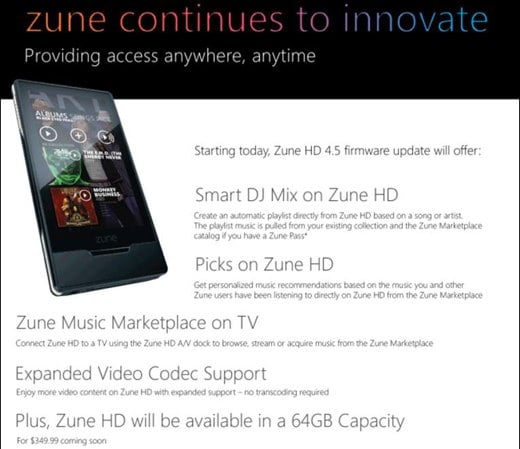
Hey Zune owners, head up—the Zune 4.5 update has just gone live, and it’s ready for you to suck down from Microsoft. As a refresher, here’s what you have to look forward to:
- Smart DJ integration on Zune HD
- Picks on Zune HD (personalized recommendations based on your listening habits)
- Browse the Zune Marketplace on TV when you dock your connected Zune
- Expanded video codec support, reducing need for transcoding
Of course, there are likely a bunch of bug fixes and all that to make things feel mo’ better. In addition to all that, the new 64GB Zune HD will be available in a week!
Gallery: Zune 4.5 update now available
Apple unveiling iPhone OS 4 on April 8th
Posted by Andru Edwards Categories: Apple, Smartphones, Software,
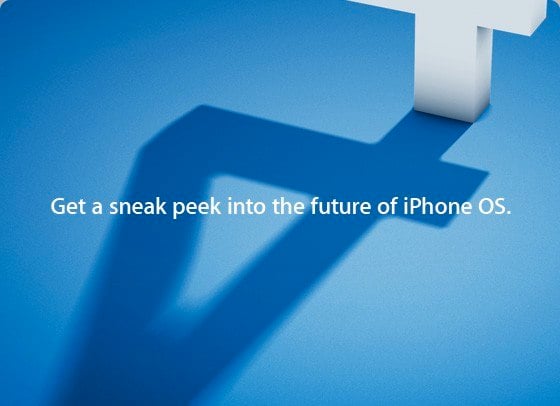
Hot on the hells of the iPad launch, Apple is continuing fell speed ahead, as they’ve invited a select group of media to come get a look at the unveiling of iPhone OS 4.0. As you can see in the image, the invite has a shadow of a large number “4” figure, and invites us to “Get a sneak peek into the future of iPhone OS.” The event takes place at the Cupertino campus, it’s just 3 days away, and we are excited. You?
Gallery: Apple unveiling iPhone OS 4 on April 8th
iTunes 9.1 now available with iPad and iBooks goodness
Posted by Andru Edwards Categories: Apple, Software,
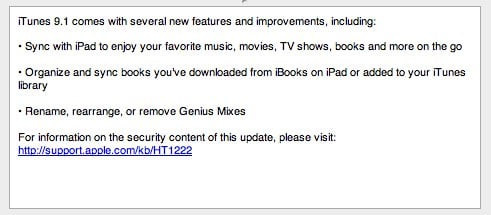
Apple has just unleashed iTunes 9.1 into the wild, and with it comes the ability to sync your iPad, as well as the ability to start managing ebooks. Interestingly enough, it looks like the iBooks store will only be accessible on the iPad itself, and not within iTunes, if we are understanding this correctly:
- Sync with iPad to enjoy your favorite music, movies, TV shows, books and more on the go
- Organize and sync books you’ve downloaded from iBooks on iPad or added to your iTunes library
- Rename, rearrange, or remove Genius Mixes
Remember, iTunes does support DRM-free ePub ebooks also, so if you have any, feel free to add them to your iTunes library after installing 9.1!
Gallery: iTunes 9.1 now available with iPad and iBooks goodness
Mac OS X 10.6.3 released, causes problems for some
Posted by Andru Edwards Categories: Apple, Software,
Apple finally released Mac OS X 10.6.3 yesterday morning, aimed at providing fixes that enhance the stabilit and security of your Mac, but it seems that a few people are experiencing some major issues after installing. On the bright side, we’ve heard that manually downloading the update, rather than bringing it in using Software Update, results in no problems at all. Here’s the quick list of fixes you’ll find in 10.6.3:
- improve the reliability and compatibility of QuickTime X
- address compatibility issues with OpenGL-based applications
- address an issue that causes background message colors to display incorrectly in Mail
- resolve an issue that prevented files with the # or & characters in their names from opening in Rosetta applications
- resolve an issue that prevented files from copying to Windows file servers
- improve performance of Logic Pro 9 and Main Stage 2 when running in 64-bit mode
- improve sleep and wake reliability when using Bonjour wake on demand
- address a color issue in iMovie with HD content
- improve printing reliability
- resolve issues with recurring events in iCal when connected to an Exchange server
- improve the reliability of 3rd party USB input devices
- fix glowing, stuck, or dark pixels when viewing video from the iMac (Late 2009) built-in iSight camera
You can go ahead and grab it now if you’re running Snow Leopard.








