

Find Our Latest Video Reviews on YouTube!
If you want to stay on top of all of our video reviews of the latest tech, be sure to check out and subscribe to the Gear Live YouTube channel, hosted by Andru Edwards! It’s free!
Perfect Dark Zero Xbox Live Connection Problems

Posted by Andru Edwards Categories: First Person Shooters, Internet, Xbox 360, Xbox Live,
 When we realized that about 90% of the time we try to connect to a multiplayer session over Xbox Live in Perfect Dark Zero, we did some checking. As it turns out, this is not an issue isolated to our network, as plenty of people are experiencing a similar phenomenon. The error message displayed is as follows:
“You have lost connection to the match.”
Ouch. Anyone else having this problem?
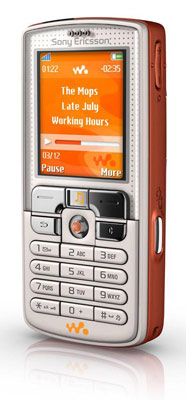 The SonyEricsson W800 is a bargain even at $500, with an impressive feature set and far better styling than the Motorola ROKR - without tying users to specific software. With all of the major features, it’s the little features that truly impress. Animated menus and Themes are a nice touch, as is the ability to set up recurring alarms for specific days of the week. The phone is SyncML compatible, so it syncs up nicely with most standard software that uses the format. There is a sound recorder, a fully-functional Voice Control, and a decent WAP 2.0 browser. Finally, it’s important to note that the battery life of the W800 is fantastic. It’s possible to go for several days on a single charge with moderate phone and MP3 usage. This is all coming from a battery smaller in size than a CompactFlash card, and is truly amazing. Frequent travelers will be happy to know that you can turn off the radios in the phone and use the MP3 player alone. Check out our full review here.
Advertisement
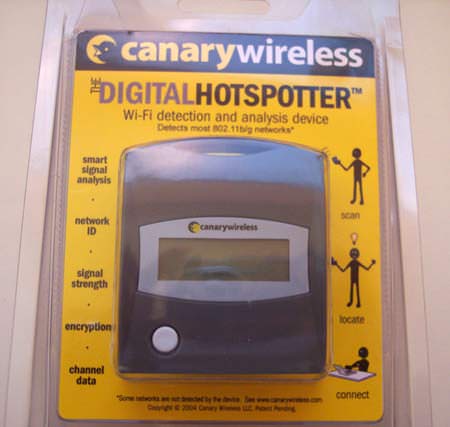
Walking around, it was way more convenient to break out the Digital Hotspotter with the one-button operation and all. No need to stop, open up the PowerBook, and search for a signal. However, we found another nice benefit. Since the Hotspotter tells you the channel of any network you are near, you can use this to your advantage in your home. If you find a neighbor is on channel 1, and another is on channel 3, you know to set yours up near 11 to reduce interference. This is one device we are recommending to anyone that uses Wi-Fi. It’s simple - but it’s that good. You can pick one up for about $60 USD, and the batteries last for about two months. Check out our full review here.
Product: CanaryWireless Digital Hotspotter
Price: $59 - Compare
WIN IT!: Wanna win a CanaryWireless Digital Hotspotter of your own? Just head on over to our Holiday Giveaway Forum Thread for details! One reader will walk away with a Digital Hotspotter courtesy of CanaryWireless and Gear Live Media.
Latest Gear Live Videos

It’s that time of year again, and Gear Live is here to help you make the purchase to geek out those you love. Oh, and we will have everyone on your list covered, from the spouse, to the kids, to the parents, to the person you are forced to buy a gift for because you just know they will be buying you one. We have collected some of the better items we have seen over the past year, along with a few new ones, in putting this years guide together.
Oh - one other special treat. We will be giving away many of the items featured in this year’s list. Think of it as our gift to you. It goes like this: If an item is up for grabs, we will let you know within that post. If you want it, you will be asked to make a post on
our forum
in the appropriate area. You are allowed to enter for only one gift, so you must choose wisely.Enjoy, and have a happy and safe holiday!
Plantronics Pulsar 590 Bluetooth Headset Now Available
Posted by Andru Edwards Categories: Accessories, Music, Portable Audio / Video, Wireless / WiFi,
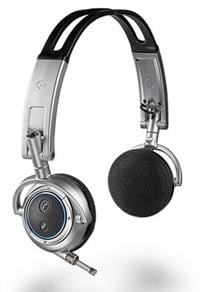 Plantronics has made it known that their Pulsar 590 stereo headphones are now available. Looking at the image, you can see that there isn’t much to them, which is a good thing in this situation. As far as functionality goes, you are able to switch from listening to your entertainment to taking a phone call with the push of a button. There is an omni-directional mic for voice optimization as well, and the unit includes an AC adapter/charger, USB charger, charging stand, travel case, and an in-flight cable. Look for this one to retail at $149.
Read More  | BIOS Magazine
TiVo HME To Add Yahoo! Services, Podcast Client, and More
Posted by Andru Edwards Categories: Home Entertainment, Internet,
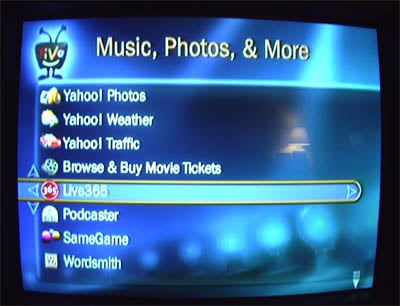
Looks like TiVo is set to make another go of this whole DVR thing, as they are readying a bunch of new services that will be integrated into the TiVo HME client. As can be seen in the image above, not only will Yahoo! Photos (read, Flickr,) Yahoo! Weather, and Yahoo! Traffic be available, but so will Internet radio, a podcasting client, and even a Fandango interface for browsing and buying movie tickets. If and when they ever get their non-DirecTV HD TiVo out the door, along with these value added features, they may be in the race again. Of course, the whole Comcast deal could turn out to be their saving grace as well.
Read More | Zatz Not Funny

Strangely enough, when I first inserted our Call of Duty 2 disc into the Xbox 360, we got an error stating that the DVD would only be playable on the Xbox 360. Basically, either the disc didn’t realize that it was in an Xbox 360 - or the Xbox 360 didn’t realize that it was, in fact, an Xbox 360. Huh. A quick reboot fixed it, but this is curious nonetheless.
This may sound like a minute detail, but it is just so elegant. The Xbox 360 can be powered on with either the bonus media remote (included in the first 1 million premium packages) or any controller. With the controller, you simple hold down the Xbox 360 logo button in the center, and both the controller and system turn on. The Xbox 360 Ring of Light begins rotating around the power symbol until it syncs with the controller(s), at which point the sections of the ring stay lit depending on the number of controllers connected. It’s so cool that it makes us smile.

A lot of portable audio players can be connected to the Xbox 360, but the iPod is undoubtedly the most popular and also the one that requires a few extra steps in order to get it working on the 360. Unfortunately, if you don’t visit the Xbox support pages, you won’t know why some songs don’t play or have a big red circle with a strike through it. Turns out an additional codec is required in order for the 360 to play AAC files from the iPod. Luckily the Xbox Support pages can help us out here. You will need a memory unit if you don’t have a hard drive.
- Go to the Xbox Live area of the Xbox Dashboard and select Xbox Live Marketplace, Game Downloads.
- Select All Games, Alphabetical List of Games.
- Select Optional iPod Support twice (once from Xbox Live Marketplace and again from the Xbox Guide screen), then Confirm Download.
- Once your download is complete, select Done and press BACK or B three times to return to the Xbox Dashboard.
Now why Microsoft didn’t just include this codec with every Memory unit sold or every Hard Drive available is beyond us, but now we can enjoy our full music collection on the new Xbox with no problems.
Read More | Xbox Support
Possible Solution To Xbox 360 Freezing Problem

Posted by Oscar M. Cantu Categories: Mods/Hacks, Xbox 360,

Most people have heard or read about the freezing issue some people have experienced with their new toy, freezing after a minimal uptime. Everything has pointed to a faulty power supply, and while Microsoft has not issued a statement as of yet, Goldeneyemaster from Gamespot forums took things into his own hands to come up with a solution to the problem: suspend the power “brick” in the air to allow it to dissipate heat through all of its sides. Now you can go about this various ways, you could actually suspend it in the air by means of strings or just get a box with an open top and place it on top. Whatever way you go about it be sure to tell us if this worked for you and what you did. Lets see how creative we can all get with this.
Read More | Gamespot Forums








