

Articles tagged Sms
Latest Andru Edwards Videos
Google Glass XE5 update brings Google+ integration, refinements

Posted by Andru Edwards Categories: Wearables, Google, Software,

Google has pushed out a new update for Google Glass Explorers, the early testers and purchasers of the ambitious wearable tech. Most notable in the XE5 update is the addition of Google+ functionality in Glass, specifically allowing you to comment on, and +1 entries on Google's social network. You can also receive incoming Google Hangout invitations. Here's a full rundown of the changes:
- Change to sync policy: require power + WiFi for background uploads
- Crash reporting
- Incoming G+ notifications (direct shares, comments, +mentions), including ability to comment and +1
- Incoming Hangout notifications
- Transcription of queries & messages is now wicked-fast
- Long-press to search from anywhere in the UI (no longer just from off)
- International number dialing + SMS
- Hop animation on disallowed swipes in the UI
- New On-Head Detection calibration flow
- Show device Serial Number on Device Info card
- More reliable estimation of battery charge remaining
- New recipient-list mosaic
As you can see, Google is steadily improving the Glass experience, even as it's just in the beta Explorer stage. With a year-or-so before it hits mass market, the company has a lot of time to refine the technology to get it ready for the meanstream. They'll need to, in order to quiet the jokes.
Advertisement
Samsung TouchWiz bug erases all of your Galaxy S data (update: fixed!)

Posted by Jason Diaz Categories: Smartphones, Handhelds, Mods / Hacks,
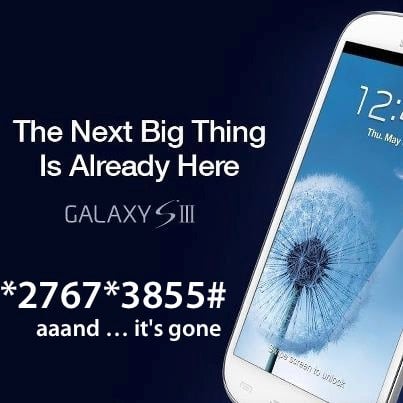
There is an SMS exploit in the wild that can cause a Samsung Galaxy device (including the latest Galaxy S III) running TouchWiz to be completely reset. This exploit was first discovered by tech security researchers and proof of that concept was shown on YouTube. There are many vectors where this could be distributed and executed such as SMS, email, and QR codes. This is practically on the same level as a Zero Day attack. However, the interesting aspect is that this was mostly likely implemented by carrier request and designed by the OEM, which is Samsung. We at Gear Live have not yet independently confirmed this exploit, but other tech publications have confirmed the legitimacy of the hack. Some refer to this as a feature? As always, use of safe computer and internet practices is advised.
UPDATE: Samsung has released a patch for this exploit, and recommends that all of its users download the latest software update, which eliminates the problem.
Click to continue reading Samsung TouchWiz bug erases all of your Galaxy S data (update: fixed!)
OnStar, RelayRides partnership allows GM vehicle owners to rent out vehicles to strangers for cash
Posted by Andru Edwards Categories: Transportation,
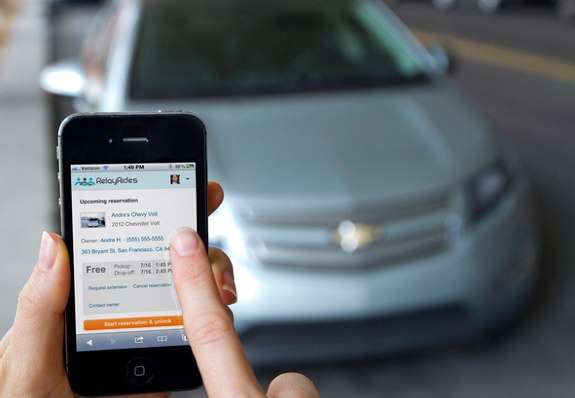
We reported on the RelayRides OnStar partnership back at CES, with RelayRides using the OnStar API to broaden its network of available vehicles. RelayRides allows its members to rent cars on a short-term basis directly from the car owners. It's a peer-to-peer car-sharing network. The partnership with OnStar will allow owners of cars equipped with the OnStar service to add their vehicles to RelayRides, giving them the opportunity to rent out their vehicles for cash. Locking, unlocking, and starting the vehicle can all be performed using the RelayRides smartphone app, and OnStar has made it easy for owners to add their vehicles to the service.
It may seem a bit unorthodox to make your personal vehicle available for rental to strangers, but RelayRides does have protections in place as they look to compete with the likes of Zipcar. What do you think? Would you use a service like this?
Read More  | GM
| GM
Bleeding Edge TV 431: Vonage Mobile vs. Skype
Posted by Andru Edwards Categories: Apple, Cell Phones, Features, Internet, Podcasts, Product Reviews, Software, Videocasts, Videos,
We compare the new Vonage Mobile free calling and free texting app against the Skype app for iOS and Android in this episode. Both Vonage and Skype offer apps for smartphones that enable you to communicate with others using voice or text for free, yet the apps also have some key differences. For example, Vonage Mobile uses your existing contacts and address book, rather than requiring you to set up a new username, get a new phone number, and set up a whole new buddy list like Skype requires you to do. Also, Vonage Mobile doesn't require you to set up an account with them to pay for any off-network minutes like Skype, instead you just add your minutes right from the App Store or Android Market! Another big difference is that Skype offers video chat, while Vonage Mobile is strictly for free phone calls and free texts in its current form. Check out the video for the full comparison and rundown!
Big thank you to MozyPro and JackThreads for sponsoring the show - be sure to check them out! MozyPro provides simple, automatic, and secure data backup. As for JackThreads, we've got exclusive invite codes that give you $5 to use towards anything you'd like on the site.
Bleeding Edge TV 430: Vonage Mobile giveaway - Win one of twenty $25 iTunes gift cards!
Posted by Andru Edwards Categories: Announcements, CES, CES 2012, Features, Internet, Podcasts, Videocasts, Videos,
We give you a look at Vonage Mobile and explain how you can win one of twenty $25 iTunes gift cards in this episode! Vonage Mobile allows you to make free phone calls to other users of the app (which is currently available for iOS and Android.) In addition, you can also send free text messages as well to other users of the app, cross platform. Even better, you can call any phone number, the rate is much lower than what your mobile carrier would charge, and is even 30% less than what Skype would charge you as well.
So, how do you enter to win one of the $25 iTunes credits? We've got a few different ways for you to enter. You only need to enter once, but for each method of entry, you gain an additional entry in the contest. Here's how you enter:
- Download the Vonage Mobile app (it's free!)
- TWITTER ENTRY: Follow the Gear Live Twitter account and take a picture of the app on your phone. Include that image in a post with this tweet exactly as written: “Hey @GearLive I got @Vonage Mobile! Hook me up with that prize! http://gear.lv/vonagecontest” (Click here to tweet this now)
- FACEBOOK ENTRY: Like the Gear Live Facebook page, and take a picture of the Vonage Mobile app on your phone. Leave a post on our wall and include that photo.
- YOUTUBE ENTRY: Subscribe to Gear Live on YouTube and leave us a video response on this video showing us that you downloaded the Vonage Mobile app.
That's it! Again, there is no requirement for you to perform all three methods of entry, but you do get a point for each entry that you do. At the end of the week, we'll choose twenty winners at random who followed the rules!
Big thank you to GoToMeeting and JackThreads for sponsoring the show - be sure to check them out! GoToMeeting provides rich, super-simple collaborative virtual meetings. As for JackThreads, we've got exclusive invite codes that give you $5 to use towards anything you'd like on the site.
Bleeding Edge TV 429: Vonage Mobile review
Posted by Andru Edwards Categories: Full Episodes, Cell Phones, CES, CES 2012, Features, Internet, Podcasts, Product Reviews, Software, Videocasts, Videos,
We give you a look at Vonage Mobile and explain how you can win one of twenty $25 iTunes gift cards in this episode! Vonage Mobile allows you to make free phone calls to other users of the app (which is currently available for iOS and Android.) In addition, you can also send free text messages as well to other users of the app, cross platform. Even better, you can call any phone number, the rate is much lower than what your mobile carrier would charge, and is even 30% less than what Skype would charge you as well.
The app works over both Wi-Fi and cell service (3G and 4G) and it uses your existing contacts and address book, rather than requiring you to set up a new username, get a new phone number, etc. Even cooler, you don't need a Vonage account to pay for your calls - instead, you just add your minutes right from the App Store or Android Market! As we said, the video also explain how you can win one of the 20 $25 iTunes gift cards we will be giving away as well!
Big thank you to MozyPro and JackThreads for sponsoring the show - be sure to check them out! MozyPro provides simple, automatic, and secure data backup. As for JackThreads, we've got exclusive invite codes that give you $5 to use towards anything you'd like on the site.
Enter to win 1 of 20 $25 iTunes gift cards in our Vonage Mobile giveaway!
Posted by Andru Edwards Categories: Announcements, Smartphones, Features, Software,

Vonage Mobile has launched, and we're giving away 20 iTunes gift cards to our readers to celebrate! In case you're unaware, Vonage Mobile allows you to make free phone calls to other users of the app (which is currently available for iOS and Android,) anywhere in the world. In addition, you can also send free text messages as well to other users of the app, cross platform, anywhere in the world. Even better, you can call any phone number, and if that other person doesn't have Vonage Mobile, then the rate is much lower than what your mobile carrier would charge, and is even 30% less than what Skype would charge you as well.
The app works over both Wi-Fi and cell service (3G and 4G) and it uses your existing contacts and address book, rather than requiring you to set up a new username, get a new phone number, etc. Even cooler, you don't need a Vonage account to pay for your calls - instead, you just add your minutes right from the App Store or Android Market!
So, how do you enter to win one of the $25 iTunes credits? We've got a few different ways for you to enter. You only need to enter once, but for each method of entry, you gain an additional entry in the contest. Here's how you enter:
- Download the Vonage Mobile app (it's free!)
- TWITTER ENTRY: Follow the Gear Live Twitter account and take a picture of the app on your phone. Include that image in a post with this tweet exactly as written: “Hey @GearLive I got @Vonage Mobile! Hook me up with that prize! http://gear.lv/vonagecontest” (Click here to tweet this now)
- FACEBOOK ENTRY: Like the Gear Live Facebook page, and take a picture of the Vonage Mobile app on your phone. Leave a post on our wall and include that photo.
- YOUTUBE ENTRY: Subscribe to Gear Live on YouTube and leave us a video response on this video showing us that you downloaded the Vonage Mobile app.
That's it! Again, there is no requirement for you to perform all three methods of entry, but you do get a point for each entry that you do. At the end of the week, we'll choose twenty winners at random who followed the rules!
Click to continue reading Enter to win 1 of 20 $25 iTunes gift cards in our Vonage Mobile giveaway!
Ask Andru: Apple iMessage Follow-Up
Posted by Andru Edwards Categories: Apple, Smartphones, Features, Handhelds,
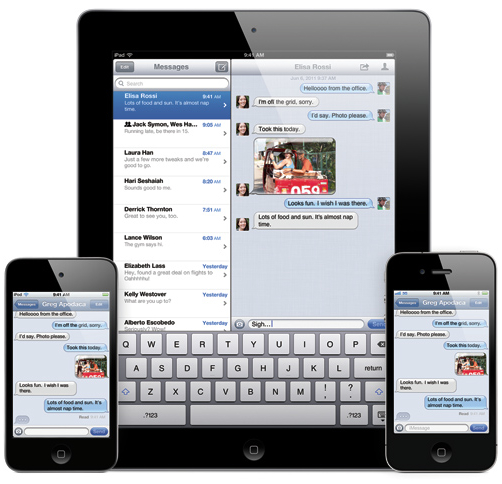
The first ever Ask Andru column featured a question about Apple's iMessage, a proprietary method the company uses to allow owners of iOS devices to send text messages, pictures, and videos to each other through Apple's servers, bypassing the traditional wireless carrier. This allows users to send as many messages as they want without having to pay a text message fee (or being docked against their texting plan if it isn't unlimited.)
We got a couple of follow-up questions from our readers, and we figured we'd address them here. First, from Rob, who had two questions:
Is there a way to force a message to go via the carrier? I was in a text messaging conversation with a friend, they went to Eastern Washington for the weekend and thus no 3G. iMessage doesn't seem to work on EDGE.
Click to continue reading Ask Andru: Apple iMessage Follow-Up
Introducing Ask Andru: Apple’s iMessage, explained
Posted by Andru Edwards Categories: Apple, Smartphones, Features, Handhelds,
I'm a big fan of GeekWire, so when one of my Twitter followers suggested that I start a regular Q&A column for the site, focusing on consumer electronics and gadgets, I figured "Why not?" I talked with the crew, and the result is Ask Andru. In case you're curious about what qualifies me to answer your nagging questions about the devices that have become such an integrated part of our lives, well, I've been running Gear Live for over seven years now. If you're unfamiliar, Gear Live is one of the top gadget news and review sites in the world, and I absolutely love what I do. If you've got a question you'd like me to answer, drop me a line at askandru@gmail.com, and I'll throw it in the queue.
Our very first question deals with iMessage, a new feature introduced to iOS devices with the release of iOS 5:
After upgrading to iOS 5, sometimes I see an iMessage reference in my text-messaging app, and sometimes not, and it doesn't seem to be correlated to whether or not I'm on WiFi or 3G. I also see different colors. I know the idea is to be able to send text messages without going over the wireless carrier's network, but how the heck does this work and what's actually going on?
Click to continue reading Introducing Ask Andru: Apple’s iMessage, explained
Turns out texting while driving is even more dangerous than we thought
Posted by Andru Edwards Categories: Smartphones, Transportation,
 In case you need and more proof that you shouldn't be texting while driving (or really, doing anything at all with your smartphone,) it's just been found that the practice is more dangerous than originally thought:
Drivers were asked to stop when they saw a flashing yellow light, and their reaction times were recorded, Yager said.
The typical time it took a driver who was not texting to respond to the flashing light was one to two seconds. But when the driver was texting, the reaction time extended to three to four seconds, and the texting motorist was 11 times more likely to miss the flashing light altogether.
Yager said the reaction time was the same whether the driver was typing a message or reading one.
One in five motorists admit to texting, emailing, and checking social networks while driving.