

Latest Gear Live Videos
Bleeding Edge TV 215: Beats by Dr. Dre Private Listening Session and Impressions

Posted by Andru Edwards Categories: Full Episodes, Gizmatic, Accessories, CES, CES 2008, Design, Features, Home Entertainment, Music, Podcasts, Portable Audio / Video, Product Reviews, Videocasts,
The Gear Live crew got the only private listening session of the newly-announced Beats by Dr. Dre headphones during CES, and our thoughts are in this episode. Be sure to check out our other Beats by Dr. Dre video, and our Beats by Dr. Dre photo gallery.
I’m what you would refer to as a cost-sensitive buyer. I’m obsessive about value propositions with my purchases. And I would buy the $400 Beats by Dr. Dre headphones by Dre & Monster Cable.
We got a private demo with Monster and had the opportunity to listen to what’s amounted to more than two years of obsessive research and attention to detail. All the materials, the drivers, the amplifier and more are clearly thought out and it shows. The response from these is absolutely incredible. Their intent was to allow you to listen to the music as the producer intended and dare I say it’s as faithful reproduction as you’ll find on a $400 set of headphones. It’s enough that I would buy these before buying the nearest-priced Logitech system for my computer. The bass response was impressive to the Nth—low bass held its tonal quality through a great deal of dynamic range, something not usually seen. The midrange was rich and warm and perfectly presented and the high ends came out just as well.
I’m sad because I really want these. I mean, I was upset that I had to go home tomorrow to my sound system, and that it’s nothing close to how these performed. They were comfortable, sexy, and sounded absolutely incredible.
Try these when they come out in June. But only if you’re prepared to buy them.
Advertisement
MacWorld 2008: Apple MacBook Air Notebook Announced
Posted by Andru Edwards Categories: Apple, PC / Laptop, Wireless / WiFi,
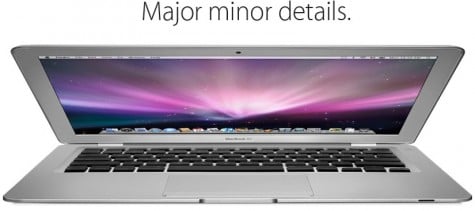
During this morning’s MacWorld keynote, Steve Jobs announced the new MacBook Air notebook. We’ve all been expecting some sort of Apple sub-notebook, and this one looks amazing. Apple it touting this as the “world’s thinnest notebook”. The MacBook Air is 0.16-inches to 0.76-inches. The thickest part of the Air is thinner than the thinnest part of a Sony TZ series notebook. That is impressive. The device features an 80 GB 1.8-inch hard drive, with a 64 GB SSD drive as an option. It ships standard with 2 GB of RAM and a 1.6 GHz Intel Core 2 Duo chip, with the option to switch to 1.8 GHz. Other features include a 45-watt MagSafe, 1 USB 2.0 port, a Micro-DVI port, and audio out. There is no Ethernet port (otherwise they couldn’t have gotten it this thin) so you will have to rely on the built-in 802.11n WiFI and Bluetooth 2.1+EDR. The MacBook Air also leaves out the optical drive, but you can purchase an external SuperDrive accessory for $99 USD. It also ships with software that allows it to “borrow” the optical drive of another Mac or PC. Expect 5 hours of battery life out of this one - or more if you opt for the SSD drive. The MacBook Air will hit retail in about two weeks, and will cost $1799. Pre-orders start today.
Read More  | MacBook Air Product Page
CES 2008 Video: Samsung’s Q1 Ultra UMPC Line
Posted by Andru Edwards Categories: Full Episodes, Gizmatic, CES, CES 2008, Features, Handhelds, PC / Laptop, Podcasts, Portable Audio / Video, Videocasts,
We visited Samsung and learned about their new Ultra Mobile Personal Computers (UMPC). They’re basically palm-sized computers with the power of a laptop. Their line starts with the Q1 Ultra, which runs Windows XP or Vista has a standard 80GB hard drive, a battery life of 4 ½ hours with WiFi enabled, includes a webcam, 2 USB ports and an SD Card slot, weighing only 1.5 pounds at a price of $1300 USD. There’s also the Q1 Ultra SSD, with a 32 GB solid-state drive for increased boot time and access to data. Finally, there’s the just-launched, award-winning Q1 Ultra Premium, with a powerful Intel Pentium Mobile Processor, 80GB hard drive, and a battery life up to 7.5 hours with WiFi enabled. Available at the end of the month for $1500.
CES 2008 Video: Sparky gets tasered / Taser MP3 player
Posted by Andru Edwards Categories: Gizmatic, Short Bytes, CES, CES 2008, Features, Misc. Tech, Podcasts, Videocasts,
When going to CES one expects a rough week involving countless interviews, hour after hour of writing, and defending oneself from PR reps from round the world. One thing you don’t expect is to get the living daylights shocked out of you. First and foremost, watch the video above for a chance to see me get tasered. After all, it’s hard to pass up an opportunity to see some poor sot get tasered - particularly when they signed themself up for it (full waiver and everything).
Oh yeah, a bit of background - we didn’t go for the ‘shock treatment’ but rather went to check out Tasers new MPH or Music Playing Holster. With this faux-leather device one can carry their original, pink, or leopard skin taser in style and listen to 1GB of tunes at the same time. It doesn’t fully make sense to us, but the Taser company claims this makes it an ideal exercise companion for those jogs through the seedy underbelly of your favorite big city.
CES 2008 Video: Beats by Dr. Dre First Look with Noel Lee
Posted by Andru Edwards Categories: Full Episodes, Gizmatic, Accessories, CES, CES 2008, Design, Features, Home Entertainment, Music, Podcasts, Videocasts,
We got a chance to catch up with Noel Lee, Head Monster of Monster Cable to talk to him about their newly announced Beats by Dr. Dre headphones. Noel goes into the background and development of these amazing headphones, the two-year development, and the relationship with Dr. Dre. Be sure to also check out our Beats by Dr. Dre photo gallery to get a good look at these things.
CES 2008 Video: TiVo Desktop 2.6 First Look
Posted by Andru Edwards Categories: Full Episodes, Gizmatic, CES, CES 2008, Design, Features, PC / Laptop, Podcasts, Videocasts,
TiVo takes some time at Digital Experience from CES to show us their latest iteration of TiVo Desktop, version 2.6. Version 2.6 includes some very cool features, including the ability for users to automatically push web-based video and podcasts (like like ours) straight down to their TiVos automatically. We talk about availability and what else to expect coming down the pipeline from TiVo in the near future in this video.
iPhone 1.1.3 Q&A: Batch Two
Posted by Andru Edwards Categories: Apple, Smartphones, Features, Handhelds, Portable Audio / Video,

UPDATE: In case you thought this was fake, Steve Jobs just confirmed that our 1.1.3 coverage is real in his MacWorld 2008 keynote.
We’ve been getting hit with tons of iPhone 1.1.3 questions on our 1.1.3 forum thread. In case you missed it, check out our iPhone 1.1.3 video - if you have questions, check out our first batch of 1.1.3 answers. If you still have questions, read the rest of this post, as we answer even more of your questions. If we missed anything, let us know, okay? By the way, if you are looking for an excellent program to create custom ringtones for your iPhone, check out iPhone RingToneMaker.
I have 1.1.1. when i play a song on the ipod and start surfing using safari the music stops. i believe this is a bug. i tried this on a 1.1.2 iphone in the apple store and also experience the same behavior. can you please check if this is fixed in 1.1.3? (Asked here)
This isn’t so much a bug in 1.1.2 as it is a protection. The music will stop playing if the web page you are visiting consumes too much memory. When you load a page in Safari, if it needs more memory, it will unload pages in other tabs. If that isn’t enough, it talks to Springboard, which will start closing other applications, one of which is iPod.
That said, in our testing on 1.1.3, we were able to both listen to music and browse in Safari at the same time.
Do you have any idea how much of this is going to apply to the iPod touch? (Asked here)
I am sure the iPod touch will also gain the ability to move icons around. However, the touch doesn’t have the SMS or Maps apps, which is where a lot of the new features are found.
Click to continue reading iPhone 1.1.3 Q&A: Batch Two
2007’s Ten Most Popular Episodes of Bleeding Edge TV
Posted by Andru Edwards Categories: Apple, Smartphones, CES, CES 2007, Features, Handhelds, Mods / Hacks, PC / Laptop, Product Reviews, Software, Transportation, Video Games, Videos, Wireless / WiFi,
We know we are a couple days late, but being the extreme hardcore rockers that we are, we weren’t coherent enough to push out our top 10 most popular episodes of Bleeding Edge TV, Gear Live’s technology video show. Or something like that. Anyhoo, click through to check out the ten videos that were viewed the most in 2007. If we’ve learned anything from compiling the list, it’s that you guys love yourselves some iPhone, Bluetooth, AMD, and video games. Exclusives also seem to strike your fancy.
Click to continue reading 2007’s Ten Most Popular Episodes of Bleeding Edge TV
iPhone 1.1.3 Q&A: Batch One
Posted by Andru Edwards Categories: Apple, Smartphones, Features, Handhelds, Portable Audio / Video,

EDIT: We have posted Batch Two of our iPhone 1.1.3 Q&A.
UPDATE: In case you thought this was fake, Steve Jobs just confirmed that our 1.1.3 coverage is real in his MacWorld 2008 keynote.
After posting our iPhone 1.1.3 coverage (if you missed it, here is our iPhone 1.1.3 firmware video and iPhone 1.1.3 photo gallery), we started asking you all to submit your questions to us. We set up a dedicated iPhone 1.1.3 Q&A thread on our forums, and got quite a response. We figured we’d better start pumping out some answers, so here goes. Meantime, leave us your 1.1.3 questions, mkay?:
Does 1.1.3 seem more stable than previous versions of the iPhone software? Also, can you please provide a more in-depth look at the new Google Maps? In addition, can you please explain how the iPhone creates an icon for the Safari bookmarks (for the home screen)? Does it automatically take a snapshot of the top-left corner of the website? (Asked here)
I guess you can say it feels more stable in some cases - but then again, it did crash once in our video. Certainly feels more complete.I am not sure how much more in-depth we can go with the Maps app, as we showed all the new functionality in the video. Lastly, the iPhone takes a snapshot of the left side of your screen to create the bookmark icon. So if you zoomed into the bottom-right of a website, the snapshot would be of the left side of the bottom right. Make sense?
Do you see these changes as a preview of what’s to come in February with the release of the SDK? (Asked here)
I am sure a lot of the changes that are in place in the 1.1.3 firmware are in preparation for the SDK. I am also sure there are under-the-hod changes that are less obvious that we don’t even know about yet.
Click to continue reading iPhone 1.1.3 Q&A: Batch One
Bleeding Edge TV 195: iPhone 1.1.3 Firmware Feature Walkthrough
Posted by Andru Edwards Categories: Gizmatic, Short Bytes, Apple, Cell Phones, Features, Handhelds, Podcasts, Portable Audio / Video, Videocasts,
UPDATE: In case you thought this was fake, Steve Jobs just confirmed that our 1.1.3 coverage is real in his MacWorld 2008 keynote.
Our iPhone 1.1.3 news has been blowing up the Internet. Quite a few people think the images in our iPhone 1.1.3 image gallery were fake, so we figured, why not put up a video? Here is our video proof that iPhone 1.1.3 firmware is, in fact, real. Any questions you want answered about it? Let us know in our iPhone 1.1.3 thread. By the way, if you are looking for an excellent program to create custom ringtones for your iPhone, check out iPhone RingToneMaker.
Meantime, the video shows you all the features that we have found (so far) in the 1.1.3 update. That includes the home screen shuffling and reorganizing of the icons, the multi-person SMS sending, the new “Locate Me” feature in the Google Maps application, Hybrid mode in Google Maps, and creating web bookmarks and putting them on your home screen.
At the end of the video, we show you the Gear Live custom painted iPhone that we will be giving away to one of you viewers, courtesy of Monster Cable.
By the way - if you liked this episode, please check out our Top 10 Most Watched Bleeding Edge TV for 2007 - we think you’ll get a kick out of it!
EDIT: We are answering your iPhone 1.1.3 questions! Check out our first batch of iPhone 1.1.3 answers here.








