

Find Our Latest Video Reviews on YouTube!
If you want to stay on top of all of our video reviews of the latest tech, be sure to check out and subscribe to the Gear Live YouTube channel, hosted by Andru Edwards! It’s free!
Latest Gear Live Videos
Hack your Galaxy Nexus to run Google Wallet

Posted by Andru Edwards Categories: Smartphones, Google, Mods / Hacks, Software,
Be it Verizon's fault or Google's, owners of the recently released Galaxy Nexus smartphone can't tap into the device's built-in Near Field Communication feature for use with Google Wallet. It's just not going to happen.
Not going to happen, that is, unless you perform a few lengthy customizations on your smartphone. A crafty workaround has been found that allows Galaxy Nexus owners to use Google Wallet just like all of their friends that own Sprint's Nexus S 4G smartphones. But the hack comes with a few catches: Namely, you're going to hack off both Verizon and Google if you try it.
How's that? Well, the process for enabling Google Wallet on your Galaxy Nexus demands that you unlock the device's bootloader and root the smartphone. And once you've done that, there goes your warranty through Verizon should your smartphone encounter any errors (or catastrophic free-falls) in your future.
And that's just the first half. Google's own terms of service prohibit using Google Wallet, "on a mobile device or Android operating system that has been modified or customized in any way." There's no indication as to what could happen to you or your account should you proceed with the hack for your Galaxy Nexus.
Click to continue reading Hack your Galaxy Nexus to run Google Wallet
Gallery: Hack your Galaxy Nexus to run Google Wallet






Advertisement
Google's latest Internet Easter egg has a holiday theme. Even if you're living in a warmer climate, the search engine giant is making it snow.
Typing "let it snow" into Google.com will return the normal search engine results for YouTube videos of Dean Martin and Frank Sinatra singing the classic song. But then, a few snowflakes will start falling from the top of the screen until all the search results are obscured by a digital blizzard.
Once the page is completely full of snow, you can "draw" on the screen with your mouse. Clicking the "defrost" button will bring up the search results once again, but snowflakes will continue to fall in the background.
To see the snowy results, don't put quote marks around the phrase. The trick does not appear to work on mobile devices; nothing fancy from an iPhone 4 running iOS 5 (Update: One reader reported that it works on her iPad. Others, however, are having difficulties in particular browsers, like IE9.)
Click to continue reading Latest Google Easter Egg: Let it Snow
Gallery: Latest Google Easter Egg: Let it Snow
Adobe Flash Player 11.1 released, Ice Cream Sandwich now supported
Posted by Andru Edwards Categories: Google, Software,
Adobe on Friday released Flash Player 11.1 for Android devices. The update includes support for Android 4.0 Ice Cream Sandwich but is the last major version of Adobe's mobile browser plugin.
An Adobe AIR 3.1 update will ship next week.
In late November, Adobe announced that it would no longer develop Flash Player for the mobile Web after its next release. "Our future work with Flash on mobile devices will be focused on enabling Flash developers to package native apps with Adobe AIR for all the major app stores," the company said at the time.
In a Friday blog post, Adobe reiterated that stance, arguing that apps are the wave of the future.
Click to continue reading Adobe Flash Player 11.1 released, Ice Cream Sandwich now supported
Gallery: Adobe Flash Player 11.1 released, Ice Cream Sandwich now supported
Google’s Android Update Alliance not living up to expectations
Posted by Andru Edwards Categories: Smartphones, Google, Software,
At the Google I/O conference in May, many Android phone vendors and U.S. wireless carriers made a long-awaited promise: From then on, any new Android phone would receive timely OS updates for at least 18 months following launch, as part of the then newly christened Google Update Alliance.
The back story: If you own an Android phone, you may have watched with frustration as a new version of the OS hit the market. It's almost never clear if your phone will ever get that upgrade—unlike with iOS or Windows Phones, which always get all upgrades (providing they meet the right hardware requirements). With Android, it seems to depend on the phone vendor, the specific model, the wireless carrier, the Android version itself, and whether Google sent the carrier an inflatable plastic food product as a token of its appreciation that week. Worse—and much to our chagrin—sometimes vendors make promises to customers before the sale that they don't keep once you own the phone.
Many factors contribute to this. But custom versions of Android are the key culprit, either thanks to vendor-specific enhancements (like HTC Sense, Motorola MotoBlur, and Samsung's TouchWiz, though LG, Pantech, Casio, and other vendors do it too), or carrier-specific enhancements of a more dubious nature (such as unnecessary preloaded bloatware and changes to default apps). These changes require many programming hours not just to make in the first place, but to also support and upgrade down the road—resources the carrier would rather throw at making new phones to sell you.
So the Google Update Alliance was a breath of fresh air. It sounded like everyone would finally come together, streamline their OS update timelines, and stop jerking around their customers. The thing is, while the Google Update Alliance ended up being one of the biggest stories to come out of Google I/O, we've heard almost nothing about it since then. You can bet we weren't just going to forget about it and pretend it never happened—especially after the release of Google Android 4.0 (Ice Cream Sandwich), which is a huge leap in UI design and overall performance.
Click to continue reading Google’s Android Update Alliance not living up to expectations
Gallery: Google’s Android Update Alliance not living up to expectations
Google takes down Shoot View, the Street View shooting game
Posted by Andru Edwards Categories: Corporate News, Google, Video Games,
Gamers are not averse to first-person shooters—Call of Duty: Modern Warfare 3, for example, earned $1 billion in just over two weeks. But what about when the targets are real, unsuspecting people on the sidewalks rather than cartoon soldiers?
That's the approach taken by Amsterdam-based ad agency Pool Worldwide, which used Google's Street View API to create "Google Shoot View," a game that lets players take aim at those who appear in the street-level, 360-degree images captured by Google's Street View cars.
"Google Shoot View. Explore the world at street-level... and fire a M4A1 assault rifle," Pool Worldwide said in a Dec. 9 tweet announcing the game (preview below).
Google was apparently not thrilled by the idea of having its technology used as the backdrop for a street-level killing spree. The search giant this week pulled Pool's access to its API—the code that allows developers to use the technology.
"Unfortunately, Google has killed the API so at the mo we can't run shoot view," Pool tweeted yesterday.
Click to continue reading Google takes down Shoot View, the Street View shooting game
Gallery: Google takes down Shoot View, the Street View shooting game
Might Google compete against Siri with Alfred?
Posted by Andru Edwards Categories: Apple, Corporate News, Google, Rumors,
Google on Tuesday added to its acquisition arsenal with a company whose technology might take on Apple's Siri voice assistant.
The search giant purchased CleverSense, which developed Alfred, an app the company has designated as "your personal robot."
And while you can't speak to Alfred like you can with Siri, the app provides recommendations on restaurants, bars, coffee shops, and clubs based on your preferences, location, and other factors, eventually "learning" what you like over time.
"We built Alfred to create a simple, enjoyable, and powerful way to discover new places and help make decisions on the go," Babak Pahlavan, CleverSense co-founder and CEO, said in a note on its Web site. "It's exciting to see that our passion turned into something people around the world use regularly to make everyday decisions that are just right for them."
With Google, CleverSense said it will "start a new chapter in curating the world around us [and] accelerate our efforts toward this shared vision."
Click to continue reading Might Google compete against Siri with Alfred?
Gallery: Might Google compete against Siri with Alfred?
LG Nitro HD review
Posted by Andru Edwards Categories: Smartphones, Google, Handhelds, Product Reviews,
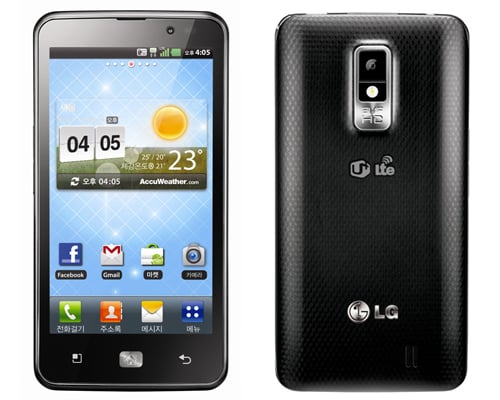
The LG Nitro HD ($249.99 with two-year contract) is the third smartphone to tap into AT&T's emerging 4G LTE network and (after the HTC Rezound) the second phone available in the U.S. to feature a 720p display. That display looks absolutely dazzling in person and the Nitro is a performance speed demon. We're leaving our Editors' Choice with the Samsung Galaxy S II Skyrocket ($249.99) for its better signal strength and data speeds, but make no mistake: Either phone is a great choice.
Design, Screen, Call Quality, and Data Speeds
The Nitro HD looks and feels a a lot like the Skyrocket. It measures 5.27 by 2.67 by .4 inches (HWD) and weighs 4.5 ounces. It's made entirely of matte black plastic and features a textured back panel. While the look is somewhat generic, that all seems irrelevant once you feast your eyes on the Nitro's glorious, 4.5-inch 720-by-1280 AH-IPS (Advanced High-Performance In-Plane Switching) display. It's a real stunner. At 329 ppi, it has even greater pixel density than the Apple iPhone 4S ($199, 4.5 stars), with its 326 ppi Retina Display. For further comparison, a device like the Motorola Droid RAZR ($299.99, 4.5 stars), which features a 4.3-inch qHD display, has 256 ppi.
Click to continue reading LG Nitro HD review
Gallery: LG Nitro HD review
Google offering 10-cent apps to celebrate 10 billion Android Market downloads
Posted by Andru Edwards Categories: Google, Hot Deals, Software,
Google said Tuesday that customers had downloaded more than 10 billion apps in the Android Market. To celebrate, Android users will be able to download 10-cent apps over the next 10 days.
Google, whose name implies a fixation on exponents of 10, didn't say whether 10 10-cent apps will be offered for 10 days. But on Tuesday—yes, Google will sell 10 apps for the 10-cent price: Asphalt 6 HD, Color & Draw for Kids, Endomondo Sports Tracker Pro, Fieldrunners HD, Great Little War Game, Minecraft, Paper Camera, Sketchbook Mobile, Soundhound Infinity, and Swiftkey X.
Android downloads have grown from 1 billion total in July 2010 to 10 billion seventeen months later.
"One billion is a pretty big number by any measurement," Eric Chu, director of the Android Ecosystem, said in a blog post. "However, when it's describing the speed at which something is growing, it's simply amazing. This past weekend, thanks to Android users around the world, Android Market exceeded 10 billion app downloads—with a growth rate of one billion app downloads per month. We can't wait to see where this accelerating growth takes us in 2012."
Gallery: Google offering 10-cent apps to celebrate 10 billion Android Market downloads
Asus Eee Pad Transformer Prime review
Posted by Andru Edwards Categories: Google, Handhelds, Product Reviews,
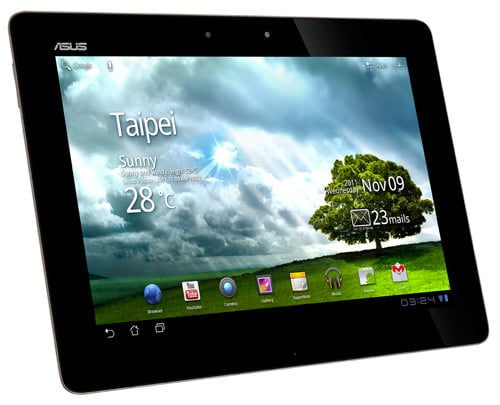
The Asus Eee Pad Transformer Prime feels like the first laptop-class Android tablet, with its quad-core 1.4GHz processor, clever add-on keyboard dock, and its support for USB storage and console gamepads. This is easily the most impressive Android tablet ever. But with such startling specs, it's outstripping the weak app selection available for Google's Android Honeycomb OS. Although there are a few standout apps for the platform, the lack of a thriving Android tablet app community makes the Transformer Prime a less sure choice than it should be. Read on for our full review of the Transformer Prime to see if it's worth your attention (or money.)
Click to continue reading Asus Eee Pad Transformer Prime review
Gallery: Asus Eee Pad Transformer Prime review
Samsung now lets you test Chromebook Series 5 for a week
Posted by Andru Edwards Categories: Google, PC / Laptop,
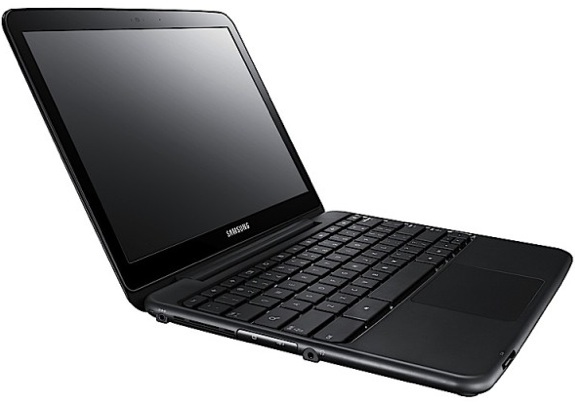
In addition to Samsung announcing a drop in the price of its Chromebook Series 5, the company's New York City Samsung Experience center in Columbus Circle is also loaning them out for a free, seven-day trial.
Samsung has redone the front of its store to feature something akin to Apple's Genius Bar—only with more color—where you can log on to a Chromebook, check email, and get a feel for the machine (provided you have a Gmail account). If you want to check one out, you'll need to provide a government issued ID and have a credit card on hand—the credit card provides security just in case you decide that you want to keep it, for which you'll be charged $449.
The unit Samsung is renting out come with Verizon 3G and Wi-Fi, and a handy laptop bag in which to tote the Chromebook around. After the Series 5 notebook has been registered to you, you'll receive an email asking to schedule a "Get to Know Your Chromebook" session, where a representative with take you through the ins and outs of the notebook. Or if you prefer not to talk to people, there's a handy support page that walks you through some of the things to know about Chromebook.
Click to continue reading Samsung now lets you test Chromebook Series 5 for a week








