

Find Our Latest Video Reviews on YouTube!
If you want to stay on top of all of our video reviews of the latest tech, be sure to check out and subscribe to the Gear Live YouTube channel, hosted by Andru Edwards! It’s free!
Need Disaster Help from FEMA? Hope You’re Using Internet Explorer…

Posted by Kristin Wenzel Categories: Internet, Misc. Tech,
FEMA’s online registration site for victims of Hurricane Katrina is browser specific, throwing another completely unneeded wrench into an already dismal situation for Katrina survivors. Users of other browsers are greeted by this cheerful message upon trying to login:
In order to use this site, you must have JavaScript Enabled and Internet Explorer version 6.
Download it from Microsoft or call 1-800-621-FEMA (3362) to register.
Fantastic. Actually, wait, no. It’s not. It’s simple to fix and sheer laziness on the part of whoever threw the site up. It’s not acceptable, seeing as people may not have access or time to download and install a new browser, for one. Additionally, why make things harder for people who’ve already had it pretty darn hard (and that’s an understatement) to begin with, but that’s just the beginning. In an article from Ars Technica:
Something so minor has become a considerable problem for relief workers, who are attempting to setup as many kiosks as possible for refugees. Workers on the ground have told Ars Technica that they would prefer to avoid setting up Windows XP workstations because they take longer to setup, and even longer to properly patch and configure for use.
XP hardware requirements, while not impressive by today’s standards, rule out using some donated hardware as well. Furthermore, legitimate copies of Windows also cost money, and relief workers are trying to stretch their dollars as far as they can go.
The last thing we really need in a disaster situation is the need for licensing copies of Windows at a high price, software that won’t work on the donated hardware, viruses, security problems, and people waiting for Windows to install (which, on my uber-slick hand-built PC, took three hours and then another hour and a half to patch and update everything). On donated hardware, probably not top-of-the-line brand new stuff like mine… I don’t even want to think of how long it could take.
Nice move, FEMA. Fix it. This is not acceptable.
Read More  | ArsTechnica
I love Mac OS X’s Dashboard feature. Consequently, I’m always searching for new, useful, fun, or just plain awesome widgets to install to make my life easier (or more entertaining). Even some that aren’t useful to me personally have made it onto the list because they’re just solid, awesome little widgets. So here are my top picks for widgets that need to be downloaded.
DashBlog
 DashBlog is an incredibly user-friendly widget that lets you write and publish to your Blogger account through Dashboard, without having to open an application like MacBlog or login through Blogger’s web-interface. All you have to do is open Dashboard, write an entry, and post it to your blog. It’s a perfect example of a great, must-have widget that I had to include even though I’ve no use for it, since I prefer to publish my website entirely by hand. However, if you use Blogger, this one is a must.
Read More | DashBlog
Proxify Anonymous Surfing
 If you’re a little on the “paranoid” side and don’t want people to know who you are as you visit their website or what have you, Proxify’s Anonymous Surfing widget is for you. All you do is type in the address you’re going to, and Proxify hides your IP address and prevents monitoring of your network traffic, allowing you to surf confident that nobody’s watchin- unless they’re actually in your room looking at your computer. That would be creepy.
Read More | Proxify Anonymous Surfing
Mini CPU Heat and Mini CPU Usage
 I can’t even begin to describe how unbelievably useful this one has been. I use a PowerBook G4, which are known to run very hot. This widget helps me keep an eye on my CPU temp with no muss and fuss - pop open Dashboard, glance, and go back to what I was doing. An absolute must-have. Additionally, if you’re like me and always want to keep a watchful eye on your Mac, the mini CPU Usage widget will keep you informed with a touch of a button and goes hand in hand with mini CPU heat. It can read as a numeric value, or as a progress bar, whichever works best for you.
Read More | mini CPU heat
Read More | mini CPU usage
miniUptime
 Many people have stories about how they never need to shut down their Mac, as they leave it running 24-7 with no problems. Well, now you have a way to track your uptime right on Dashboard. So if you’re looking for a way to show off your uptime for bragging rights, or just for your own curiousity, this widget needs to be on your dashboard.
Read More | miniUptime
Let us know which widgets you find most useful in the comments area.
Advertisement
Microsoft Natural Ergonomic Keyboard 4000 Review
Posted by Rob Stevens Categories: Accessories, Features, Peripherals, Product Reviews,
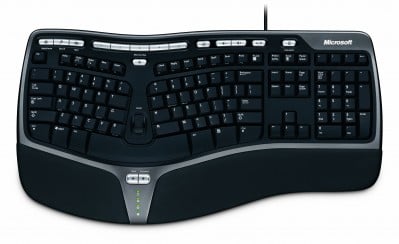
Let me get this out of the way; I’m a keyboard snob. I’ve been typing for a very long time, and still have fond memories of my IBM Selectronic (with its very nice “buckling spring” keys), and my old Northgate Omnikey, with those wonderful programmable keys. (Geek Cred +2) I hoard keyboards like they’re going out of style, because you never know when a company will stop making the perfect keyboard and leave you out in the cold.
However, since developing some severe RSI in both wrists, I had to move to a more ergonomic keyboard; a standard “straight” keyboard would have my wrists in flames in less than 10 minutes. Microsoft was one of the first companies to perform major research into ergonomics, and developed the first of what would become known as a “split” keyboard, branded under the “Natural” moniker.
The first of the Natural keyboards, the Natural Pro, was a gift from the almighty himself. As with any new keyboard layout, it took some adjustment to get used to it, but I noticed right away that the RSI that I’d developed was gone. Spending a little more time practicing with the keyboard, and my typing speeds improved even over my previous scores, and the keyboard had a fantastic “aural” response. You could hear me typing on that thing from across the office. There were some differences in the key layout, however, that had some people up in arms. Microsoft would change the layout of the 3x2 key grouping that contained the Delete, Insert, Home, etc., to a 2x3 layout of only five keys … removing the Insert key entirely and doubling the size of the Delete key. It was a controversial change, but one I came to embrace.
A series of refinements came to the line, starting with the slimmer “Elite” model, which many people still swear by to this day, but which also came with a new key configuration for the arrow keys, changing the “inverted T” to a cross layout with smaller keys. The Natural Multimedia would come later, adding specific keys for commonly used programs, as well as a two-port USB hub, but it retained that wonderful loud “clackity” sound. After that, it seemed as if there was no further development into the ergonomic keyboard design, and rumors started to spread that they simply weren’t selling as well as they should.
Finally, when Microsoft jumped into wireless technologies, they released a wireless desktop set called the Wireless Optical Desktop Pro. It features a wireless version of the Natural Multimedia with slick translucent keys, and while the sound had been reduced somewhat, it was still easy to hear when you were making good contact with the keys. They also introduced an “F-Lock button, which can convert your F-keys into dedicated keyboard shortcuts for New, Open, Close, etc. Today, I use the Natural Multimedia at work, and the Natural Desktop Pro at home. The wireless feature ended up being far more useful than I had anticipated … sometimes it’s nice to be able to just grab the keyboard and toss it aside to give yourself more desk space.
Click to continue reading Microsoft Natural Ergonomic Keyboard 4000 Review
Latest Gear Live Videos
Om Malik has a great article up on his blog where he lists his 10 ‘must have’ apps for the Mac. His list includes a few applications that I would recommend for any Internet entrepreneur using OS X. One that I didn’t see on his list is Transmit, a great FTP client for the Mac. If you have ‘made the switch’, you should check out this list of great applications. In additon, let us know which programs you consider to be hidden gems.
Click to continue reading 10 Mac Apps You Can’t Live Without
I think I learned a few things today about how to better handle my ever-so-daunting email inbox. I am the type of person that feels the need to respond to things as soon as they come in, which unfortunately results in constant distractions since I have my mail client set to check for new messages every 60 seconds. I get so much email that every 60 seconds I stop the work I am doing to reply to something, or read something else. If you find yourself in an email rut, here are a few things you can do to change your ways:
Shut off auto-check - Either turn off automatic checking completely, or set it to something reasonable, like every 20 minutes or so. If you’re doing anything with new email more than every few minutes, you might want to rethink your approach. I’m sure that some of you working in North Korean missile silos need real-time email updates, but I encourage the rest of you to consider ganging your email activity into focused (maybe even timed) activity every hour or three. Process, tag, respond to the urgent ones, then get the hell back to work.
Continue reading for more great tips. Do you have any of your own?
Click to continue reading Tips to Increase Email Productivity
iPod Nano To Be Announced September 7

Posted by Andru Edwards Categories: Portable Audio / Video, Rumors,
 Gotta hand it to krose, the man with the scoop. Apparently, one of the flash-based iPods that Apple is going to announce on the 7th will be called the iPod Nano. The newest addition to the iPod line will sport a color screen, store 2 GB of music, and will obviously be much smaller and lighter than the current iPod mini. Here’s to hoping that Apple will also be doing something in the 4 GB, and 8 GB neighborhood. Of course, it would rock if it looked like the image to the right, but sadly, it’s just a mockup. Kevin also states that the Cingular iTunes phone will be announced as well, but we all knew that already, didn’t we?
UPDATE: Here is the real iPod nano. Sexy.
Read More | Kevin Rose
Cingular LG C1300i Cell Phone Review

Posted by Sparky Categories: Smartphones, Features, Product Reviews,
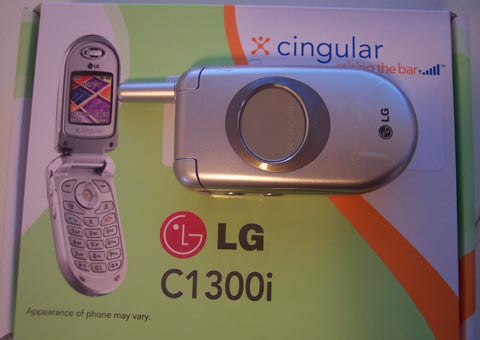
We recently got o ur hands on the LG C1300i, an entry level cell phone available from Cingular. The thought behind this was that not everyone absolutely needs the high-end phones out there, but do need something functional. The C1300i is a fairly low end phone, but has some great features - some of which go unadvertised. Being true gadget fans, we went into this review without high hopes and came away impressed with a few key points on this phone. Read the full Gear Live review after the jump for more.
Click to continue reading Cingular LG C1300i Cell Phone Review
 Okay ladies and germs, time to take a time out to address something of grave importance. There are people in our country who are in desperate need of some help. We have seen a disaster of epic proportions sweep over the Gulf of Mexico, leaving cities in ruins. If you have been watching the news and are wondering how you can help, the Red Cross is ready and willing to take your funds and put them to good use. If you want to get something out of it, Bungie is selling Halo 2 Gamer T-Shirts for $20, and $15 of that cash goes straight to the Red Cross. In addition, if you have a website, I urge you to place the Hurricane Katrina relief “dog ear” on it. Big props to Brian Alvey for coming up with the design, and thanks to Jason Calacanis for trying to spread the word. We will be implementing the graphic on Gear Live, Playfeed, and The Andru Edwards Weblog.
- Advertisement -
 Cashzfree is a website offering cash incentives to people for signing up for popular services that they would use anyway. If you have been thinking about signing up for unlimited DVD rentals from Blockbuster Online, or unlimited streaming music from Real Rhapsody, why not do it through a service that will put cash back into your pocket? If you like what you sign up for, recommend it to a few friends, and you can walk away with up to $1,000 in your Paypal account for you to spend any way you wish. Check out Cashzfree - you sign up for services, they hit you back with cash.
Bungie’s Hurricane Katrina Relief Effort

Posted by Oscar M. Cantu Categories: Corporate News, Internet,
 You’ve fought the flood in the game, now its time to fight it in the real world. Unless you’ve been living in a cave for the past week, then you have seen the natural disaster our nation has faced with in Hurricane Katrina. Maybe you’ve helped in some shape or form in the last couple of days and we thank you for that - if you haven’t then here’s just one more reason for you to do so. Of course, if you already helped, please do so again. Bungie is now taking donations and giving you a T-Shirt for your generosity. For merely a $20 bill you will be donating to the Red Cross and getting a T-Shirt to show the world that gamers care about the victims of the devastating hurricane. At least $15 of those $20 dollars will go towards that donation. After you purchase one, be sure to tell everyone you know - the more people that buy the shirt, the more of a difference we can make.
Just so that we’re clear, of the $19.95 the shirt costs, about $15 in cleared funds will go straight to the Red Cross and directly to the disaster relief. Nobody, not Bungie, the Bungie store, or the distributor will clear a penny profit. That’s important. We basically want to get as much cash, as quickly as possible to those in dire need.
Read More | Bungie.net








