

Articles tagged Software
Latest Andru Edwards Videos
Audacity 4.0 Looks Like a Different App, and Edits Like One Too

Posted by Andru Edwards Categories: Music, Software,

If you have ever cut a podcast in Audacity, you know the routine. You get a clean take, you go to slide one clip a half second to the left, and the app makes you work for it. Audacity 4.0 shipped on September 3, and it is the first version in years that seems interested in making that part easier.
This is the largest update since version 3.0 in 2021, and it changes both how Audacity looks and what it can do. It is still free, still open source, still maintained by Muse Group.
Click to continue reading Audacity 4.0 Looks Like a Different App, and Edits Like One Too
Advertisement
Google’s WeatherNext 3 Redraws the Forecast Every Hour
Posted by Andru Edwards Categories: Google, Science, Artificial Intelligence,

The forecast you checked at breakfast was probably built from a picture of the atmosphere taken several hours before you looked at it. That lag is baked into how traditional forecasting works, and it is the thing Google DeepMind went after with WeatherNext 3, announced Thursday and already wired into Search, the Gemini app and Google Maps.
The big change is cadence. The previous version put out a new forecast every six hours. This one does it every hour, pulling in live geostationary satellite imagery as it arrives instead of waiting on the usual analysis cycle. Google calls the result "roughly five times sharper than our previous model."
Click to continue reading Google’s WeatherNext 3 Redraws the Forecast Every Hour
China’s Kimi K3 Just Took the Top Coding Spot, and You Can Download It
Posted by Andru Edwards Categories: Editorial, Software, Artificial Intelligence,

For a couple of years now, the story about Chinese AI has been that it is close, impressive, and always a step or two behind the American frontier. That story just got harder to tell. Moonshot AI, the Beijing startup behind the Kimi chatbot, has released Kimi K3, and it did not quietly match the leaders. It walked into the Frontend Code Arena, a public leaderboard where models compete head to head on building working interfaces, and finished first. Ahead of Claude. Ahead of GPT. At the very top.
Here is the part that should make you sit up: this is not a locked API you rent from a company an ocean away. Kimi K3 is open-weight, which means the full model is going out to anyone who wants it. Moonshot says the complete weights land on July 27, and at 2.8 trillion parameters, K3 is the largest openly released model the world has seen. You could, in theory, download the same thing that just beat everyone at coding and run it yourself.
Click to continue reading China’s Kimi K3 Just Took the Top Coding Spot, and You Can Download It
1Password Will Let Claude Log You In Without Ever Seeing Your Passwords
Posted by Andru Edwards Categories: Internet, Software, Artificial Intelligence,

Here's the thing nobody wants to admit about turning an AI agent loose on the web: sooner or later it hits a login screen, and then what? You either hand the robot your passwords and hope for the best, or the whole errand grinds to a halt. 1Password thinks there is a third option.
This week the company rolled out 1Password for Claude, a browser integration that lets Anthropic's assistant log you into websites without the password ever touching the model. The pitch, in the words of 1Password CTO Nancy Wang, is simple: "The answer isn't handing agents your secrets, but letting a user give an agent permission to use a credential without letting the agent see it."
Click to continue reading 1Password Will Let Claude Log You In Without Ever Seeing Your Passwords
Moonshot’s Kimi K3 Is the Open Model That Just Crashed the AI Benchmark Party
Posted by Andru Edwards Categories: Misc. Tech, Software,

Here is the question everyone in the AI world woke up asking this week: how far ahead are American labs, really? Alibaba-backed Chinese startup Moonshot just gave a very specific answer with Kimi K3, a new open-weight model that is turning up near the top of some serious benchmarks. The weights land on July 27, and at 2.8 trillion parameters, Moonshot says it will be the largest open model anyone has released.
That size is the headline number, but it is not the interesting part. The interesting part is what K3 does on the leaderboards. On Arena.ai's front-end development test, it ranks above both Anthropic's Claude Fable 5 and OpenAI's GPT-5.6 Sol, the two strongest proprietary systems on the market. Arena's CEO did not hedge: he called it "the single biggest release of the year" and said it "marks the moment that OSS Chinese models have surpassed US models," noting that Kimi K3 had "BEATEN FABLE" just six weeks after Fable shipped.
Apple’s visionOS 27 Update is Actually Insane (Video)
Posted by Andru Edwards Categories: Apple, Wearables, Software, Videos,
You can probably recite the joke by now: Vision Pro is a very expensive iPad strapped to your face. I've heard it for two years. However, after going hands-on with the visionOS 27 developer beta, I think that joke is finally running out of road.
Start with Siri, because Apple basically started over. On visionOS 27, the assistant lives in your room as a small 3D orb you can park anywhere - next to your monitor, above the couch, wherever - and it stays anchored there. There's no wake word anymore, either. A new interaction called Look and Speak means you just glance at the orb and start talking. That sounds small. In practice, it removes the most awkward thing about talking to a headset.
Click to continue reading Apple’s visionOS 27 Update is Actually Insane (Video)
Apple Intelligence Photo Editing: Everything You Missed! (Video)
Posted by Andru Edwards Categories: Apple, Software, Videos, Artificial Intelligence,
Apple’s Photos app is getting a serious AI upgrade in iOS 27, and it changes what happens after you tap the shutter. In this video, I break down three new Apple Intelligence photo tools coming to iPhone: a much more powerful Cleanup, a new Extend feature that can grow the edges of your photo, and Spatial Reframing, which lets you shift the composition after the shot was already taken.
Click to continue reading Apple Intelligence Photo Editing: Everything You Missed! (Video)
WWDC 2018: Apple announces iOS 12
Posted by Andru Edwards Categories: Apple, Smartphones, Corporate News, Handhelds, Software,
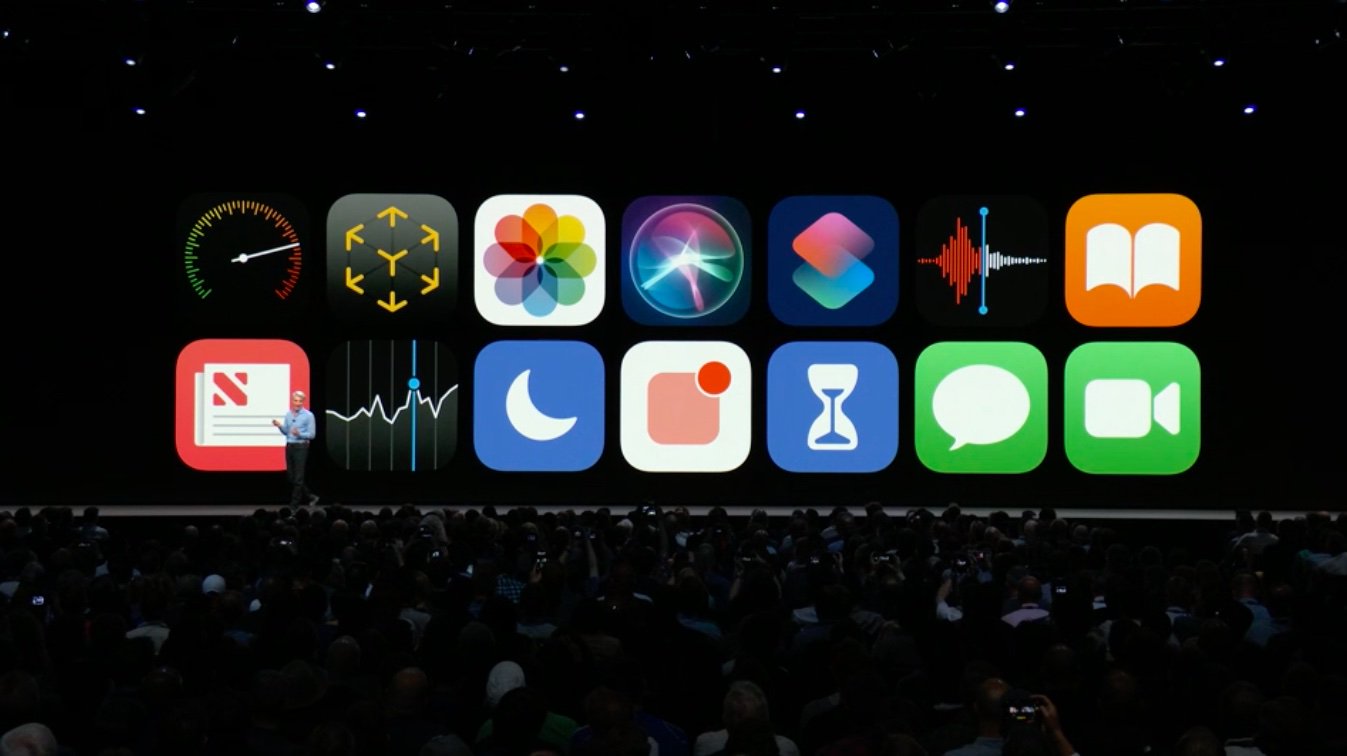
During today's WWDC 2018 keynote, Apple announced the next generation of its mobile software in iOS 12. Here are the biggest points of news for iOS 12:
PERFORMANCE
- Apple is doubling down on performance with the aim of making devices faster and more devices
- iOS 12 will be available on all the same devices that support iOS 11 - this includes devices that shipped back in 2013.
- Apps launch twice as fast on devices running iOS 12 on even the oldest devices
AUGMENTED REALITY
- A major update in iOS 12 is more AR support. Adobe took the stage to introduced simplified tools that will allow developers to create better AR experiences.
- There's a new file format for AR, called USDZ, created in collaboration with Pixar.
- A new app, Measure, will allow you to take measurements in real-time using an iOS device with AR. A demo was shown measuring a suitcase using just an iPhone X.
- Support for shared experiences is announced - multiple users can see the same AR environment in real-time. This allows developers to create worlds that people can all see simultaneously.
- LEGO took the stage to demo a shared AR LEGO app
PHOTOS
- The Photos app gets new updates and features, starting with search. Search Suggestions will highlight things like key moments, places you've taken photos, business names, and events like concerts and sporting events. You can search for multiple terms, like surfing and vacation, to drill down into your library.
- Effect suggestions give you reccomendations to edits you can make to your photos to make them even better.
- Sharing suggestions will find people in your photos and allow you to share them with the folks who are in them. Shared photos are full resolution.
- When you share, the receiver will also be given a suggestion to share photos from the same event with you.
SIRI
- Siri Shortcuts allows you to pull in specific tasks from your apps. An example given was "I lost my keys" to have Siri activate your Tile hardware.
- You can create your own Siri Shortcuts as well, so you can put together your own shortcut phrases.
- A demo was shown using Siri Shortcuts - the user said "travel plans" and got their hotel reservation with an image, address, and check-in time from Siri
- A "Heading Home" shortcut is able to set the home thermostat, play a podcast, send an ETA to a contact, and turn on a HomeKit fan. Very impressive stuff.
APPS
- The News app gets an updated sidebar to make navigation easier
- The Stocks app gets more granular vision to see stock performance. Apple News stories are now integrated into the Stocks app as well, giving you business news on the stocks that you follow.
- The Stocks app now comes to iPad with iOS 12.
- Voice Memos app also comes to iPad with iOS 12, with iCloud support built-in for syncing across devices.
- iBooks becomes Apple Books with a redesigned app.
- In iOS 12, CarPlay will support third-party navigation apps.
DIGITAL HEALTH
- Do Not Disturb is updated to hide notifications at night, and in the morning hides notifications until you specify that you want to see them.
- Do Not Disturb allows you to choose much more granular timeframes rather than just optimized for overnight.
- Notifications can be turned on or off on a per-app basis right from the lock screen
- Notifications can now be grouped by app, topic, or thread. With a swipe, you can dismiss an entire group of notifications.
- A new feature called Screentime offers reports, giving a weekly summary that shows how you used your iOS device. This shows how much time you spend in each app, how often per hour you pick up your phone, and which apps are sending you the most notifications.
- App Limits allows you to set a limited amount of time that you'd like to use specific apps per day.
- Kids get activity reports too, and parents get reports on their own devices of their kids usage. Parents can also create downtime periods and app limits. This is setup through the Family Sharing interfaces.
MESSAGES
- Animoji now support tongue detection for sticking tongues out
- New ghost, koala, tiger, and T-Rex Animoji characters
- Apple announces Memoji, allowing you to create your own customized 3D emoji character that looks like you
- Memoji has a slick creator app to design your character
- The Messages camera now includes effects, filters, stickers, and even Animoji and Memoji right in the camera
FACETIME
- Apple announces Group FaceTime, which allows you to chat with up to 32 simultaneous participants
- You can use both audio or video
- FaceTime is integrated into Messages, allowing you to quickly do a Group FaceTime right from a group chat
- A demo is shown, and as people speak, they become bigger on screen, or you can choose who to bring front and center
- The same effects mentioned above in Messages also applies to the FaceTime camera
Improved performance, new AR experiences, digital health, improved Messages, Group FaceTime, and more. That's iOS 12.
Top 10 Gear Live tech stories of 2015
Posted by Andru Edwards Categories: Apple, Wearables, Editorial, Features, Handhelds, Mods / Hacks, Movies, Software, Transportation, Videos,
.jpg)
We've come to the end of another year, and as we wave goodbye to 2013, we figured it was only fitting that we share the most popular stories published on Gear Live this year, as determined by our readers (we've also got the top ten most read stories regardless of publish date, as well as the ten most popular Gear Live videos of 2013!) These are the ten stories that were read the most, and when you consider that fact, it's pretty surprising to see what made the list. Let's kick it off with our most read story of the year:
OS X El Capitan will be released on September 30:
Anticipation for Apple's newest desktop operating system, OS X 10.11 El Capitan, trumped all other news here on Gear Live in 2015!
Click to continue reading Top 10 Gear Live tech stories of 2015
2015 Holiday Gift Guide: Fallout 4
Posted by Andru Edwards Categories: Features, Video Games, Men, Teens, Under $100, Under $250, Under $500,

Bethesda Game Studios, the award-winning creators of Fallout 3 and The Elder Scrolls V: Skyrim, have released Fallout 4 – their most ambitious game ever, and the next generation of open-world gaming, and it's completely worthy of being featured in our 2015 Holiday Gift Guide. As the only survivor of Vault 111, you re-enter a world that’s been destroyed by nuclear war in an attempt to locate and get back your kidnapped son as you make your way through the nuclear wasteland.
You can pick up Fallout 4 for PS4, Xbox One, and PC.
Read More  | Fallout 4