

Articles tagged Location
Latest Andru Edwards Videos
Instagram 3.0 introduces Photo Map feature

Posted by Andru Edwards Categories: Photography, Social Networking, App Updates, Free Apps,

Instagram 3.0 was released today, and with it comes a host of new features and bug fixes. One of the major additions is the Photo Map, which makes it easy to find images that have been geo-tagged to specific locations. Users will find a new Photo Map section in their profiles that will allow them to see their own images overlayed on a map as well. Other features include infinite scrolling on photo feeds, redesigned profile and upload screens, and other performance improvements. Grab Instagram 3.0 now from the App Store or Google Play for free. Check out a video explaining it all after the break.
Click to continue reading Instagram 3.0 introduces Photo Map feature
Advertisement
Foursquare 5.0 brings new design, improved recommendations, and more
Posted by Andru Edwards Categories: Social Networking, App Updates, Free Apps,

Foursquare has released a major revision and revamp of its iOS and Android apps, introducing a brand new user interface. Foursquare 5.0 aims to make it easier to find places to go and activities to do, as it now takes into account the time of day, the local weather, and your location before recommending something to do. It also now incorporates a Like button on venues, which it will then use to find more places that it thinks you'll like when you are using the Explore function. You can grab Foursquare 5.0 now from the App Store and Google Play.
Will Apple replace Google Maps in iOS 5?
Posted by Andru Edwards Categories: Apple, Google, Rumors,
Apple could be ditching Google Maps in favor of its own navigation software in iOS 5.
MacRumors uncovered a new section in the legal disclaimers section of iOS 5 called "Map Data" that references several different third-party mapping and naviation companies such as CoreLogic, Getchee, Localeze, and TomTom, among others.
It wouldn't be much of a shock if Apple ditched Google Maps and launched its own mapping service. In recent years, Apple has snapped up a couple of mapping companies, Placebase and Poly9. Apple has also been hiring engineers with mapping and navigation experience to join the iOS team. On top of that, when Apple responded to the outpouring of media scrutiny about iPhone location tracking in April, the company revealed it was creating its own traffic database.
Click to continue reading Will Apple replace Google Maps in iOS 5?
TomTom apologizes for selling your traffic data to law enforcement
Posted by Andru Edwards Categories: Corporate News, GPS,
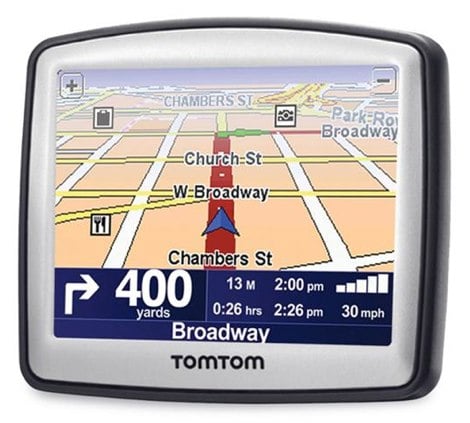
TomTom has apologized for selling user data from personal navigation devices to police.
It wasn't exactly a surprise. When Netherlands-based TomTom reported weak first quarter earnings earlier this year, it said it would try to supplement earnings through certain methods like selling traffic data to governments.
But when Dutch newspaper Algemeen Dagblad revealed that the information was obtained by Dutch police, who used it set targeted speed traps, people got upset.
But TomTom CEO Harold Goddijn said the company only had the best of intentions, because the company believes it "can help make roads safer and less congested."
Click to continue reading TomTom apologizes for selling your traffic data to law enforcement
Okay, what’s up with Apple creating its own traffic database?
Posted by Andru Edwards Categories: Apple, Smartphones, Editorial, GPS,
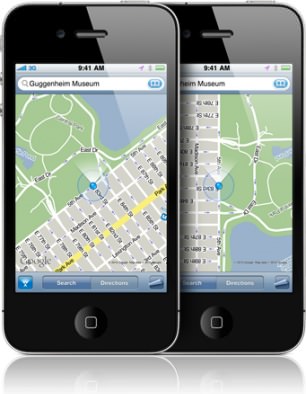
Buried in Apple's statement on how the iPhone tracks a user's location data, the company admitted it was collecting anonymous location information to create a "crowd-sourced traffic database" that will be part of a future "improved traffic service."
The thing is, there's already a traffic service on the iPhone, provided by Google. If a user launches the Maps app and selects "Show Traffic," the map overlays colors on roads that show traffic congestion. Google gets the traffic data by—surprise!—crowd-sourcing it, aggregating information from Google Maps users who have approved the app for location services on their mobile devices.
Apple's statement reveals that the company is working on its own version of such a service. Whether that service will be something that Apple will use to improve traffic in Google Maps, or if Apple will launch a competing maps app, or something else entirely isn't known. Apple didn't respond to multiple requests for comment on the topic.
Click to continue reading Okay, what’s up with Apple creating its own traffic database?
Researchers say police already use iPhone tracking data
Posted by Andru Edwards Categories: Apple, Smartphones, Corporate News,
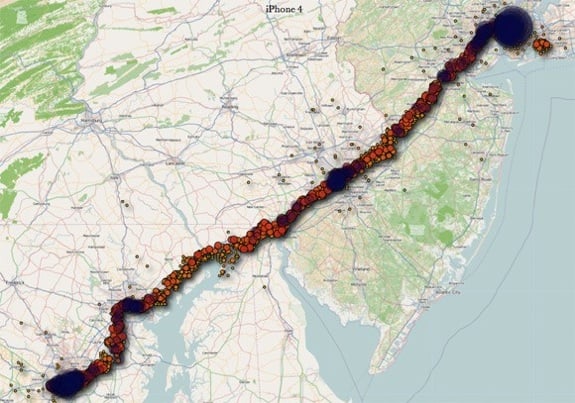
A pair of mobile forensic researchers who independently identified a location tracking system on the iPhone 4 several months before it was publicized earlier this week say that law enforcement agencies are currently using data from a hidden iOS file called "consolidated.db" in criminal investigations.
Evidence from the location tracking database stored on iPhones "has been used in actual criminal investigations and yes, it's led to convictions," said Alex Levinson, a Rochester Institute of Technology researcher and technical lead for iOS forensics consultant Katana Forensics.
But Levinson and Christopher Vance, a Marshall University digital forensics specialist, also contend that Apple probably included the technology in its iOS operating system to deliver location-based services like iAds rather than to create dossiers on the whereabouts of iPhone users.
A great deal of buzz has surrounded a Wednesday O'Reilly Radar blog post by researchers Pete Warden and Alasdair Allan that highlighted a hidden file on iOS devices like the iPhone and iPad which includes latitude-longitude coordinates and a timestamp to track where such devices have been geographically and when.
But Warden and Allan apparently weren't the first to discover the file.
Click to continue reading Researchers say police already use iPhone tracking data
You gave Apple permission to track your whereabouts via your iPhone
Posted by Andru Edwards Categories: Apple, Smartphones, Features, GPS, Videos,
Did you know that Apple is tracking your every move with your iPhone and iPad? A blog post published today on O'Reilly Radar claims that devices running iOS 4 are gathering location and storing it in an unencrypted manner.
"What makes this issue worse is that the file is unencrypted and unprotected, and it's on any machine you've synched with your iOS device. It can also be easily accessed on the device itself if it falls into the wrong hands. Anybody with access to this file knows where you've been over the last year, since iOS 4 was released," wrote Pete Warden, founder of the Data Science Toolkit, and Alasdair Allan, a senior research fellow at the University of Exeter.
The data is being stored to a file known as "consolidated.db," which includes latitude-longitude coordinates and a timestamp.
Of course, this shouldn't surprise anyone who read the entire 45-page EULA, as it clearly states the following clause when going into detail on the type of “non-personal information” that Apple can “collect, use, transfer, and disclose … for any purpose.”
We may collect information such as occupation, language, zip code, area code, unique device identifier, location, and the time zone where an Apple product is used so that we can better understand customer behavior and improve our products, services, and advertising.
Click to continue reading You gave Apple permission to track your whereabouts via your iPhone
Google Latitude adds check-in deals
Posted by Andru Edwards Categories: Location Services, Marketing, Mobile, Product Offers,
Google took aim at Foursquare on Thursday with the addition of checkin rewards for its Latitude app for Google Maps, while replacing 'mayors' with "gurus" and "VIPs".
Google's location class warfare didn't stop there: there are a poor, middle, and elite class under Google's hierarchy, known as "Regulars," "VIPs," and "Gurus," respectively. Users who check in for the first time might not receive any special designation.
Users will need to update to Google Maps 5.2 via the Android Market, join Latitude, then tap "check in here" from the menu. Google said a version for the iPhone would be coming soon.
The new rewards will be rolled out - where else? - at the South by Southwest Interactive (SXSWi) show in Austin, Texas this weekend, where discounts will be offered at restaurants, bars, and other venues around the downtown area.
The new checkins scheme provides a sort of game-like approach to rewards, with additional checkins propelling users to new social rankings - and new discounts, to boot. "Footprint" icons let users track their progress. As an example, a restaurant could offer a free drink to a regular, free breadsticks to a VIP, and possibly a free dessert to a "guru".
Google began offering checkins on Latitude in February.
Click to continue reading Google Latitude adds check-in deals
Google Latitude now lets you check in to local spots

Posted by Patrick Lambert Categories: Google, GPS, Software,
In the crowded world of location apps like Foursquare and Facebook Places, Google Latitude aimed to differentiate itself from the rest of the pack. Unlike the others which center around checking into places by tapping an icon, Latitude always tracked where you were in real-time, without any user interaction needed. Then it would share your whereabouts with your friends as you moved around. Thing is, people like checking in. So Google went ahead and added the ability to check in on Latitude, which will allow more flexibility for users of the app. A more interesting feature in Latitude is you can even choose to be automatically checked into locations, which sounds fairly ridiculous given how close many spots are to each other.
Google Offers to compete with Groupon
Posted by Patrick Lambert Categories: Google, Hot Deals, Internet,

A few months ago Google was in talks to buy Groupon for $6 billion in order to bolster its local advertising business, but nothing came out of it. Now, a leaked document points at the company starting their own Groupon clone, Google Offers. The new service will be similar to Groupon and offer coupons to subscribers, based on location, offering them a deal of the day. It will be powered by Google Checkout and allow sharing through Facebook, Twitter, Reader and Buzz.
The service is in the testing phase right now, but we know Google wants to push this one out to the masses as soon as possible.
Read More  | Mashable