

Find Our Latest Video Reviews on YouTube!
If you want to stay on top of all of our video reviews of the latest tech, be sure to check out and subscribe to the Gear Live YouTube channel, hosted by Andru Edwards! It’s free!
Latest Gear Live Videos
RemoteCalendars - Synchronize Google Calendar With Outlook
Posted by John Goulden Categories: Editorial, Google, Microsoft, Software,
 Google continues to draw users with its suite of applications that can be accessed from practically anywhere you can access the Internet. One such application, Google Calendar, is especially nice as it helps answer the eternal question that friends and family members inevitably ask - “when are you free?”. With a shared version of the Google Calendar they can answer their own question, but its lack of offline use and portability leaves a little something to be desired.
It turns out that there’s a solution to the problem for those of us who use Microsoft Outlook as our personal information manager. RemoteCalendars is an open source plugin that allows you to import iCalendar-based files into Outlook, and with the latest release of version 5.61, allows you to perform two-way synchronization as well. RemoteCalendars is still a work in progress, but if you follow the instructions implicitly, there’s a fair chance it will work as well for you as it did for me.
Read More  | RemoteCalendars
Gallery: RemoteCalendars - Synchronize Google Calendar With Outlook






Advertisement
Office 2007 Public Preview and New Windows Beta Builds
Posted by John Goulden Categories: Corporate News, Microsoft, Software,
 With WinHEC (Windows Hardware Engineering Conference) in full swing this week, it’s not unusual that we see new builds of beta products float to the surface. This time around we have new builds of Loghorn Server and Windows Vista, both at build 5384, as well as Beta 2 of Office 2007.
Office 2007 Beta 2 is available as a public preview, and if you opt for the Professional Plus version, weighs in as a 550MB download. Per Ars Technica, “Office 2007 uses the new Microsoft Office Open XML file format, and will be broken down into seven different editions: Office Basic, Office Home and Student, Office Standard, Office Small Business, Office Professional, Office Professional Plus, and Office Enterprise.
* Basic includes Word, Excel, and Outlook
* Home and Student includes Word, Excel, PowerPoint, and One Note
* Standard includes Word, Excel, Outlook, and PowerPoint
* Small Business is the same as Standard plus Publisher and Outlook with Business Contact Manager
* Professional includes everything from Small Business plus Access
* Professional Plus comes with Word, Excel, Outlook, PowerPoint, Publisher, Access, InfoPath, and Communicator. It also includes Integrated Enterprise Content Management, Electronic Forms, and Advanced Information Rights and Policy Capabilities
* Office Enterprise adds OneNote and Groove 2007 to the Professional Plus package.”
Unlike Office 2007, the new builds of Windows are not available to the public and can only be had from MSDN, Technet, or the beta program.
Read More | Microsoft via Ars Technica
Read More | Office 2007 Public Preview Site
Gallery: Office 2007 Public Preview and New Windows Beta Builds
Apple Makes OS X Completely Proprietary
Posted by John Goulden Categories: Apple, Microsoft, Software,
 In a move that will disappoint some users, and leave others caring not one whit, Apple has closed down the ability to roll your own kernel for the Intel-based build of OS X. This news comes purportedly from Apple’s fear of piracy, which sadly seems justifiable when one looks at how quickly the Intel version spread in the wild.
Macworld had the following not-so-encouraging words to say on the subject (Note: my emphasis). “The Darwin open source Mach/Unix core shared by OS X Tiger client and OS X Tiger Server remains completely open for PowerPC Macs. If you have a G3, G4, or G5 Mac, you can hack your own Darwin kernel and use it to boot OS X. But if you have an Intel-based Mac desktop or notebook, your kernel and device drivers are inviolable. Apple still publishes the source code for OS X’s commands and utilities and laudably goes several extra miles by open sourcing internally developed technologies such as QuickTime Streaming Server and Bonjour zero-config networking. The source code required to build a customized OS X kernel, however, is gone. Apple says that the state of an OS X-compatible open source x86 Darwin kernel is ‘in flux.’”
As a Windows user, the remote possibility of OS X being available for non-Apple hardware was only intriguing as something to tinker with. Windows is my platform of chioce because it’s what I’m comfortable with, it runs all of the software I need/want, and there’s no impetus to make me migrate to something new. However, Apple’s hardware is a different story with its sleek lines and fantastic build quality, and it’s that portion of Apple’s business model that will drive new growth for them in the years to come.
Read More | Macworld
Gallery: Apple Makes OS X Completely Proprietary
Pandora Plugin For Windows Media Center
Posted by John Goulden Categories: Home Entertainment, Microsoft, Music, Software,
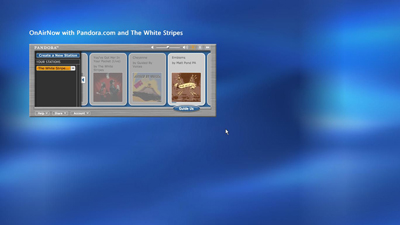
We’ve talked about Pandora before, a music service which recommends new music for you based upon your favorite artists. A plugin has surfaced to merge the power of Pandora with Microsoft’s Media Center 2005, and while the installation process isn’t idiot-proof, it’s still easy enough for all but the most computer illiterate among us.
Since “simple” is often times the best, the plugin sticks to that ideal with usage that couldn’t be easier. Browse through your collection of artists to find one you like, stab the “info” button on your remote, and choose “More…” to let Pandora do its thing. The only downsides so far seem to be a formatting issue (since Flash-based Pandora was never intended for the “big screen”), and some minor performance issues with the author’s website (the plugin runs a web application on said site). To help ease the first a tad, and eliminate the second, a refined plugin has been created that runs off of a mirror site. The links to both versions of the plugin can be found below.
Read More | Colin’s Blog via eirikso
Read More | Refined Pandora MCE Plugin
Gallery: Pandora Plugin For Windows Media Center
SlingPlayer Mobile Now Available
Posted by John Goulden Categories: Broadband, Home Entertainment, Internet, Portable Audio / Video, Software, Wireless / WiFi,
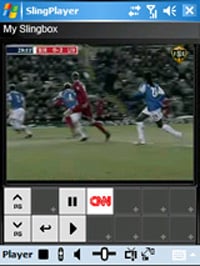 The Slingbox just gets better and better with each new update, and the gang at Sling Media have finally released SlingPlayer Mobile. Unlike streaming media options offered by Verizon, Sprint and Cingular, there’s no recurring monthly fees (aside from the data plan), and you can watch exactly what you want to. The software works on PocketPC and Windows Mobile 5 devices, with the exception of Windows Smartphones. SlingPlayer Mobile for Smartphones will be released in the 2nd Quarter of 2006.
For proper operation a minimum of 112Kbps sustained incoming bandwidth is required. Beyond that just about any type of Internet connection will do, including WiFi, USB, Bluetooth, EV-DO and UMTS. EDGE may not quite make the grade as its advertised speeds range form 80-130Kbps, so your mileage may vary.
SlingPlayer Mobile is available for purchase at $29.99 USD unless of course you qualify to get it free. To obtain a free license you must have purchased and registered your SlingPlayer prior to April 26, 2006.
Read More | Sling Media
Gallery: SlingPlayer Mobile Now Available
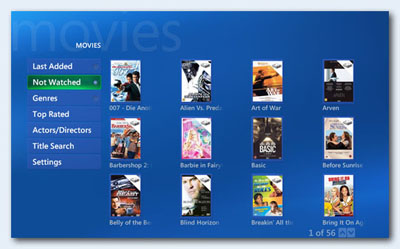
Easily one of the best plug-ins for Microsoft Media Center, My Movies 2 has been released from beta status and is readily available for download. In case you’re not familiar with the movie collection software, we’ll let Brian Binnerup, the author, give you the lowdown. “My Movies integrates with Microsoft’s Media Center Edition to let users easily index and access their entire movie collection in single or multi-room environments, regardless of where the movies are stored (remote or local hard drives, DVD changer or simply sitting on a shelf).”
New features in v2 include DVD changer control for the Sony DVP-CX777ES, increased flexibility for parental control restrictions, series/box set support, personal categories, and more. Available in multiple languages, My Movies is a must-have application for Media Center, and if you’re running MCE without it then run, don’t walk to the link listed below.
Read More | My Movies
Gallery: My Movies 2 Released

Last month Google acquired @Last Software, makers of a neat piece of software called SketchUp. SketchUp is a 3D modeling tool that is simple enough for just about anyone to use, yet offers powerful tools for professionals as well. Speculation about SketchUp’s future pricing began the moment news of the acquisition was released, and true to Google’s track record, there’s now a free version of the software. The free version, entitled Google SketchUp, is licensed only for non-commercial use and is missing a few features compared to the standard version, which is now called SketchUp Pro and provides the full feature set and naturally the full price tag of $495 USD.
Sure, there are differences between the free and Pro versions, but for someone just looking to dabble with 3D modeling, or thinking about creating some buildings for Google Earth, the free version will do nicely. The differences are summed up as:
• Pro users are able to print and export raster images at higher-than-screen resolution.
• Pro users have access to the following 3D export formats: DWG, DXF, 3DS, OBJ, XSI, VRML and FBX.
• Pro users are able to export animations and walkthroughs as MOV (Mac) or AVI (Windows) files.
• Pro users get the Sandbox Tools (for organic modeling of terrain, etc) and the Film & Stage Tools (for pre-viz work).
• Pro users have access to free email tech support for two years after they buy SketchUp Pro.
• Finally, only SketchUp Pro is approved for commercial use; the Free version is licensed for personal use only.
Currently available only for Windows-based machines, a Mac version is in the works.
Read More | Google SketchUp via Ars Technica
Gallery: SketchUp Free At Last!
Meedio Sold To Yahoo
Posted by John Goulden Categories: Corporate News, Editorial, Home Entertainment, Software,
 Depending on your point of view, the fact that Meedio has sold off its technology and intellectual property to Yahoo!, falls somewhere between “another one bites the dust” and “the greatest thing since sliced bread”. Meedio, for those of you not in the know, was a media center application that started life as myHTPC. When myHTPC was in full swing I remember tinkering with and coaxing it into life, but in the end moved away from the platform to Windows Media Center. Although Windows MCE didn’t originally have the depth and breadth of scope that myHTPC (and eventually Meedio) encompassed, what enticed me was the ability to get it up and running with minimal fuss. After all, the time saved in setup and configuration allowed more time for enjoyment of the media center, and additionally allowed more time for the million other projects I always seem to have cooking.
Although it’s sad to see Meedio go the way of the corporate giant, it’s far better than the fate that another media center pioneer, ShowShifter, met with . . . non-existence altogether. Unfortunately, for current users of Meedio your official support options have ceased to exist effective immediately, and while Yahoo! didn’t technically purchase the existing Meedio product, they have everything else. Depending on what Yahoo! does with Meedio’s technology and how long it takes, it leaves the current media center market open mainly to Microsoft, MythTV and SnapStream.
Read More | Meedio via Zatz Not Funny
Gallery: Meedio Sold To Yahoo
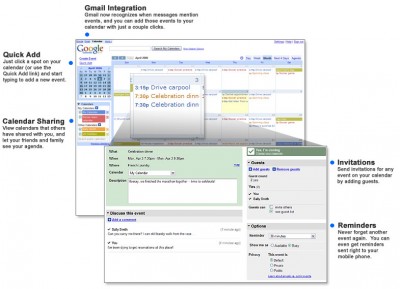
Google Calendar has gone beta to the public.
Simplify. Organize. (And relax.) Organizing your schedule shouldn’t be a burden. That’s why we’ve created Google Calendar – our free online shareable calendar service. With Google Calendar, it’s easy to keep track of all your life’s important events – birthdays, reunions, little league games, doctor’s appointments – all in one place.
The feature set on this free service is quite impressive:
- XML/ICAL feeds for public and private calendars.
- Share your calendar
- Auto-add invitations.
- Notifications via email, SMS and Pop-up (No GTalk notification?).
- Import iCal or CSV (MS Outlook).
- Gmail Integration
- Mobile access
- Event publishing (share your organization’s events with the world).
It was only a matter of time before Google added a calendar feature to their impressive list of services. The fact that you can share a RSS feed of your calendar with the public seems to have a lot of potential.
Read More | Google Calendar
Gallery: Google Calendar Launches
How To: Automatically Convert DVR-MS Files for PSP Playback
Posted by Jake Ludington Categories: Features, Microsoft, Mods / Hacks, PC / Laptop, Software, Video Games,
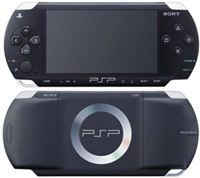 Despite the recent launch of Sony’s own Media Manager, PSPWare remains the best solution for syncing content to your PSP. Chris and I were lamenting the lack of an easy way to automatically convert DVR-MS files created by Windows Media Center to files ready for playback from PSP Memory Sticks. Here is the solution.
Required Software:
Tweak MCE Power Toy $0.00
Lupas Rename 2000 $0.00
PSPWare $15.00
Windows Task Scheduler (part of Windows XP)
Click to continue reading How To: Automatically Convert DVR-MS Files for PSP Playback








