

Find Our Latest Video Reviews on YouTube!
If you want to stay on top of all of our video reviews of the latest tech, be sure to check out and subscribe to the Gear Live YouTube channel, hosted by Andru Edwards! It’s free!
Latest Gear Live Videos
 “When it rains it pours” goes the old saying, and with Adobe snagging Pixmantec and now Microsoft grabbing iView, digital workflow companies seem to be vanishing left and right. iView Multimedia is the maker of MediaPro, an image cataloging application that is quite popular. One difference between this acquisition and that of Adobe/Pixmantec, is that Microsoft will keep the product line intact and continue to sell both the Mac and Windows versions.
It is important for current iView customers and those considering buying iView products to know the following:
* All iView products will continue to be sold on the iView web site and through many of iView’s existing partners/channel. Existing customers and new customers who buy iView products will continue to receive full support, per their iView software agreements.
* Macintosh versions of iView products will continue to be available and fully supported.
* Users of iView products will be offered promotional upgrade pricing for any future products that Microsoft releases that are based on the existing iView products.
* Users of earlier versions of iView MediaPro (pre v3.x) and iView Media will continue to qualify for upgrades to the version 3.x product line, and can upgrade now and in the future to the latest version.Therefore, customers can continue to use and buy iView products knowing that they will be fully supported as Microsoft evolves the iView product line in the future, for both Windows and Macintosh platforms.
Read More  | iView Multimedia via Rob Galbraith DPI
Gallery: Microsoft Acquires iView






Advertisement
 Pixmantec RawShooter was a great RAW workflow and processing application that was easy to use and produced superb results. Why the need for past tense? Well, because Adobe has acquired Pixmantec’s technology assets, and will be incorporating the technology into Lightroom and anywhere a RAW application process is required. Lightroom is Adobe’s RAW application that is currently in beta for the Mac platform. A Windows version of Lightroom is planned but there is no word on when it will be available.
“With high quality digital cameras now within reach of every photographer, customers are gravitating to raw file formats that allow them to get more control over final results,” said John Loiacono, senior vice president of Creative Solutions at Adobe. “By combining Pixmantec’s raw processing technology and expertise with our own, we’re continuing to deliver on the promise that even your existing raw files can be processed with increasing quality as our software technology evolves.”
Pixmantec is a privately held company headquartered in Copenhagen, Denmark and currently ships the RawShooter® line of digital photography software products. Adobe plans to integrate Pixmantec raw processing technologies into Lightroom™ and wherever customers will be working with raw files.
In preparation for this integration, the Pixmantec RawShooter Premium product is being discontinued, though the free RawShooter Essentials product will continue to be available until the Lightroom public beta program is completed. Existing Pixmantec customers will continue to be supported by Adobe and will be provided with an upgrade path to the Adobe digital imaging product family.
So, if you want to snag a free copy of RawShooter Essentials, or an upgrade to RawShooter Premium, then there’s no time like the present as they won’t be around forever. Get them here.
Read More | Adobe via Rob Galbraith DPI
Gallery: Adobe Acquires Pixmantec
 Looks like Apple has just released the latest Mac OS X Update, bringing Tiger to 10.4.7. The update is recommended for all users and includes general operating system fixes, as well as specific fixes for the following applications and technologies. It includes fixes for:
- preventing AFP deadlocks and dropped connections
- saving Adobe and Quark documents to AFP mounted volumes
- Bluetooth file transfers, pairing and connecting to a Bluetooth mouse, and syncing to mobile phones
- audio playback in QuickTime, iTunes, Final Cut Pro, and Soundtrack applications
- ensuring icons are spaced correctly when viewed on desktop
- determining the space required to burn folders
- iChat audio and video connectivity, creating chat rooms when using AIM
- importing files into Keynote 3
- PDF workflows when using iCal and iPhoto
- reliable use of Automator actions within workflows
- importing and removing fonts in Font Book
- syncing addresses, bookmarks, calendar events and files to .Mac
- compatibility with third party applications and devices
- previous standalone security updates
I am on an Intel iMac, and the download clocks in at 133 MB on my end.
Read More | 10.4.7 Details
Gallery: Apple Releases OS X 10.4.7 Update
Test Drive A Web-based Office 2007 Beta *UPDATED*
Posted by John Goulden Categories: Google, Internet, Microsoft, Software,
 Microsoft has made available today a website where users can take Office 2007 beta out for a test drive, without having to download a thing. Well, that’s not exactly true. While you aren’t required to download the hefty beta ISO, you are required to install a browser plugin from Citrix, and if you don’t already have one you’ll need to sign up for a Microsoft Live or Passport account as well.
Applications included in the Web-based test version of Office 2007 are: Microsoft Office Access 2007, Excel 2007, InfoPath 2007, OneNote 2007, Outlook 2007, Outlook 2007 with Business Contact Manager, Outlook Web Access, PowerPoint 2007, Project Professional 2007, Publisher 2007, SharePoint Designer 2007, Visio 2007, Word 2007, SharePoint Services, Project Server 2007 and SharePoint Server 2007.
This could be a sign that Microsoft is concerned about competition from Google’s online word processing and spreadsheet applications, or they could simply be looking at others avenues of growth for their Office products. Regardless of their motives, I decided to give the Office Beta Test Drive a little test of its own. Positive of the expected outcome, I loaded up Firefox 1.5.0.4 and tried accessing the test site. Microsoft didn’t let me down, and spurned my attempts to use a browser other than IE. So I dusted off IE 6.0, fired up the test site, and was greeted by the confidence inspiring message you see below.
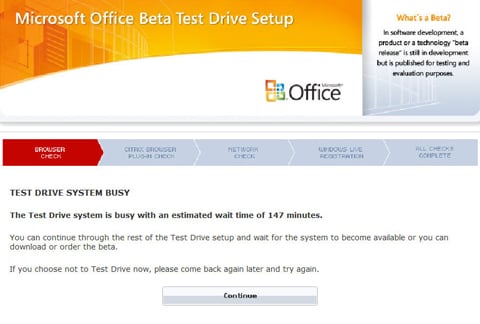
Undaunted by this sign of either extreme popularity or poor planning on the part of the test site, I forge ahead. With the browser check complete, the next task up is the installation of the Citrix plugin. All goes well at this stage, albeit extremely slowly. So slow at times that I think the test site has given up and gone home for the day. The plugin does install though and I move on to the network check, and this is where things come to a complete, dead stop. Plenty of bandwidth is available on my end of things, so the hold up is definitely on the test site’s end.
And that’s where this story ends, for now. I’ll update this later today once the test site has decided to wake up from it’s nap, or once it finally succumbs and gives up the ghost.
*UPDATE* After a few tries throughout the day, the test site did eventually speed up and I was able to progress to the point of entering the waiting queue. With the prospect of a 173 minute wait in front of me, I finally threw in the towel and sent my IE window back to the depths from which it came. If anyone has the patience to wait it out, and is successful in trying the online beta, please let us know your thoughts.
Read More | Microsoft via Computerworld
Gallery: Test Drive A Web-based Office 2007 Beta *UPDATED*
Gear Live Interview: Benjamin Rudolph, Parallels

Posted by Andru Edwards Categories: Apple, Corporate News, Features, Microsoft, PC / Laptop, Software,
 Parallels Desktop has quickly replaced VirtualPC in the eyes of many a Mac user, as the product works (and works well) on Macs running on Intel chips. Throughout it’s beta period, the Parallels Desktop for Mac software grew due to the dedicated help from the Mac community. The product is now out of beta and ready for purchase. We caught up with Parallels’ Benjamin Rudolph to talk about how to they to where they are today:
Ben, thank you for taking some time to talk with us today. Tell us a little about what you do at Parallels.
Good to be here! I’ll keep this short since I’m the least interesting thing we’ll be talking about today….I lead our marketing and communications efforts here at Parallels, including PR, product marketing, and partner relationships.
How soon after the announcement of the Intel Macs did development of Parallels Desktop for Mac begin?
We started thinking about a Windows-on-Mac solution when Apple made the announcement that they were moving to Intel chips. Since our virtualization engine was already compatible with the x86 chipset, it was simply a matter of porting the code over to the Mac, refining the API, and getting devices working.
Click to continue reading Gear Live Interview: Benjamin Rudolph, Parallels
Gallery: Gear Live Interview: Benjamin Rudolph, Parallels
BumpTop - An Alternative Desktop Interface
Posted by John Goulden Categories: PC / Laptop, Software,
Whether you are a firm believer in the power of OS X’s Aqua, in love with Gnome or KDE on Linux, or simply can’t wait for Vista’s Aero, the desktop interface plays a fundamental role in the way we use our computers. Some people treat the desktop as a virtual dumping ground, while others prefer a more pristine look. Regardless of your organizational skills, it’s arguable that every UI could use a little tweaking, or in some cases a complete overhaul, to better fit the way we think and work. Anand Agarawala and Ravin Balakrishnan, from the University of Toronto, have developed an alternative UI called BumpTop.
BumpTop departs from the normal, flat perspective we’re all used to, and tries to impart of feel of realism to the UI through the use of physics and a 2-1/2 dimensional perspective. The prototype UI uses a TabletPC and a pressure sensitive pen for interaction purposes, and the principle of “piling” documents is a main emphasis in the workflow methodology.
A workspace in the physical world typically has piles of documents, binders and other objects arranged in a way that provides considerable subtle information to the owner. For example, items are often casually placed but their spatial position and orientation are usually meaningful. Closer items can indicate urgency, and piles of items are “automatically” ordered chronologically because new items are typically placed on top. This casual organization, prevalent in the real world, differs greatly from the GUI desktop which forces users to immediately file their documents into a rigid hierarchy.
[In BumpTop] objects can be casually dragged and tossed around, influenced by physical characteristics such as friction and mass, much like we would manipulate lightweight objects in the real world. Using a pen as the primary input device can potentially enhance the feeling of realism and directness of manipulation since objects being acted upon are visible directly under the pen tip.
Okay, enough chit-chat. Pictures may be worth a thousand words, but in this case the video is worth a million.
Read More | Anand Agarawala
Gallery: BumpTop - An Alternative Desktop Interface
The Bleeding Edge 016: Windows Media Player 11, Motorola SLVR, MTV URGE
Posted by Andru Edwards Categories: Accessories, Smartphones, Features, Microsoft, PC / Laptop, Product Reviews, Software, Videocasts,
In this episode, we show off Motorola’s new ultraslim phone, a great travel bag by Pacific Designs, and more:
WEB GEMS
Windows Media Player 11
UNWIRED
Motorola SLVR Review
GIZMATIC
Rolling Lite Review
Here’s how to get the show:
Subscribe: iTunes iPod / H.264 | iTunes MPEG-4 | RSS iPod Feed | RSS MPEG-4 Feed
|Download| - iPod-formatted H.264 (Mirror)
|Download| - DivX (Mirror)
|Download| - MPEG-4 (Mirror)
|Download| - PSP (Mirror)
 IMPORTANT: We are surveying the viewers of our show to see what it is that people like, and more importantly, what they don’t like. It is anonymous, and just takes a couple of minutes. If you have the time, we would appreciate it! As always, feel free to let us know what you think in the comments.
|Download| - iPod-formatted H.264
|Download| - MPEG-4
Gallery: The Bleeding Edge 016: Windows Media Player 11, Motorola SLVR, MTV URGE
Pyrrha Lets You Record Pandora Streams
Posted by John Goulden Categories: Internet, Music, Software,

We’ve talked about the virtues of Pandora many times in the past so I won’t rehash old news, but wouldn’t it be great if you could record your Pandora streams and save them for later? A utility called Pyrrha lets you do just that. Yes, there are other utilities out there that let you “hijack” audio streams and record them for later use, but Pyrrha works a bit differently.
There’s no need to go to Pandora’s website to login as Pyrrha handles all of that for you. Enter your username and password, choose your radio station and recording duration, click the “generate” button, and away it goes, quietly recording your chosen station as a 128kbps MP3 complete with playlist.
With a Java version for non-Windows users available, it’s hard to fault an application that does so little, yet does it so well. However, I like to nitpick so I’d like more control over the duration of the recordings, and a feature to remember my username and password.
Read More  | Pyrrha via eirikso
Gallery: Pyrrha Lets You Record Pandora Streams
Sirius Satellite Radio On Your Pocket PC
Posted by John Goulden Categories: Smartphones, Portable Audio / Video, Software,
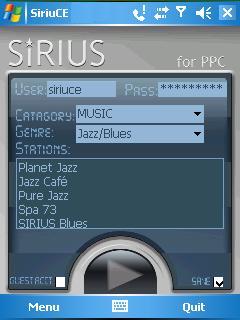
While XM Satellite Radio currently has two handheld devices for live portable listening, the Inno and Helix, Sirius has . . . wait for it . . . none. Alright, Sirius has the S50, but it can’t receive live broadcasts and that’s the whole point. However, if you have a Pocket PC device with any kind of broadband connection, you can take advantage of SiriuCe to get your music fix. Granted, SiriuCE doesn’t magically turn your handheld into a satellite receiver, but it does allow you to easily tap into Sirius’ Internet radio stream for playback on the go. An ideal companion for the software is a Pocket PC Phone with a high-speed data connection.
The software provides the interface for accessing the audio streams, and then relies on your choice of Windows Media Player 10 or TCPMP to provide playback duties. While SiriuCE has been available for some time, it was recently updated to solve some compatibility issues with Sirius, and to implement support for the aforementioned TCPMP. Since this isn’t true satellite radio, the restrictions Sirius has on their Internet streams still apply. Therefore no talk radio for you Howard Stern fans, no news and no sports programming.
While the main focus of this article has been software for Sirius, there are similar options for XM as well. A freeware application is XstreamXM, with the flipside being Pocket XM which is available for purchase. It should go without saying that you must be a subscriber to the respective satellite service for any of these options to work.
Read More | SiriuCE
Read More | XstreamXM
Read More | Pocket XM
Gallery: Sirius Satellite Radio On Your Pocket PC
SlingBox Recording With Replay SlingCorder *UPDATED*
Posted by John Goulden Categories: Home Entertainment, Portable Audio / Video, Product Reviews, Software,

If you’re a Slingbox owner, how many times has this happened to you? You’re away from home and watching video content being streamed by your Slingbox, when it occurs to you that you need to record the current stream. No? Well, me either, but I can see how some people might find the ability to record from a Slingbox a useful thing. Considering how litigious today’s society is, it comes as no surprise that SlingMedia neglected to include any kind of recording capabilities in their SlingPlayer software.
To fix this shortcoming, Applian Technologies introduces their Replay SlingCorder software. Not only can you record content currently being viewed, but a scheduling feature provides even more versatility. To operate simply provide a name for your recording, enter the duration you want to record, provide the channel number if necessary, and specify whether to start now or at a future time. The software records at 320x240 resolution and saves the files as Windows Media (ASF) files which should be playable on a variety of devices.
A resolution limit of 320x240, the inability to schedule more than a few hours into the future, and the record start/stop sequences are the only downsides I’ve been able to find so far. The Slingbox itself is capable of 640x480 and it would be nice to have the SlingCorder match the resolution that is currently being streamed. Also, when SlingCorder starts a recording it has to close and re-launch the SlingPlayer software. Given the method Applian uses to capture the stream that’s only slightly annoying and really of no consequence, but when a recording stops, the SlingPlayer is disconnected and does not reconnect. It would be handy if an option was provided to keep the SlingPlayer connected when recording stops. On the upside, the SlingCorder is a lightweight application that does one thing, and does it well, the aforementioned quibbles aside. For a piece of software I didn’t even realize I was missing, the Replay SlingCorder fits the bill.
A feature-limited (5 minute recording limit) demo version is available for free, and the full version sells for $29.95 USD.
UPDATE: Bill Dettering, CEO of Applian Technologies, was kind enough to point out that the SlingCorder will indeed record whatever resolution is being streamed. That bit of info easily negates my biggest complaint about the software. Also, for clarification purposes it should be noted that the scheduling limitation of “a few hours into the future” really equates to “no more than 24 hours into the future”.
Read More | Applian Technologies via Zatz Not Funny








