

Articles tagged Iphone Apps
Latest Andru Edwards Videos
Isis rebrands mobile wallet as Softcard

Posted by Andru Edwards Categories: Smartphones, Corporate News, Software,
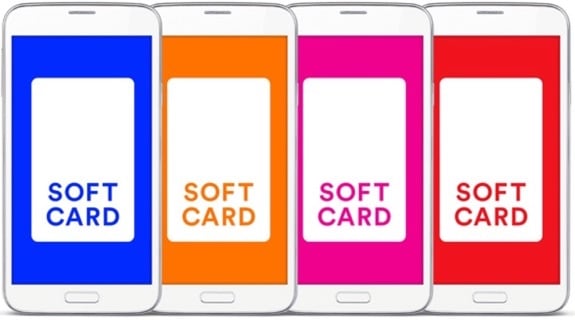
The folks behind the Isis Wallet recently announced that the company would rebrand and change its name due to the rise of the ISIS Middle Eastern terrorist group in the public eye. A great decision to be sure, the company announced today that the Isis Wallet will shortly be known as Softcard. An app update will be pushed to the various app stores where Isis Wallet is available within a few weeks, and Softcard will take its place. No word on any new features at this time, as the company is looking to swiftly get the name change in place to distance itself from the militant group of a similar moniker.
Read More  | Softcard
Advertisement
Skype completely redesigns iPhone app

Posted by Ariel Levin-Waldman Categories: Social Networking, App Updates, Free Apps,
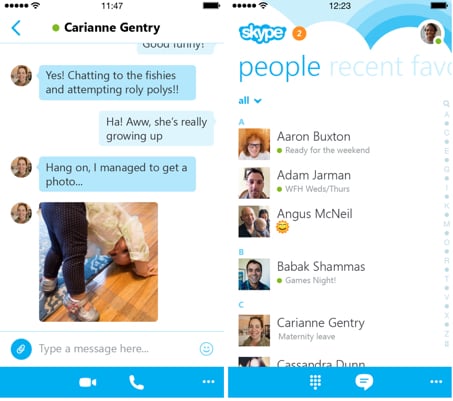
Skype has decided to overhaul its iOS app, bringing it to version 5.0. Recently, the communications company has been upgrading its mobile app for other platforms, namely Android and Windows Phone, but until now Apple has been left behind.
The first thing you might notice is the new interface. They have completely changed the looks to bring it in line with the newer iOS design language. The next thing is the software changes. You can now start group chats directly from the central hub and don't have to wait until a friends is online before you can message them. Apparently offline messaging was something that was only developed in 2014.
Skype 5.0 also has some software upgrades that are not obvious upon opening the app. It is better at synching your messages between devices and has had its coding redesigned to work up to five times faster, according to a teaser video released Monday evening.
But after tempting you with all the upgrades and good news, Skype is going to leave you hanging. It will be another week before the new Skype for the iPhone is released to the public.
Read More | Skype for iPhone
Facebook Paper brings elegance to your timeline
Posted by Andru Edwards Categories: Smartphones, Internet, Software,


Facebook has released its new Facebook Paper app, a free version of Facebook that introduces new ways of interacting with the social network. Similar to the popular Flipbook app, Facebook Paper is centered around eye-catching, full-screen images, and gesture-based navigation, bringing the topics and people you care about most to the forefront.
A product of Facebook Creative Labs, Paper looks great, and could likely replace the default Facebook app for most users, what with its magazine-style layout. To get users acquainted, Facebook Paper launches with a gesture tutorial, helping you become familiar with the new way of interacting with Facebook. It's a bold move, but it works. Facebook needs to constantly monitor the pain points that its users experience when using the service, especially on mobile. Paper solves a lot of those issues that the common Facebook user encounters in the more bloated full app, bringing a simple elegance and sense of ease with it.
Give it a shot, and let us know what you think in the comments. You can grab Paper now, for free.
Reeder 2 RSS reader now available for iPhone and iPad
Posted by Andru Edwards Categories: News, App Updates, New Apps, $4.99,

We loved Reeder for iOS and Mac, and the thoughtful RSS reading app was fantastic, right up until Google pulled the plug on Google Reader, a service that was essential to the usability of Reeder--at least on the Mac and iPad. Now, developer Silvio Rizzi is back with his second act: Reeder 2. Unlike the first version, Reeder 2 is a universal binary, which means that for the price of the app, you get both the iPhone and iPad versions included. The design language of Reeder 2 is updated to match the look and feel of iOS 7, and gone is the requirement and reliance on Google Reader. In its place, Reeder 2 now allows you to pull and sync data from Feedbin, Feedly, Feed Wrangler, Fever, and can even act as your RSS storage app in and of itself.
You can pick up Reeder 2 now for $4.99.
Read More | Reeder 2 (App Store)
Tempo for iPhone now supports auto dial-in to top 20 conference call services
Posted by Andru Edwards Categories: Business, Productivity, App Updates, Free Apps,
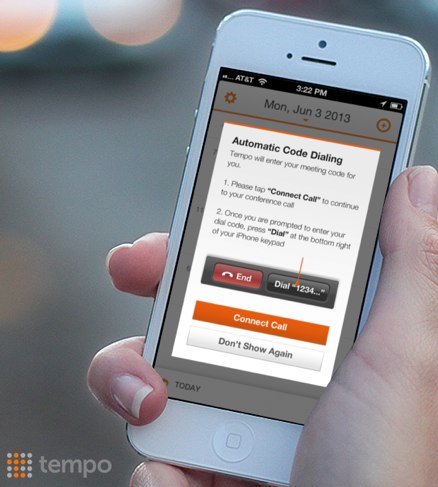
Tempo, one of our favorite iPhone calendar apps (alongside Fantastical) just received an update that should make it significantly more attractive to business users. Why? Well, Tempo now includes support for automatical dial-in for the top 20 most popular conference call services. So now, when you set a calendar appointment for a conference call, Tempo will find that email, grab the dial-in details and code, and if it is one of the 20 services, you can use Tempo to call and enter the conference code for you, all with one tap. The 20 services include: AccuTalk.net, AdConferencing, AnyMeeting, Calliflower, Free Audio Conferencing, Free Conference Calling, Free Conference USA, FreeConference, FreeConferenceCall.com, Fuze, GlobalMeet, GoToMeeting, join.me, Powwownow, Rondee, TalkShoe, Totally Free Conference Calls, UberConference, Wiggio, and WebEx.
You can get Tempo Smart Calendar for free in the App Store.
Twitter for iPhone 5.7 improves photo sharing, timeline view
Posted by Andru Edwards Categories: Social Networking, App Updates, Free Apps,

Twitter for iPhone 5.7 has been released, bringing with it improved photo sharing and a preview of what your media- and metadata-filled tweets will look like prior to you posting them, so you can get them juuust right. The Twitter timeline also gets a makeover, now being wider and easier to read throughout the app. You'll also now receive a notification whenever a friend of yours joins Twitter (we aren't sure how that one works,) alongside all the typical bug fixes and code optimizations. You can download Twitter for iPhone now.
Read More | Twitter for iPhone
Yahoo! Weather for iPhone quick review
Posted by Andru Edwards Categories: Weather, Reviews, Free Apps,

Yahoo! Weather was released this morning for iOS, and we've gotta say, it's gorgeous. The company has brilliantly tapped it's Flickr community for imagery that's used in the app, along with nice, lightweight typography.
The app pulls in your location after you give it permission to do so, and combining that with the time and weather conditions, it will then select images to show in the background of your location that nearly match all those parameters. If it is nighttime and snowy, you'll likely get an image of a place somewhere near you taken in similar conditions. Pull up on the display, and you get an hourly forecast for the day, as well as a five-day forecast, and other details like wind level, humidity, visibility, weather map, and even sunrise/sunset details. It all looks really good.
Click to continue reading Yahoo! Weather for iPhone quick review
Twitter #Music service launches on web and iPhone
Posted by Andru Edwards Categories: Industry News, iTunes,

The rumored Twitter Music service has become a reality, launching this morning. Twitter #music seems to be a natural step for the service, which sees hundreds of millions of users regularly discussing music on the service, as well as a bunch of popular musicians as well. Twitter #music aims to help you find music you'll like, based on your Twitter activity. You can access #music through a web browser, and there's also a new dedicated #music iOS app that lets you easily view and listen to music that's popular and trending on Twitter, undiscovered artists, music that it knows you like, and a #NowPlaying area that shows what others are listening to.
One important note here is that Twitter #music isn't a streaming music service. Instead, it's a layer that allows you to access your Rdio, Spotify, and iTunes tracks, using Twitter #music as your navigation mechanism. You simply connect your accounts to #music, and you are all set. The iOS app is slick, and we hear the Android version will be on its way soon. You can download Twitter #music for iPhone now.
Read More | Twitter #music
Skype for iOS 4.6 brings new interface, improved calling

Posted by Jason Diaz Categories: Social Networking, App Updates, iPad Apps, Free Apps,

Skype, the popular video and VoIP calling service, has updated its iOS apps for iPhone, iPod touch, and iPad to version 4.6. It includes a revamped user interface and improved calling experience. Here's the rundown of the changes:
What's New in Version 4.6
- Beautiful new calling experience
- Mark all your recent chats as read with just a few taps.
- General fixes and improvements
iOS iWork apps updated with bug fixes: Keynote, Pages and Numbers 1.7.2
Posted by Jason Diaz Categories: Productivity, App Updates, iPad Apps, Apple, $9.99,
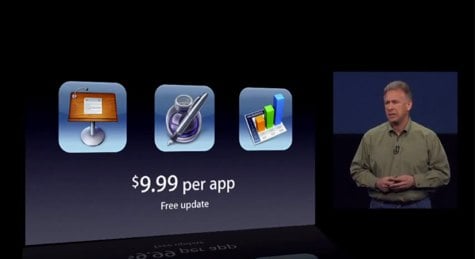
Apple has updated its iOS iWork apps with stability improvements and the usual bug eliminating maintenance for Keynote, Pages, and Numbers. You can grab the updates now, or if you don't own them, each app is $9.99 in the App Store.