Latest Gear Live Videos
Wednesday July 13, 2005 10:11 pm
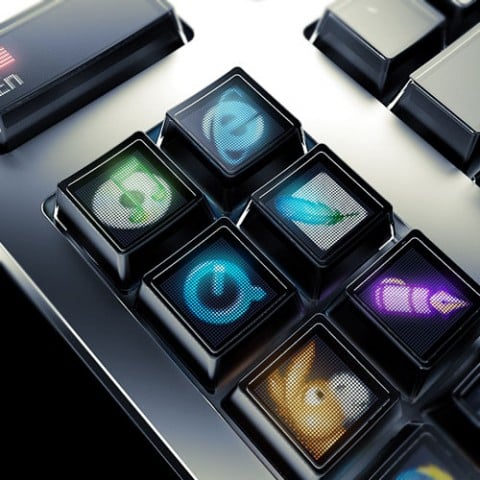
Optimus OLED Keyboard With Customizable Layout

I must get this keyboard, by any means necessary. Check it out - the keyboard uses OLED to display the keys, and thusly, they are all configurable. As you can see in the image, a few smart keys have been programmed to start specific applications. You can also change the layout display to match that of a first-person shooter for example. Just awesome. Check out more pictures of this marvel after the jump.
Quake Layout:

Photoshop Layout:

Full View:

- Related Tags:
Advertisement
Advertisement
Advertisement
© Gear Live Inc. – User-posted content, unless source is quoted, is licensed under a Creative Commons Public Domain License. Gear Live graphics, logos, designs, page headers, button icons, videos, articles, blogs, forums, scripts and other service names are the trademarks of Gear Live Inc.


Comments:
that’s simply one of the hottest pieces of hardware i’ve ever seen
Reply to this: comment | thread
That is so RAD! I’d love to get one of those…
Reply to this: comment | thread
I NEED ONE NOW!!!
Reply to this: comment | thread
That thing is SICK! I want one!
Reply to this: comment | thread
English Translation
http://www.artlebedev.com/portfolio/optimus/
Reply to this: comment | thread
Oh…. my ...... lord
Reply to this: comment | thread
I would buy one in a heart beat if it were out here and I had enough money. Simply the best ide anyone has ever had. This person is going to become so rich.
Reply to this: comment | thread
http://www.t3.co.uk/news/general/general/strutting_onto_the_keyboard_catwalk
so its just a prototype. prototype shmototype. who’s starting the petition to have logitech begin mass production of these? i want one…make that five.
Reply to this: comment | thread
I’d give a kidney for that…that is by far the best thing i’ve seen in quite sometime.
Reply to this: comment | thread
^^^ Way to spoil our fun by making sense… :(
Reply to this: comment | thread
1. It is costly to make this keyboard. $500 minimum.
Ok.
2. The keys are just to small to hold any useful information (imagine writing “Press me to fire, dude”).
All you need written is fire, whic can definatly fit on
a key.
3. Where do you get power to drive all those screens?
Battery, or plug it into the wall…....
4. The most important thing is support from all software vendors like Microsoft etc to provide one common way to draw images (tons of questions related to screen-on-key resolution)
All you need to do is set up your drivers correctly.
I can set up keys on my keyboard right now to do
whatever I want.
5. To get really cool keyboard with, for example, animated keys you’ve got to use fast interface (USB 2.0 or Ethernet)
So? Go ahead and use USB 2.0.
6. PC software driver for this keyboard is not trivial at all.
It’s not much more complicated then current
keyboard software. You just have to add
something to control the images.
Reply to this: comment | thread
lol../.i head these can get expensive
Reply to this: comment | thread
Comments: Page 1 of 1 pages