

Latest Gear Live Videos
U.S. officials seize bin Laden hard drives and data, hit “mother lode”

Posted by Andru Edwards Categories: Storage,

"Can you imagine what's on Osama bin Laden's hard drive?"
That's the question a U.S. official posed to Politico recently in an article that revealed the government is now in possession of the deceased terrorist leader's computers.
The Navy SEALs who infiltrated bin Laden's compound Sunday, killing him and several others, also confiscated computer drives and disks that the U.S. official said was "the mother lode of intelligence." The contents of those machines are currently being torn apart at a secret location in Afghanistan.
"It's going to be great even if only 10 percent of it is actionable," the official told Politico.
Click to continue reading U.S. officials seize bin Laden hard drives and data, hit “mother lode”
Advertisement
Newegg Deal: Western Digital Elements 640GB External Drive
Posted by Andru Edwards Categories: Hot Deals, Storage,
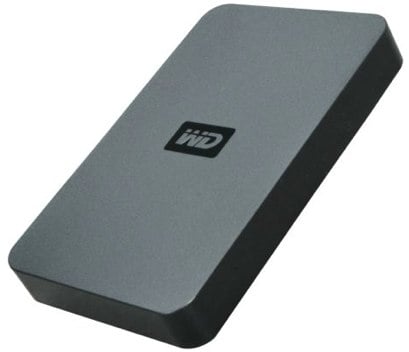
Newegg has a pre-Valentine’s Day sale going on right now that features a bunch of nice discounts and deals, including this Western Digital Elements 640GB portable hard drive for just $99.99. Definitely a great deal for a lightweight external hard drive that uses less power and is quieter than the average. I also personally like it because it doesn’t require any SmartWare. If you want to get in on it, head on over to the Western Digital Elements 640GB external drive page, add it to your cart.
As always, you can find all sorts of Newegg promo codes and deals on our forums.
Read More  | Western Digital Elements 640GB external hard drive
A-DATA SH93 super-rugged portable hard drive

Posted by Mark Rollins Categories: Design, Storage,
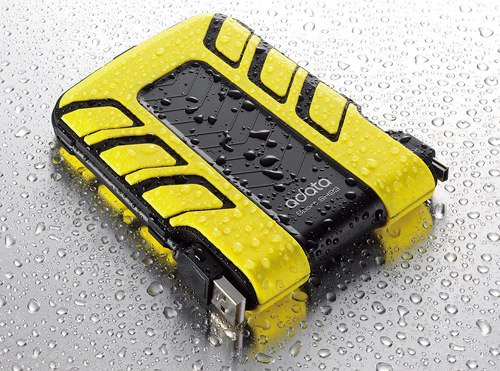
I’m not in the habit of keeping my portable hard drives next to the bathtub, but if I did, the SH93 from A-DATA would be a legitimate contender. These new portable HDDs can last up to 30 minutes when plunged into one meter of water. And hey, not only is it water-resistant, but it’s durable in other ways. The rubberized coating can survive the military MIL-STD-810F drop test, so you know it’s solid, right?
No word on pricing or availability as yet, but they will come in a red or yellow finish in memory capacities of 240, 320, 500, and 640GB.
Read More | Adata
Freecom’s Hard Drive Secure: RFID keycard required
Posted by Mark Rollins Categories: Storage,
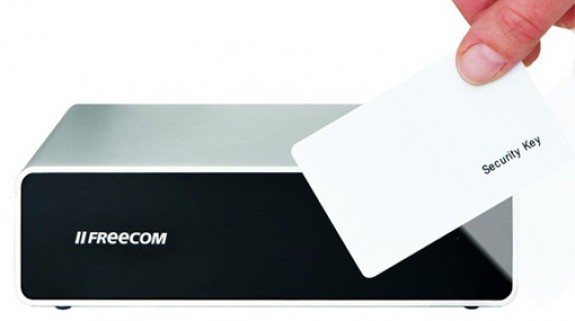
Since we live in an age of personal security, it is important that the valuable information on our hard drives is locked down under lock and key. Fortunately, Freecom has released the Hard Drive Secure.
The Hard Drive Secure is a compact and portable external hard drive that can only be accessed with the use of an AES-encrypted RFID keycard. Passing the card through the reader gives the user access to their data in just seconds, while maintaining that extra level of security.
Read More | Freecom
Bleeding Edge TV 310: NewerTech miniStack v3 review
Posted by Andru Edwards Categories: Gizmatic, Short Bytes, Features, PC / Laptop, Podcasts, Product Reviews, Storage, Videocasts, Videos,
We’ve had the NewerTech miniStack v3 quad interface powered hub external storage solution running for 9 months now, and we are reporting back with our review of the device. The miniStack v3 is a hard drive enclosure that had FireWire 800, FireWire 400, USB 2.0, and eSATA ports, giving you four ways to connect this external storage device to your computer. It supports Plug and Play, and is simple to set up and use. Plus, as you’ll see, it sits atop a Mac mini perfectly, hence the name miniStack. Check out the video for our full review of the NewerTech miniStack v3.
You can get the miniStack v3 in the following configurations:
Giveaway Results: His and Her Seagate FreeAgent Go drives
Posted by Andru Edwards Categories: Accessories, Announcements, Features, PC / Laptop, Storage,
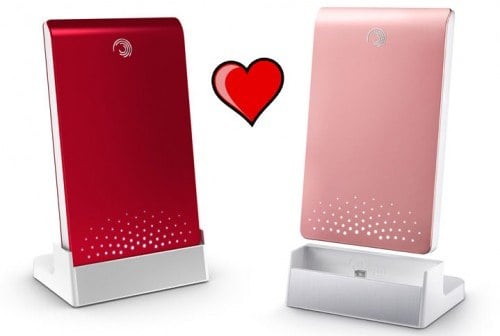
A few days ago we announced our His and Her Seagate FreeAgent Go Valentine’s Day giveaway, where we asked you guys to leave a comment answer the question: What’s one thing on your computer that you love so much, you never want to lose it? As it turned out, almost every response had to do with images, which we kind of figured, although we expected more people to be concerned about their music collection.
In any event, we’ve chosen our random winner. Gear Live reader netgeek won, leaving this comment:
Without a doubt it would have to be pictures of my wife and kids. My wife would hate to lose those pictures and her MP3 collection. Excellent giveaway, btw!
Congrats! And for everyone else, stay tuned, we’ve got another contest starting shortly.
Giveaway: His and Her Seagate FreeAgent Go drives
Posted by Andru Edwards Categories: Accessories, Announcements, Features, PC / Laptop, Storage,
Okay, we know we are already giving away five $70 ProFlowers gift certificates for Valentine’s Day, but hey, this is a tech site, and we had to keep it real, right? That’s why we are happy to announce that, in addition to the flowers (which you know will score you some points with the lady,) we are also giving away three pairs of Seagate FreeAgent Go hard drives. What’s so special about that, and what does that have to do with Valentine’s Day, you ask? Well, in case you missed the image up there, these drives go together like a couple of passionate lovers. We’ve got a red one for the guys, and a pink one for the ladies (but you two can swap, if that’s your thing, we won’t judge.) Each drive can hold 320 GB of information, so you know, these are solid.
How do you win? We are keeping it simple. All you need to do is the following:
- Log in to the site with your Gear Live account. Don’t have one? Register here.
- Leave a comment on this post answering this question:
What’s one thing on your computer that you love so much, you never want to lose it?
That’s it! The contest ends at 11:59 PM on February 9th, go ahead and leave your comments until then!
Our friends at Notebooks.com and GottaBeMobile are helping to give away these drives, so you actually get three seperate chances to win. Head on over to those two respective sites for details on how to increase your chances to win - that is three pairs of his and her drives.
We’ll pick a winner on Tuesday Feb. 10th, and try our best to get you and your sweetheart/mom the drives by Valentine’s Day. A big “thank you” to Seagate for providing the drives for this giveaway. As is usual for these kinds of things, US and Canadian residents only, and the contest is void where prohibited by local laws and regulations. You may enter once on Notebooks.com, GottaBeMobile and Gear Live. Duplicate entries will be discarded. All decisions by the respective sites are final. Please be sure to enter your email in the email field, and not in the comment itself, so that it’s protected.
Latest Newegg deals: LCD monitor, Kodak photo frame, Logitech Cordless TrackMan
Posted by Andru Edwards Categories: HDTV, Home Entertainment, Hot Deals, PC / Laptop, Storage,
We are back once again with the latest in Newegg deals and sales. This week we’ve uncovered fantastic pricing on an Asus LCD monitor, a Western Digital Elements 1TB external hard drive, a Kodak digital photo frame, and more. We know, you want the deals, so let’s get to it:
- Asus VW193T 19” LCD widescreen monitor: $89.99 (expires 12/31)
- Kodak EasyShare 10” digital photo frame: $124.99 with code “FRAME1255” (expires 12/31)
- Envision 42” 720p LCD HDTV: $599 with code “TV129100” (expires 12/16)
- Seagate Barracuda 750GB hard drive: $79.99 (expires 12/14)
- Logitech cordless optical TrackMan: $49.99 with code “MOUSE129FS” (expires 12/19)
- Western Digital 1TB USB 2.0 external hard drive: $134.99 (expires 12/14)
As always, we’ve also got a bunch of Newegg promo codes and deals that don’t expire, over on the forums.
Hitachi to Build 5TB Hard Drive

Posted by Sheila Franklin Categories: Corporate News, PC / Laptop, Storage,
 Hitachi is planning to release a 5TB 3.5-inch hard drive within the next two years. They will accomplish this with Current-Perpendicular-to-Plane Giant Magnetoresistance (CPP-GMR) magnetic read heads. The company’s Dr. Yoshihiro Shiroishi says that two of them will “provide the same storage capacity as the human brain.”
The way we figure it, if we only use one of them, we would still have plenty of space left. We know we lost a few cells back there somewhere in the last decade or so.
Read More | Register Hardware
Bleeding Edge TV 264: Install a hard drive in a Mac Pro
Posted by Andru Edwards Categories: Gizmatic, Short Bytes, Apple, Features, Mods / Hacks, PC / Laptop, Podcasts, Storage, Videocasts,
A quick and simple way to set up fast Time Machine backups on your Mac Pro, or more storage for all those Bleeding Edge episodes you’ve been downloading, is to add in more hard drives. Thankfully, Apple has made the upgrade path to accomplishing this super simple. In this episode, we show you the step-by-step process that is takes to install a new hard drive in your Mac Pro in under 5 minutes. All you need is a Mac Pro, a Philips screwdriver, and a SATA hard drive. Oh, and of course a few minutes of spare time. It really is that easy. Hit up the video for the proof, and let us know what you think.
A big thank you goes out to HP for sponsoring this episode.









Advertisement
© Gear Live Inc. {year} – User-posted content, unless source is quoted, is licensed under a Creative Commons Public Domain License. Gear Live graphics, logos, designs, page headers, button icons, videos, articles, blogs, forums, scripts and other service names are the trademarks of Gear Live Inc.