

Find Our Latest Video Reviews on YouTube!
If you want to stay on top of all of our video reviews of the latest tech, be sure to check out and subscribe to the Gear Live YouTube channel, hosted by Andru Edwards! It’s free!
Wednesday October 20, 2010 5:59 pm
Windows Phone 7 review

Posted by Andru Edwards Categories: Smartphones, Features, Handhelds, Microsoft, Product Reviews, Software
When Apple announced the iPhone three years ago, the entire mobile industry started to play catch-up to what Apple was doing. It took a while, but slowly companies like Google, RIM, and Palm eventually released smartphone operating systems like webOS and Android that aimed to compete. However, not much was heard from Microsoft. Once heralded as a major player in the smartphone business with Windows Mobile, Microsoft took a hell of a long time to come up with anything that could compete against iOS, Android, webOS, and really anything else out there. Then, finally, they announced Windows Phone 7 Series, and smartly dropped the "Series" part when just about everyone made fun of them for coming up with a name that was more convoluted than necessary.
Microsoft wanted to tell the world that they were serious about competing, even going so far as to hold a funeral for the iPhone and BlackBerry. A bold (and ridiculous) statement for sure, but now Windows Phone 7 has arrived, launching tomorrow over in Europe, and arriving in the USA on November 8th. Has Microsoft actually learned anything by sitting back and observing the smartphone wars over the past few years, sitting on the sidelines while taking notes? We've been playing with Windows Phone 7 non-stop for a while now, and we're sharing our answers with you here in our Windows Phone 7 review.
Look and Feel of Windows Phone 7
When you jump into Windows Phone 7, a couple of things are obvious. First, if you've ever used Windows Mobile 6.x, this is nothing like it. This isn't an upgrade--it's a brand new operating system written from the ground up. Don't expect older Windows Mobile phones to be upgradeable to WP7. Second, Microsoft has something special on their hands here. As soon as you start using the OS, you realize the complete parity that the phone has with all of Microsoft's major brands...and relies heavily on the "coolest" portions of the company, those being Xbox 360 and Zune.
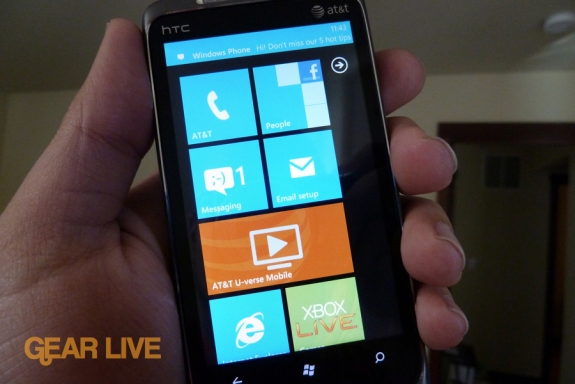
The home screen introduces you to the tiles that make up the main navigation, some of which are live tiles that update with information in realtime. The live tiles are great because they give glance-able information that let you take a quick gander at your device and get information without having to go into an app and back out.
The tiles can be removed, or rearranged however you'd like them to be. If you've used a Zune HD, then you will be familiar with the UI of Windows Phone 7. The phone, though, is far more customizable, with Microsoft wanting you to be able to personalize the phone and make it totally "yours." One thing that seems to be odd is that some of the animations give the appearance that the operating system is slower than it is. It all looks great, but the animation when you are in an app and hit the Home button, or when you are on Home and you tap on a tile just seems like they should go about 50% faster than they do.
Hubs
There are a few hubs that everything is centered around on Windows Phone 7:
- People hub: Pulls in live data feeds, bringing you social networking status updates and photos from services like Facebook and Windows Live.
- Pictures hub: Brings together picture and video assets from your phone, web, and PC, allowing you to view your entire collection. Even cooler, Facebook and Windows Live albums also get pulled in and are displayed here, right from the cloud.
- Games hub: Check out your Xbox Live messages, achievements, avatar, and even play some games. Achievements can be earned directly on the phone.
- Office hub: Access to Microsoft Office suite, including OneNote and SharePoint Workspace. Also includes new version of Outlook Mobile for email.
- Music+Videos Hub: This is where you'll find any videos on your device, music you've synced, and Zune access.
People Hub
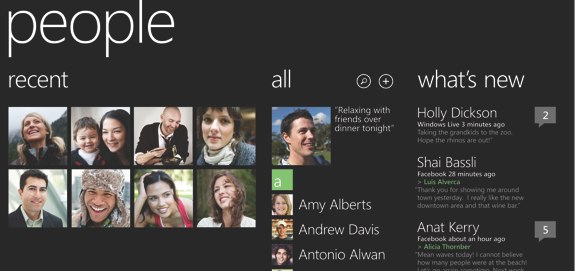
The cool thing about the people hub is that Windows Phone 7 takes all the information is has about any of your contacts, and pulls them all in to one area, based on the accounts that you put into the phone. So if you put your Facebook account into the phone, your Windows Live account, your Gmail, and an Outlook Exchange account and you have a buddy named John who you are friends with across those services, you will see all that info when you go into John on your contact list. Any info he has shared with Facebook (like phone number or address) will automatically appear on his contact card as well, so you don't need to go searching across a bunch of services or apps to get the information you need about someone. The People Hub also has a "what's new" area that shows you the recent Facebook and Windows Live updates of anyone you have in your networks.
Picture Hub

The pictures hub is where you'll find images you've taken with the device in the camera roll, a "what's new" area that shows you images from your friends social networks, and also images and albums from your social networks that come straight from the cloud to your device.
Games Hub
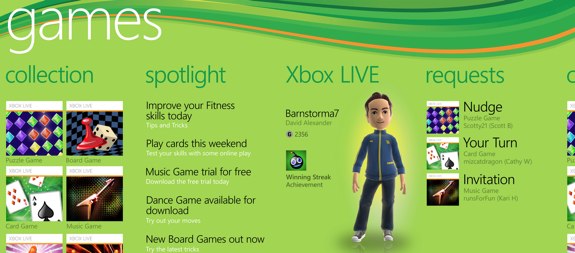
Windows Phone 7 supports apps, and many of those apps are going to be games. Xbox Live games are now a part of a mobile device, and this really is Microsoft's portable gaming play. That said, not all game apps are Xbox Live enabled, so don't expect to be earning achievement points on every game that you download. You can also send messages to your Xbox Live pals, see game requests, and mess with your Avatar.
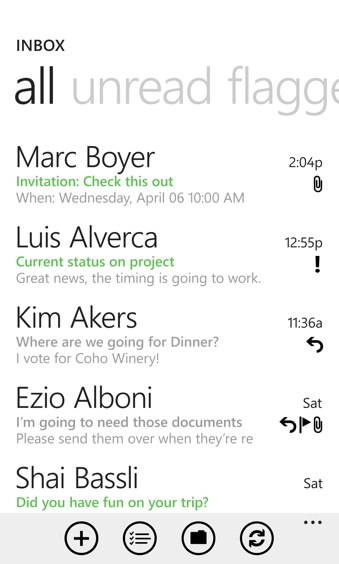
We definitely see potential in the email client on Windows Phone 7. It has a nice, minimalistic look, and you can set up as many email accounts as you'd like. The problem is that when you are viewing HTML email, oftentimes they won't be rendered to fit to the screen. More annoying, though, is the fact that there isn't really an email app. Instead, each email account becomes its own app/tile. We want to be able to fast-switch between mail account while we are in any mailbox.
The email client is integrated with the calendar on the phone, so you can view and accept appointments that come through email and have them appear right in the calendar with notifications and reminders as well. The calendar live tile will always display the next thing on your agenda, again saving you from having to actually go into the calendar app for that information.
Web browsing
Microsoft decided to use Internet Explorer 7 as their mobile browser, and while it performs okay, it definitely isn't as snappy as some other mobile OS browsers that we've used. You can choose to view mobile or full versions of websites, and you can zoom in and pinch and use other familiar multi-touch gestures as you'd expect. The browser also has a smart address bar that allows you to just start typing while it searches your favorites, history, and popular Bing searches.
Soft keyboard
One thing we absolutely love about Windows Phone 7 is the software keyboard. We were a little scared that we would be putting up with the same awful keyboard offered on the Zune HD, but we are happy to report that Microsoft went back to the drawing board and came back with an absolutely killer keyboard that is highly accurate, and great at spell checking. One odd thing we found, though, was that whenever we typed "blackberry," the phone would auto-correct that to "BlackBerry." Free advertising for the competition!
Search
.jpg)
Search is built right in to the phone, and is one of the three hardware buttons that you will find on all Windows Phone 7 devices, regardless of carrier or manufacturer. By default, hitting search takes you right to Bing, which is great for web searches and finding local information as well. If you are in a contact list and you hit search, instead of Bing, you get contact search. If in email, you get email message search. It's definitely smart and acts as you'd expect it to. When searching Bing, you get three sets of results that you can swipe through - web, local, and news.
Zune
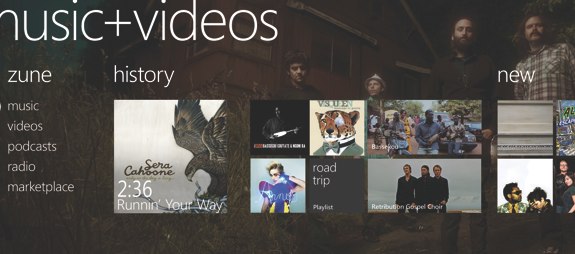
At first glance, the Zune experience on Windows Phone 7 looks to be the best ever. If you've got a Zune Pass subscription, you have access to the entire Zune library and you can stream songs or playlists right from the cloud to your device. If you're a music fan, this is incredible. Then we realized that there were a couple of shortcomings that disappointed us. First, there is no Zune Social on the phone--and that's been Microsoft's biggest push with Zune. The fact that you can discover music through what your friends are listening to. No social, no Zune Cards. Then we also realized that you can't subscribe to or sync Zune Channels to the phone either! Here's hoping that Microsoft fixes this up soon in a Windows Phone 7 software update.
Syncing
Speaking of software, you have two options for syncing Windows Phone 7 with your computer - if you are on the PC, you are using the Zune software. Zune 4.7 is officially your Windows Phone 7 sync client, similar to how iTunes plays that role for the iPhone. If you are on a Mac, you actually aren't left out in the cold. While there is no Zune software for the Mac, Microsoft has made Windows Phone 7 Connector available, which lets you sync content from iTunes, iPhoto, and other areas of your Mac directly to your WP7 device. It's definitely not the Mac client we hoped for, but its at least a step in the right direction. Here's a look at Windows Phone Connector for Mac:
One point of contention we had with the syncing process - while we were reviewing the HTC Surround WP7 device, it failed and we couldn't boot it back up. It was bricked. We got in a replacement device and connected it to Zune, fully expecting to be offered the choice to restore from a backup. We never got that choice. We dug for it and finally threw in the towel and started over. It's a little disconcerting to know that there is no easy way to just restore from a phone backup, especially across like devices.
Wrap-up
So Windows Phone 7 has been unleashed to the world, and you're wondering if it is even worth your time? Our answer is, definitely. We've used iOS devices, Android phones, webOS, BlackBerry 6, and all the rest. We can definitely say that Microsoft has come out swinging, and for me personally, they've got the second-best smartphone OS out there right now. The fact that they've been able to do that with their version 1 of this new platform is highly impressive, and goes a long way at showing that Microsoft can be player again in an arena where they were once dominant. If you're an Xbox Live gamer and you wanna game on the go, this is definitely worth a look as an operating system. If you're the corporate type, Windows Phone 7 will sync right up with Exchange, while also offering you a bunch of entertainment options that are built right in to the device in a way that no other mobile OS has captured yet. If you're just someone looking for a new phone and wanting to try something different, we totally think you should give Windows Phone 7 a shot.
One thing is for certain here, Microsoft designed this phone for the consumer first, but paid attention to the details so that corporate and enterprise clients wouldn't shy away. That makes the learning curve virtually non-existent to get acquainted with the devices and OS, and that's exactly what Microsoft needed to do.
Windows Phone 7 devices launch on November 8th in the USA on AT&T, and they include the HTC Surround, LG Quantum, and Samsung Focus.