
Categories
RSS Feeds
Archive
- May, 2008
- April, 2008
- March, 2008
- February, 2008
- January, 2008
- December, 2007
- November, 2007
- October, 2007
- September, 2007
- August, 2007
- July, 2007
- June, 2007
- May, 2007
- April, 2007
- March, 2007
- February, 2007
- January, 2007
- December, 2006
- November, 2006
- October, 2006
- September, 2006
- August, 2006
- July, 2006
- June, 2006
- May, 2006
- April, 2006
- March, 2006
- February, 2006
- January, 2006
- December, 2005
- November, 2005
- October, 2005
- September, 2005
- August, 2005
- July, 2005
- June, 2005
- May, 2005
- April, 2005
- March, 2005
- February, 2005
- January, 2005
- December, 2004
- November, 2004
- October, 2004
- September, 2004
- August, 2004
- July, 2004
- June, 2004
Latest Video: Bleeding Edge TV 209: MacBook Pro RAM upgrade tutorial
In this episode, we show you how to install and upgrade the RAM in your Apple MacBook Pro.Play Video
Monday October 1, 2007 1:43 pm
The Starbucks iTunes WiFi music store reviewed
Posted by Sparky
Categories:
Apple,
Cell Phones,
Handhelds,
Internet,
PC / Laptop,
Portable Audio / Video,
Product Reviews,
Software,
Wireless / WiFi
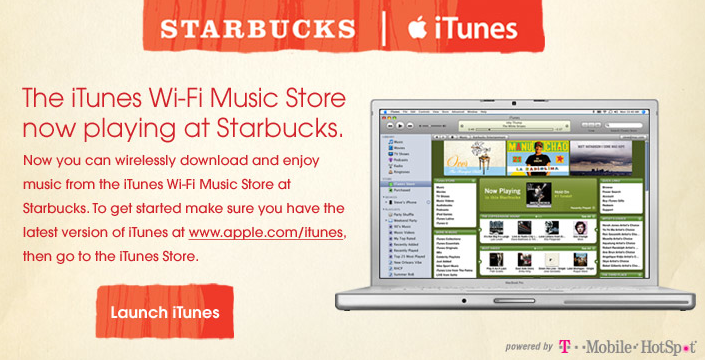
As promised Apple and Starbucks started their rollout of the Starbucks WiFi Music Store in select cities. Gear Live is lucky enough to be in Seattle, the first city to get the special version of the iTunes Music Store in our Starbucks. The service allows laptops, iPhones, and the iPod Touch users to connect for free to the iTunes store while sipping lattes without having to pay for for a T-Mobile Hotspot account. Click through for our full impressions on Apple’s new partnership with the coffee mega-store Starbucks.

Upon flipping open a laptop and firing up iTunes while in a Starbucks you are automatically connected to the Starbucks WiFi Music Store. The green-themed Starbucks store allows full access to the entire iTunes store, with extra Starbucks branded content. For information about the generic iTunes WiFi Music Store check out our in-depth review. New features in the Starbucks version include a section dedicated to music sold in Starbucks retail locations, and a slick view of what track is playing now at the Starbucks you are currently sipping coffee in.

The now playing view looks similar to a typical album view on the iTunes store, but shows instead the 10 most recently played tracks for the store you are in. Buying a track is a single click away - it makes it easy to take the songs you like out of the store with you.
Didn’t bring your laptop to the Starbucks? No problem - the iPhone and the iPod Touch work great with the Starbucks WiFi music store as well. Just like with the laptop variant the WiFi store has full access to the 6 million track iTunes library as well as the Starbucks special content.

When tapping the WiFi music store icon the store comes up as it usually would, but with an extra icon - the Starbucks logo - in the lower-left side of the user interface. Clicking this icon shows content featured at Starbucks retail locations as well as the view for what’s played recently. Again a single click (and your password if you have restarted your iPhone since you last purchased songs) starts the download. The fast T-Mobile Hotspots WiFi access speeds downloads to you quickly. In a couple of tests most tracks took 15-30 seconds to download to our library, ready for listening and syncing back to iTunes.

This proof of concept deployment at Starbucks has a promising future. As of October 1st all the Starbucks in Seattle feature the service, with New York lighting up their side of things tomorrow. Starbucks and Apple have promised to roll out the service nationwide within the year. While iTunes prepares to battle AmazonMP3 this kind of slick user experience might help keep the ball in Apple’s court.
Hopefully this kind of mini-store partnership won’t be limited to Starbucks and we will see many more partnerships in the near future. Having the feature available at concerts could be a huge win for Apple, music venues, and artists alike. Imagine seeing your favorite band perform a concert, and whipping out an iPhone to buy their albums or even songs from the live performance before heading home - the era of location-based e-commerce is close at hand.
--Sparky
Advertisement
Advertisement
Advertisement
© Gear Live Inc. 2007 – User-posted content, unless source is quoted, is licensed under a Creative Commons Public Domain License. Gear Live graphics, logos, designs, page headers, button icons, videos, articles, blogs, forums, scripts and other service names are the trademarks of Gear Live Inc.
Gear Live Presents: TV Envy
Gear Live Presents: Venturus
- Blog Business Summit: 10 Ways To A Killer Blog
- Blog Business Summit: Jason Calacanis Keynote - From Weblogs, Inc. to Netscape
- Blog Business Summit: What’s Next In Online Communication?
- Blog Business Summit: Setting Up TypePad
- Live-Blogging Blog Business Summit: Dave Taylor Keynote, The Future of Findability
Digg This

Comments
did you have to manually join their ‘tmobile’ hotspot? or does firing up the itunes music store automatically search for the ‘tmobile’ ESSID? I ask for a <a href="http://ehed.blogspot.com/2007/10/starbucks-itunes-part-i.html">good reason..</a>
link to this comment
Emil - good question! Sadly you do need to associate your laptop or iPhone to the TMOBILE SSID, so you would have the problem listed in your blog entry. I found it’s easy enough to connect to the access point, then turn of WiFi after I’m done downloading the track to force my iPhone to use EDGE for other data connections.
You are right - not a perfect solution, but a lot closer than the Zune gets you.
link to this comment
Great review.
A question: What is the little clock icon in your iPhone’s menu bar?
link to this comment
That’s appears when you set up a daily alarm clock.
link to this comment
Jason, the clock icon just symbolises that you have an alarm set.
does starbucks actually play decent music that is worth buying???
link to this comment
This is where the ability to see a list of your “preferred” networks would be helpful. The only way to remove a network from the list to be auto-joined is to join it, then specify to remove it. I just left Starbucks after exploring the store, and forgot to un-join the network.. now I have to remember to the next time I am near a Starbucks.
link to this comment
hey. wow, i really love the concept. as to starbucks’ music taste, well i do like the kind of music. mostly poppy, alternative—i think sometimes it is quite specific, so it is “off the beaten track”. Apple has pretty much the same taste, hence “feist” in their latest ipod nano spot.
I love the concept, and I wish i could afford an iPhone (and the plan
)—Austria hasn’t got the iPhone anyway (iPod touch, no thanks)…
Anyway, I hope they offer the service globally, since I will be a good customer at Vienna’s Starbucks with my macbook
wooho!
PS: love your blog!
link to this comment
Actually one of my friends first read this article and asked me to visit this page. This article has very useful information, it will be helpful for many. It’s really amazing to read this description. Thank you so much for your help and for your efforts.
Thanks,
Alex
http://www.NobleHelp.org
link to this comment