

Find Our Latest Video Reviews on YouTube!
If you want to stay on top of all of our video reviews of the latest tech, be sure to check out and subscribe to the Gear Live YouTube channel, hosted by Andru Edwards! It’s free!
Monday August 30, 2010 11:44 am
Amazon Kindle 3 review


With the release of the iPad, many started writing off dedicated eBook readers like the Kindle and the nook, saying there was no place for devices that were dedicated to doing just one task when there are more powerful devices that can do the task just as well, while also meeting a myriad of other needs. Sure, in theory, that sounds about right; but you have have to take things like price into account. With the third generation Kindle, Amazon decided they’d rethink the price structure for the Kindle eBook reader, while also revamping the design a bit. Rather than going full color like many were hoping for, Amazon instead made the decision to try and make the best eBook reader on the market, and to sell it at an extremely competitive price. They announced the third gen Kindle a month ago, and it has finally started arriving on the doorsteps of eager buyer. So, how’d they do? Read on for our full review.
Hardware
If you’re familiar with the Kindle 2 at all, then you know what to expect from the Kindle 3. It’s pretty much the same device (with a few tweaks, of course) but smaller. In fact, it’s 21% smaller, and that’s one of the three major draws of the new model. The screen size remains the same, that’s 6-inches of E-Ink goodness, however the screen is also much improved with a much better contrast ratio and faster refresh rate. Now, don’t go thinking this will solve our main E-Ink complaint—the screen does refresh faster than the Kindle 2, but seriously, it’s still slow. Luckily, when compared to the speed of manually turning a page on a real book, it’s a wash in our minds.
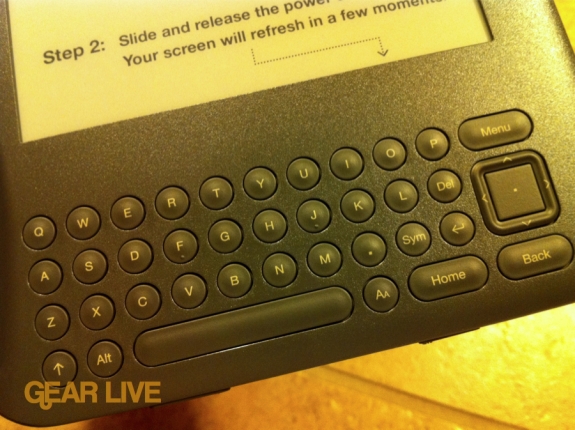
Since the device is smaller, it’s also lighter - 15% lighter than the previous model. It doesn’t sound like much, but you can really feel the difference. With the size and weight changes in the 2010 Kindle, it becomes a device that is easily portable without being an annoyance. The back is rubberized, which feels great in the hand compared to the metallic back that it used to rock. One change that we thing will take soem getting used to for seasoned Kindle veterans (but won’t be an issue at all with new owners, which we think will be plenty,) is that the buttons have been resized a bit to compensate for the decrease in size. It’s honestly not that big a deal, you just need to train yourself to get reacquainted with where the controls are. You also lose out on the physical number button on the keyboard, as Amazon has eliminated that row in favor of conserving space. Numbers are now found in the symbols area.
One area of trouble we found was that you needed to be very deliberate and precise when using the joystick area. If you have thumbs larger than a toddler, you’ll end up hitting the surrounding buttons when navigating, which leads to nothing but frustration.
Other less obvious changes with the new model include a storage bump, as the Kindle now sports 4GB of internal memory, up from 2GB on the previous model. Amazon says that this means you can carry around 3,500 books on one Kindle device. You’ll obviously need some juice to read all that content, and thankfully Amazon has doubled the battery life of the device as well. You’ll now get a full month of power (with wireless turned off) as opposed to two weeks like before.
Using the Kindle
Again, if you’ve used a Kindle, you know what to expect here. Even if you haven’t, it should be fairly obvious. The 6-inch E-Ink display is great to look at, and the improved contrast makes text nice, rich, and sharp. If you’ve got the Wi-Fi-only model, you’ll need to load up on books at home or at a hotspot. Seriously, I don’t see this being concern for anyone, as Wi-Fi is pretty easy to find these days. The Kindle does offer a 3G model for $50 more, and I guess if you like using the
experimental web browser on the E-Ink display then you might want ubiquitous access to the Internet, but seriously, for the rest of us, the $139 model is ideal and hits the spot with a comfortable price point.
As for glaring omissions, we were happy to see that the Kindle now natively supports PDF documents right out of the gate without need for conversion, but there is no ePub support to speak of. Why?
Gallery:






Final Thoughts
Just over two months ago, the previous generation Kindle (the Kindle 2) sold for $259. On June 21st, Amazon dropped that down to $189 in response to Barnes & Noble doing the same with the 3G version of the nook. A month later, Amazon announced the third-generation Kindle and priced it aggressively. The Wi-Fi model is just $139, and the Wi-Fi + 3G model is now $189—that’s less than half of the cost of the original Kindle, which went on sale for $399 in November of 2007, and with the latest model you are getting a far more capable device.
At the $139 price, we think Amazon has finally reached a price where the average consumer and lover of books would be able to buy a Kindle without having to sit down and think about their monthly budget or waiting for Christmas or a birthday to roll around. The device is super-portable, feels great in the hand, and is easy on the eyes. What you are looking at with the latest Kindle is the best dedicated eBook reader device to date, period. Sorry Barnes & Noble, but Amazon has set the benchmark here. That said, if you already have an iPad or are eyeing something like the Samsung Galaxy Tab, we wouldn’t recommend also picking up the Kindle. Those devices have great eBook reader clients that perform admirably, heck, you can even download a Kindle app to the iPad. The only reason you should consider a Kindle if you’re an owner of a tablet or slate device is if they are too heavy, unwieldy, or hard on your eyes. Otherwise, just stick with what you’ve got.
You can pick up the third-generation Kindle from Amazon, available in a Wi-Fi only model for $139 as well as a Wi-Fi + 3G model for $189. Both are available now.








