

Find Our Latest Video Reviews on YouTube!
If you want to stay on top of all of our video reviews of the latest tech, be sure to check out and subscribe to the Gear Live YouTube channel, hosted by Andru Edwards! It’s free!
Microsoft OneNote arrives on the iPad

Posted by Andru Edwards Categories: Productivity, iPad Apps, New Apps, Free Apps,
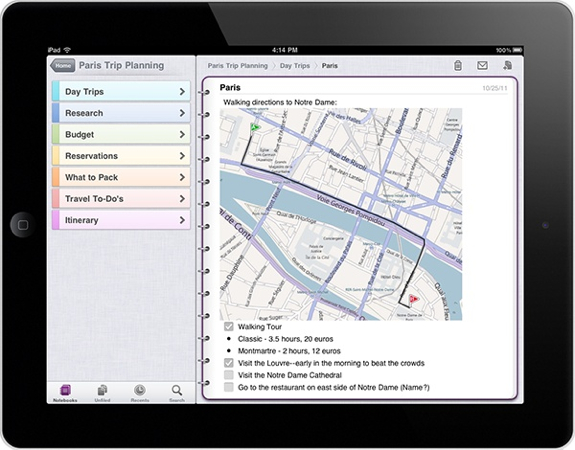
Microsoft on Monday released a version of its OneNote for the iPad.
"Since the launch of OneNote for iPhone nearly a year ago, a recurring request from our customers has been for a version that can be used more easily on the iPad's larger screen," Microsoft said in a blog post. "We're happy to announce that today's new release of OneNote for iOS devices includes a version that's tailored for the iPad."
OneNote is Microsoft's note-taking and sharing software. Like other popular note-taking apps, such as Evernote, Awesome Note, and Google Notebook, OneNote Mobile gives users the ability to jot down, amend, and organize their notes on the go.
OneNote notebooks are stored via Microsoft SkyDrive. "Your own cloud-based SkyDrive account lets you easily sync all of your notebooks across all of your devices, so they're always up-to-date and accessible from virtually anywhere—on your iPhone, your iPad, your Web browser, or your computer," Microsoft said today.
Click to continue reading Microsoft OneNote arrives on the iPad
Advertisement
Rate everything with Oink, the latest from Kevin Rose
Posted by Andru Edwards Categories: Social Networking, Travel, New Apps, Free Apps,
Oink, the service started by Kevin Rose's new incubator, Milk, is now live. You can download the companion app, Oink Builder, on the App Store now for free. Oink allows you to rank and rate the things around you. Unlike other services, like Yelp, that have you rate places, Oink is about rating the things inside the places, rather than the places themselves. Hit the video above to see what we mean.
Apple releases Cards iOS app
Posted by Andru Edwards Categories: Lifestyle, New Apps, Apple, Free Apps,

Apple just released Cards, its new app that allows users to create gorgeous greeting cards right from an iPhone, iPod touch, or iPad:
The new Cards app from Apple lets you create and mail beautifully crafted cards personalized with your own text and photos — right from your iPhone or iPod touch. Take a quick snapshot and with a few taps and swipes, an elegant letterpress card is on its way to any address in the world. Each card is just $2.99 when sent within the U.S. and $4.99 when sent to or from anywhere else. And that includes postage.
You can get it now, free, on the App Store.
Latest Gear Live Videos
Turntable.fm now available on the iPhone
Posted by Andru Edwards Categories: Music, Social Networking, New Apps, Free Apps,
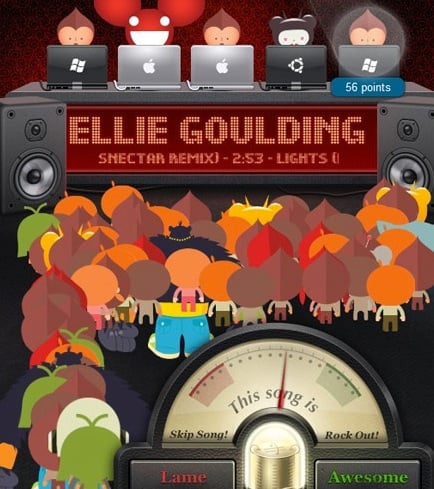
Turntable.fm is having a good week. The music streaming site on Tuesday released its iPhone app and confirmed that it has raised $7 million in funding.
It had been rumored that an iOS version of the popular service was headed to the App Store this week, and as expected, the app mimics the Web-based experience of Turntable, allowing you to do the same things on your mobile phone that you could do online. For example you can access all of the same rooms where five DJs take turns bumping the songs of their choice as well as rate those tracks as “lame” or “awesome.”
From the app, you can also make new rooms and start DJing in existing ones. The app has been well received for the most part, but VentureBeat pointed out that it moves a little bit slower than the desktop version. However, it noted that it works well over 3G, which rumored to be an issue for the app during its testing phase.
Click to continue reading Turntable.fm now available on the iPhone
Facebook Messenger joins the group messaging fray with iOS and Android apps
Posted by Andru Edwards Categories: Social Networking, New Apps, Free Apps,

Facebook has just released a new Android and iOS app called Facebook Messenger, and it's exactly what it sounds like. Basically, Facebook has taken its messaging system, used their Beluga team to simplify it a bit, and pushed it out as an independent app. You can message your contacts without using up SMS (similar to things like BBM, Google+ Huddle, iMessage, GroupMe, Fast Society, and plenty of others,) and you can also create group messages on the fly as well. People will see these messages show up in the Messenger app, their Facebook inbox, or by SMS if they don't have the app installed. You can also share your GPS location and attach images to the message conversations as well. If you've used Beluga or Facebook, then you know how to use this.
You can grab it now from the App Store and Android Market.
Download the Vonage Time to Call app and get a free international call
Posted by Andru Edwards Categories: Social Networking, Utilities, New Apps, Free Apps,
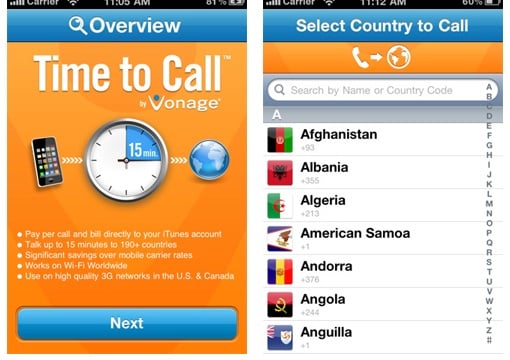
If you've been putting off calling your aunt in the Dominican Republic or your Slovenian cousins because of the cost of calling from your mobile phone, a promotion from Vonage should pique your interest. The VoIP provider is giving away one free international phone call, up to 15 minutes, to anyone who downloads its new iPhone app, Time to Call. The app is also free.
What's especially appealing about the offer is you don't have to be a paying customer of Vonage (from $11.99 per month) to use the app or get the one free trial call. The free call expires one year after you download the app. Be sure to check that the country you're calling is on the list of 100 that are included in the deal (check below).
After your one free call, all calls are billed in 15-minute increments. Prices for the 15-minute blocks of international talk time range from 99 cents to $9.99, depending on which country you call, although calling most countries is less than $1.99. And typical of Vonage's slightly experimental nature, the Time to Call app doesn't charge you through pre-paid credits or an in-system account, the way other services such as Skype do. Instead, Vonage's app bills you directly through iTunes.
Click to continue reading Download the Vonage Time to Call app and get a free international call
Google+ app now available for iPhone
Posted by Andru Edwards Categories: Social Networking, New Apps, Google, Free Apps,

Apple has finally approved the Google+ iOS app, and it's now available for your downloading pleasure from the App Store. Now you can get your Circle on using your iPhone. Nice.
Read More  | Google+
Tweetbot review: New king of the Twitter mountain
Posted by Andru Edwards Categories: Social Networking, New Apps, Reviews, Videos, Free Apps,
We've spent the last half-day or so completely enamored with the latest release from the fine peeps over at Tapbot, Tweetbot. Typically, a new Twitter client isn't anything we would get excited about, as there are probably hundreds out there, and the free Twitter for iPhone does the job well enough anyway. However, we've been impressed with every other app that Tapbot has put out. We're talking about things like Calcbot, Weightbot, Pastebot, and the awesome Convertbot. So when they released Tweetbot after working on it for over a year, we had to check it out.
It's difficult to describe everything that Tweetbot does, but if I had to sum it up with one statement, I'd say "It just makes sense." Oh, and also, it's a joy to use. While the official Twitter app has been suffering from feature bloat (going so far as to try and force a trend bar on us,) Tweetbot is a refreshing throwback to what made Tweetie great in the first place. They've even managed to make lists actually useable and convenient, rather than a clunky add-on, by giving each its own timeline.
We highly recommend Tweetbot -- get a look at the video above that walks through its interface. Pretty slick, right? You can get it now for $1.99 in the App Store.
Read More | Tweetbot
Bing launches magazine-like iPad app
Posted by Andru Edwards Categories: Reference, iPad Apps, New Apps, Free Apps,
Microsoft knows the importance of the mobile audience, even when it means taking advantage of a competitor's mobile platform—in this case, Apple's. Since late 2009, iPhone users have been able to download a Bing app that offers voice search, local shopping, scrolling image search, maps and directions. Now iPad owners get a Bing app that adds a new trends feature, which lets them explore the trending search topics of the week.
The new app, which is available in the iTunes App Store starting today, sports a homepage featuring the trademark (and often stunning) Bing photo of the day, along with tiles showing local weather, news, maps, movies, and trends. The interface makes a lot of use of the swipe touch gesture, especially in image search. A dropdown menu offers all these choices plus Images, Videos, Shopping and History—that is, your search history, not the school topic.
Trends shows tiled images for the week's major current events. It can almost be thought of as a lightweight replacement for an app like The Daily or Flipboard. Touching one of its images opens a search page showing news and images about the topic, like MLB Opening Day. Some topics get a slicker treatment rather than just a Bing search results page: touching through an entry about "30 Rock's" Tina Fey labled "Ms. Bossypants" displayed a grid of stories that somewhat resembled the New York Times' Web site layout. After reading a result page, you can swipe left-to-right to get back to the trends page.
Click to continue reading Bing launches magazine-like iPad app
Vimeo for iPhone brings free video editing, uploading, sharing
Posted by Andru Edwards Categories: Entertainment, New Apps, Video Apps, Videos, Free Apps,
Video site Vimeo on Tuesday unveiled its official iPhone app, which will allow users to create and edit videos, watch existing ones, share with friends, and more.
"We've packed all the best parts of Vimeo into one app! Now you can upload, edit, manage and watch your videos right from your iPhone," Vimeo said. "Need some inspiration? Watch great videos based on your personal preferences or our curated channels."
The app's video editor allows users to: capture video with focus control and grid alignment; combine, edit, and trim videos; add transitions, titles, and effects; add music and recordings; control volume levels; and save videos to camera roll or upload directly to Vimeo.
Footage can be uploaded to Vimeo in standard or high-definition, and the app allows users to pause uploads, replace videos, and edit details.
Click to continue reading Vimeo for iPhone brings free video editing, uploading, sharing









Advertisement
© Gear Live Inc. {year} – User-posted content, unless source is quoted, is licensed under a Creative Commons Public Domain License. Gear Live graphics, logos, designs, page headers, button icons, videos, articles, blogs, forums, scripts and other service names are the trademarks of Gear Live Inc.