On Unboxing: iPod touch 2G unboxing gallery

Latest Video: Unboxing Live 041: Metal Gear Solid 4 Limited Edition PS3 bundle

We open up the elusive gunmetal-colored Metal Gear Solid 4 Playstation 3 Limited Edition bundle in this episode.
Play Video
Close Player   Episode Permalink Comment on this Video Subscribe to this show via iTunes, Miro, or RSS Download for: iPod High Res
Thursday March 24, 2005 10:23 pm

Transparent Desktop Screens

Posted by Oscar M. Cantu
Categories: Misc. Tech, PC / Laptop

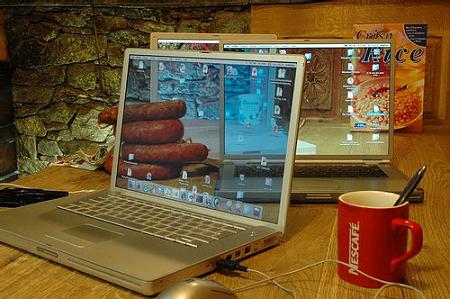
Transparent Screens

It’s always great to see what some free time, creativity, a notebook, and a digital camera can do. The results are illusions of transparent desktops on various notebooks. At first you might say, “Ah, that’s easy” (much like I said at first) – boy was I wrong. These are harder to accomplish then it seems. You must first get the right angle with your camera, take the shot, upload it, set it as your desktop and adjust the screen to match. Seems pretty simple, right? Try it out for yourself and let us know how the result came out.

Read More | Transparent Screens via flickr



  • Related Tags:

Advertisement

Comments:

Wow thats really neat. If only I had a laptop to try that on.

wicked cool. mmmmm...sausages!

who still drinks nescafe?

those are some juicy brats…

Seriously though I have tried this, and it’s extremely difficult.

FliPdice FliPdice 3/27/05 3:13 pm

Woah looks awesome..I don’t have a laptop though.  HAD one, but it died half a year ago.  lol I drink Nescafe.  It tastes really good. smile

i drink nescafe.. never gets old

Greatest Dog Greatest Dog 3/29/05 7:31 am

Actually you might be able to do it using a blue screen type technique.

Cracker Cracker 3/29/05 9:30 am

It is a nice effect, but it lasts only until you move any related object. Kinda removes the point of a laptop for many… So it is a really cool effect, it is really limited.

Andre Da Costa Andre Da Costa 3/29/05 11:00 am

Can I have one of your PowerBooks?

Snowdog Snowdog 3/30/05 4:47 pm

That’s awesome!  But there is an easier way—just take two pictures: one with and one without the pc’s.  All you need is photoshop after that.  wink

Advertisement

Post a Comment:


Smileys

Remember my personal information

Notify me of follow-up comments?


FriendFeed Activity:


On FriendFeed, this post was liked by 0 people and commented 0 times.

• View this post on FriendFeed

No FriendFeed Comments are yet added

Advertisement