

Find Our Latest Video Reviews on YouTube!
If you want to stay on top of all of our video reviews of the latest tech, be sure to check out and subscribe to the Gear Live YouTube channel, hosted by Andru Edwards! It’s free!
Tuesday August 9, 2005 3:49 pm
Logitech Harmony 880 Advanced Universal Remote Review
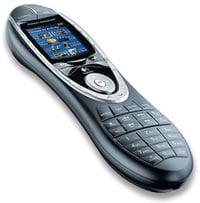 If you’re anything like me, your living room is probably cluttered with remotes. OEM remotes, “universal” remotes, and remotes for the air conditioner you left behind when you moved. Men love ‘em; there’s nothing like the feel of a plastic remote (or five) in your hand to make you feel like you’re in control. Women, on the other hand, see the remote as a bone of contention and the more of them there are, the more contentious the bone.
We asked our friends at Logitech if they could solve the problem, and they sent us their top-of-the-line programmable remote: The Harmony 880. Logitech has designed the remote to be used in conjunction with HDTV and PVR devices, and makes the process of doing things like changing the aspect ratio of your HDTV from 16x9 when on a DVD source, to 4x3 Expanded when on a TiVo. Most importantly, they tout the remote as being easy to set up and easy to use. We’ll just see about that.
The Harmony 880 makes a great first impression. The box is very eye catching and the remote has a fairly high-tech design: a charcoal body with brushed chrome accents and blue highlights. The color screen is bright (brightness is automatically adjusted through an ambient light sensor) and appears to have enough pixels to include a fair amount of detail. In what has to be the freakiest feature I’ve ever seen in a piece of technology, the remote senses when you pick it up and turns on the color screen, all through use of a tilt sensor.
The remote comes with a rechargeable Lithium-Ion battery, which is recharged by setting it on it’s including charging cradle. The cradle lies flat, and has a glowing blue circle in the middle which helps with finding the cradle in the dark. A thoughtful touch is that the cradle is low-profile enough where you can still use the remote while it lies in the cradle if you’re low on juice (or so Logitech claims … I never tried making any use of this “feature”). The best part of having the charging cradle is that you always know where to find it … you’re unconsciously trained to put the remote back in the same place. In practice, it can be tricky to just “toss” the remote in the cradle and be assured that it’s charging. You’ll need to probably jiggle the remote a couple of times until the “slideshow” on the color screen kicks in, the sign that the remote is successfully charging.
The included USB cable plugs into a standard USB port on your computer, and into a Type A port in the “nose” of the remote. It’s a bit awkward, but since you’ll only be plugging it into your computer when you are updating the configuration (and thus, not actively using it), it’s not a terribly big deal. Finally, a fold-out quick-start guide and CD with the Harmony software are included.
Once you have the Harmony hooked up to the computer and the software installed, the software will take you to the website where you will do all of the configuring of the remote. I ran into my first snag here, as the web setup didn’t like that I was using Firefox as my default browser. A bit inconvenient, but I can deal with it, I just went to the same website with Internet Explorer. Then I hit another speedbump … I had to adjust IE’s security settings to allow some of the ActiveX widgets to install. Even setting it to “Medium” security as was suggested by the website wasn’t enough, I had to manually change the settings to prompt me on just about everything.
That out of the way, the rest of the setup went very well. It asked me which devices I had (TV, DVD, Receiver, etc.), and what their brands were. No sweat. Then it asked me what the model numbers were. Oops. My TV is about eight years old, my DVR has a strange model number, and what do I call my PlayStation 2? After a little internet sleuthing and scrounging in closets, I found the model numbers I needed and guessed on the rest. The Harmony software is smart enough to know that there are several different models of PlayStation 2, and that the Xbox is a DVD player. In the rare case where your device isn’t in the online database, or is very new, there is another IR transceiver in the tail end of the remote, which you can use to program in a similar style to other universal remotes.
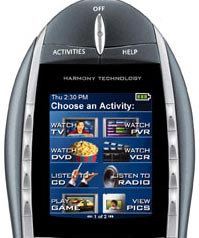
After the devices were set up, it asked me to configure my “Activities”. Here’s where I balked a bit. Logitech says that you won’t have to deal with “the hassles of elaborate macro-programming”. I’m a tweaker by heart, and I like to have things set up as manually as possible, so I was concerned that my first try would be wasted time. I decided to give my Type-A personality a rest and let the remote configure itself for things like “Watch TiVo” and “Play Game”. Once it was finished, it prompted me to download the settings, and then try the remote and make sure that things were working properly. Surprisingly enough, all of the “Activities” appeared to work correctly right out of the gate. Of course, it can’t turn on my first-generation PlayStation 2 or my Xbox, since both use IR plug-ins, but the Remote knew to tune the TV and Receiver to the correct input, which even the “universal remote” that came with my Sony Receiver couldn’t accomplish. As it turns out, the “Activities” are really nothing more than those same elaborate macros (as is evidenced by the fact that my TV tries to change the input even when it’s on the correct input), but pre-programmed based on your device.

If you have a lot of devices, and you’re concerned that switching between them on a regular basis will leave the remote forgetting if the TV is supposed to be on or not, you have nothing to worry about. The Harmony has employed what is called “Smart State Technology,” which basically remembers what power/input state each device is in. It’s very good, and as long as you avoid turning anything on or off by hand (or misfire the remote), it works as expected.
When I got away from the basic Activities and went to check on the devices individually, I discovered why the Activities are such a selling feature … the menus are nothing but pages of the buttons that used to be on your old remotes. There doesn’t appear to be a great deal of logic employed, but it’s possible that there is a method to the madness. Having to go back to the website to individually program any buttons that were missed (like the “Clear” button for the TiVo remote) is inconvenient, but the fact that you have the option at all is nice, and you’re definitely going to want to do this as much as you can, since the Device menus are jumbled and a pain to deal with.
 For the most part, Logitech (Harmony) got this one right. There are a lot of “hard buttons” for those of us that use our remotes by feel, and the more dynamic aspects of the programmable buttons with the color screen. Personally, I’m not sure that programming the remote via the web is a better option than having an actual program on the computer to do the same job, but it gets it done nonetheless. I’m constantly annoyed by the cradle not always lining up with the remote for charging, which limits its utility, but considering the 880 can go about a week on a single charge, it’s not that big a deal. Finally, the remote has a great feel, and the thoughtful touches like the tilt sensor and light up buttons make it one of the few truly “universal” remotes worth spending a couple Benjamins on.








