Latest Video: Bleeding Edge TV 311: Hauppauge HD PVR 1212 reviewx
Friday January 27, 2006 2:02 pm
iMac Core Duo: Easiest RAM Installation Ever

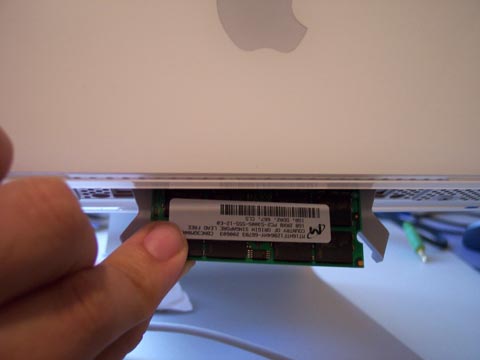
Yesterday, we gave your our impressions of the new iMac Core Duo. In the article, we mentioned that we desperately needed to upgrade from the stock 512 MB RAM the system ships with, up to 2 GB because of the kind of work we do. After thinking about it, we realized that the RAM installation for the new iMac is the easiest we have ever done. Apple has truly made it easy to upgrade the latest iMac - and it is exponentially easier than the last one, where installing RAM frustrated us to no end.
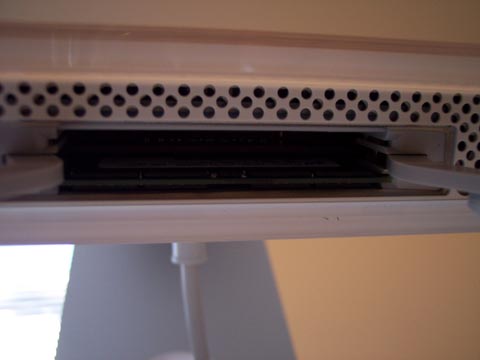
As seen in the image above, the RAM slot is at the bottom of the computer. All you need to do is unscrew a small panel, insert the RAM, and screw the panel back on. It really couldn’t be simpler. We removed the 512 MB stick, and installed two 1 GB chips in under a minute. We applaud you, Apple. We have a better image of the RAM slot after the jump.

Advertisement
Comments:
Wireless World: Enormous innovation, but big challenges
A record number of mobile phones were shipped last year, and analysts and investors are now saying that the promises made 10 years ago about the potential for the wireless economy are truly being realized. Still, some of the foremost investors and analysts tell United Press International’s Wireless World that they are nervous that the United States may not maintain its competitive edge in the global information economy unless certain changes are made—by federal policymakers and business leaders—soon.
“There is enormous innovation in our economy—no doubt,” said James Melcher, founder of the New York City-based hedge fund, Balestra Capital Management, in an interview with Wireless World. “It’s incredible. But there are problems. Why are countries with only 40 percent of the world’s population (e.g., China) graduating ten times as many engineers and scientists as we are? Why are our schools pumping out so many lawyers? There is no value-added in legal work.” By Gene Koprowski
wow - so it’s now as easy to install ram in a mac notebook as it has been on most PC notebooks for the last 3-5 years.
Looks like the king of closed box computing is catching up to the rest of the industry where people are assumed intelligent enough to perform an upgrade
Try Q, a free x86 machine emulator for the Mac which runs on the duo. Problems have been reported with XP SP2 in this configuration (but it’s a Micro$loth product, so what can you expect). Why pick one or the other when you can run both together.
Let me get this straight. The old iMac G5 has regular desktop RAM slots, but the newer Intel iMac only takes laptop RAM? How is this an improvement?
Desktop RAM is cheaper, faster, and more varied. What are the advantages to laptop RAM? All I can see is that it’s smaller. I should have stuck with the G5.
any suggestions on where to pick up this ram? a link to a page on newegg would be greatly appreciated. too novice to sort thru the muck.
thanks. so, again, im novice, but: the imac has 2 slots for ram. at apple, a 2gb model means you add 158$ (im doing educational discount too). on crucial, a 2gb (two slots, since theyre just bundling 2 1gb chips) is 318? this doesnt make sense to me. ideally, id soup it to 3gb in the most cost efficient way, but it seems like the only way to do that is 2gb (1000$+) and 1gb (about 160$). thats nuts!
Wizzel, the iMac Core Duo uses laptop memory because it needs less voltage (1.8V vs 2.2V for desktop memory), which means less heat, and less noise (the fans don’t have to work as hard to cool the system).
The performance is roughly the same between desktop and laptop memory as well.
Go to 18004MEMORY.com for a 1Gig module for $55 including shipping! Lifetime guarantee, so don’t worry. For price and performance, these folks are decent. I’ve ordered from them MANY times with good luck. Here’s the HUGE link:
http://www.18004memory.com/focus.asp?sku=502591&session=xdealram&guid=C656C6DF98AE4405A076450BE803F8D0
As for the memory being easy to install, it is just as easy to SCREW IT UP, because the little levers don’t always work to secure the RAM and the RAM can fit in there without the levers lifting, which causes a BIG problem because the RAM is stuck and there’s no way to close the RAM cover door. Be careful, gentle, and you shouldn’t have a problem. I have had to service no fewer than 5 iMac intels because of RAM being stuck and one of the iMacs needed a logic board replacement as a result!
Sincerely,
Jeffrey Wrobel, President
Lazarus Communications
Don’t use the link provided by Jeff. I did, and when I finished my order the last person to use that link’s order was added to mine AFTER checkout! SURPRISE!
I called them and it is a bug they have with their shopping cart software. No problem they said, and I would not have been billed or shipped that.
So just go to www.18004memory.com. I do appreciate Jeffs link however. I did buy from them.
Just bought 4GB of RAM for 50 Euro (about $40)...funny how much cheaper things have gotten in a year..
Going to install it now…*fingers crossed*
Hi, i brought my imac in jan this year, i could only afford to buy the base model with 1GB ram so like many of you, found this to be too slow. So i just brought 4GB of ram from Crucial, who i cannot fault for their quick service and easy download diagnosis so you buy the right sort for your mac. that cost 58 quid, a fraction of what apple wanted.
however, when i went to unscrew the hatch at the bottom with a screw driver, the screw unscrewed as far as possible but the hatch did not pop off, it seems like it is stuck at the ends or something. any ideas how i can get in?
Your problem with your RAM “door” is that it is simply a plate with two “captive” screws on it. That means the screws will not screw OUT, but will back out of the threads and stay attached to the plate so you won’t lose them. No big deal. Just loosen them carefully (they have a tendency to strip easily) and when they are thoroughly loose, pull on the screws and that will pull out the plate. Then the levers can be used to pop the existing RAM modules out and you are all set to upgrade!
Good luck,
Jeff
I bought an iMac Intel Duo Core in January 2006 and upgraded the 512 to 1 G. Now I want to add an extra 1G Ram which I just ordered from Crutial.com. I should be getting it in a few days. How would I ground myself on this iMac??? Is the iMac stand okay to use while installing the 1G RAM???
Thanks in advance for any replies.
Comments: Page 1 of 1 pages
Advertisement
Advertisement
© Gear Live Inc. {year} – User-posted content, unless source is quoted, is licensed under a Creative Commons Public Domain License. Gear Live graphics, logos, designs, page headers, button icons, videos, articles, blogs, forums, scripts and other service names are the trademarks of Gear Live Inc.

Digg This


Forum Discussion
View This Post
View Forum Thread
Hey Andru,
What kind of RAM did you buy for your new iMac Core Duo? Apple wants $600 for 2G, which is way too much.
Also, do you know if the iMac requires Heat Spreaders with the RAM.
Many thanks,
Rod
Reply to this: post
View This Post
View Forum Thread
Rod -
I just went to Crucial.com and bought from there. DDR 667 PC 5300 SODIMMs. I dont think they make SODIMMs with heat spreaders.
The $600 that Apple asks for is absurd. Just buy elsewhere and install yourself. You will save over $300.
Reply to this: post
View This Post
View Forum Thread
Do you think it would be best to buy the laptop memory from someone else too?
Apple is charging a crapload for memory in it’s new macbooks.
I have 2 question though, Should I get 1 gig preinstalled and bite the bullet and then buy another 1 gig stick later,
or just deal with 512 mb card that automatically comes with the macbook and buy two 1 gig sticks later..
hmmmm….
Reply to this: post
View This Post
View Forum Thread
I would never, ever buy RAM from Apple. That includes upgrades in a pre-configured machine.
Reply to this: post