

Find Our Latest Video Reviews on YouTube!
If you want to stay on top of all of our video reviews of the latest tech, be sure to check out and subscribe to the Gear Live YouTube channel, hosted by Andru Edwards! It’s free!
Latest Gear Live Videos
Apple Pages hits 5.0, here’s a look at what’s new

Posted by Andru Edwards Categories: Apple, PC / Laptop, Software,
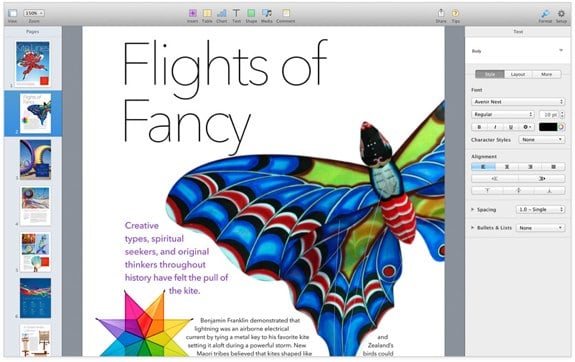
Apple has updated Pages to version 5.0 as part of a bunch of refreshed iWork and iLife updates in conjunction with its Apple iPad event today. Apple's word processor sees a host of new features integrated, including new writing tools, better performance, and a new design with a bunch of Apple-designed templates. Deep iCloud integration is here as well, allowing you to access yoru documents across all your OS X and iOS devices. Here's the full list of what's new in Pages:
- Stunning new user interface
- Over 60 Apple-designed templates
- Simplified toolbar gives you quick access to shapes, media, tables, charts, and sharing options
- New Format Panel automatically updates based on selection
- Enhanced change tracking, comments, and highlights; show and hide changes and comments on mouse-over
- Animate data with new interactive column, bar, scatter, and bubble charts
- Use gorgeous preset styles to make your text, tables, shapes, and images look beautiful
- Easy setup for headers, footers, and document body
- Use new 2D bubble charts
- Enhanced conditional highlighting makes it easy to automatically highlight cells based on numbers, text, dates, and durations
- Quickly and easily share a link to your work via Mail, Messages, Twitter, or Facebook
- Anyone with a shared document link will always have access to the latest version of the document and can edit it with you at iCloud.com
- Access and edit documents from iCloud.com using Pages for iCloud beta
- New unified file format across the Mac, iOS, and the web makes documents work seamlessly everywhere
- Turn on Coaching Tips for guided in-app help
- Pages is now available in Arabic and Hebrew
- Improved support for Chinese, Japanese, and Korean
You can download Pages now for free if you've purchased a Mac on or after October 1, 2013, otherwise you can grab it for $19.99.
Gallery: Apple Pages hits 5.0, here’s a look at what’s new






Advertisement
iMovie 10.0 now available, here’s a list of all the new features
Posted by Andru Edwards Categories: Apple, PC / Laptop, Software,
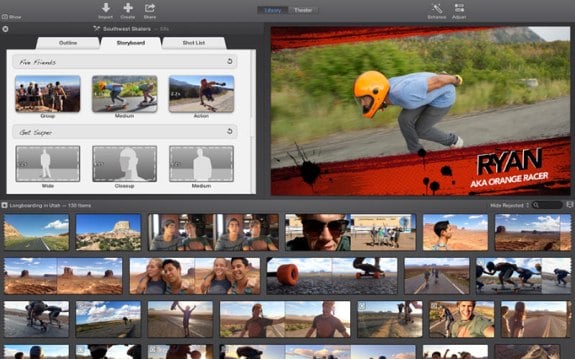
Up next for today's Apple software updates coming out of the Apple iPad event is iMovie. iMovie sees a redesign, and also bring in a bunch of iCloud functionality, allowing you iMovie content to be found and played back on your iOS devices, and Apple TV. Here's the full list of what's new:
- All-new, streamlined design
- Share clips, movies, and trailers to iMovie Theater and watch them anywhere
- Video browsing mode with quick clip sharing
- Adjustments Bar for easy access to video and audio controls
- 16 new title styles
- 14 new trailer templates from iMovie for iOS
- Eight new movie themes from iMovie for iOS
- Use photos in trailers
- Plus button for quickly adding clips to your movie
- Trim video and audio clips directly in the timeline
- Simplified drag and drop for picture-in-picture, side-by-side, green screen, and audio-only effects
- One-click Enhance for video and audio
- Adjust shadows, highlights, and color temperature
- Match the color of two clips
- Ken Burns Effect for panorama photos
- Improved video stabilization
- Enhanced green screen and blue screen effect
- Volume-aware audio ducking
- Speed change controls in the timeline
- Add just a portion of a song from iTunes to your movie
- Email video clips and projects
- Sharing support for Youku and Tudou
- Import, analyze, and share clips in the background
- Native support for AVCHD video
- 64-bit support
You can find the iMovie update in the Mac App Store for free if you're an existing user. If not, you can buy iMovie for $14.99.
Gallery: iMovie 10.0 now available, here’s a list of all the new features
Apple releases major iPhoto ‘11 update, here’s what’s new
Posted by Andru Edwards Categories: Apple, PC / Laptop, Software,
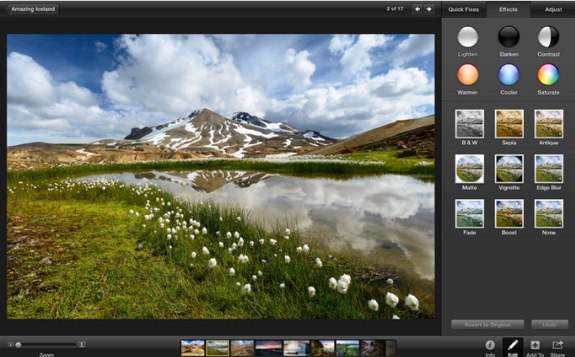
As announced during this morning's Apple iPad event, the company is also updating its entire suite of creative and productivity apps across OS X and iOS. First up, iPhoto, which is bumped to version 9.5. Below is a list of what's new:
- 64-bit support
- The Places feature now uses Apple maps to display photo locations
- Adds support for iCloud Photo Sharing, including the ability to post videos to shared photo streams and the ability to have multiple subscribers contribute to a shared stream
- Adds support for iOS 7 camera filters applied to photos imported from iOS devices
- Includes a new, streamlined interface for printing
- Replaces the Create menu with an updated Share menu providing access to all sharing options, including print products such as books, cards and calendars
- Fixes an issue that could cause iPhoto to quit unexpectedly when sharing an edited photo from a MacBook Pro with Retina display
- Addresses an issue that could cause iPhoto to show incorrect file type and size information for imported TIFF and PSD files
- Comment sheet now appears correctly when sharing multiple photos to a new or existing photo stream
- Fixes an issue that caused photos with specific color profiles to display incorrectly on iOS devices after being shared via iCloud
- Captions instead of version names are now synced between iPhoto and Facebook for newly-created albums
- Privacy settings can now be managed when sharing photos from iPhoto to a Facebook Timeline
- Videos up to three minutes long can now be shared to Flickr
- Addresses an issue that could cause photos synced to iPhoto from Flickr to appear rotated incorrectly
- Fixes an issue that could cause photos synced to iPhoto from Facebook or Flickr to be duplicated and reposted
- URLs in the photo comments field can now be clicked to open the corresponding links
- Improves reliability when working with custom locations in the Places feature
- Improves reliability when copying and pasting photos to a new event
- When a single photo is selected in an album, clicking the Trash button in the contextual menu now removes the photo from the album rather than from the library
- Includes stability and performance improvements
You can download the new iPhoto now. If you're an existing user, the update is free. If not, you can download it for $14.99.
Read More  | iPhoto '11
Gallery: Apple releases major iPhoto ‘11 update, here’s what’s new
Apple releases iOS 7.0.3 with iCloud Keychain, iMessage fix, Touch ID tweaks
Posted by Andru Edwards Categories: Apple, Smartphones, Handhelds, Software,
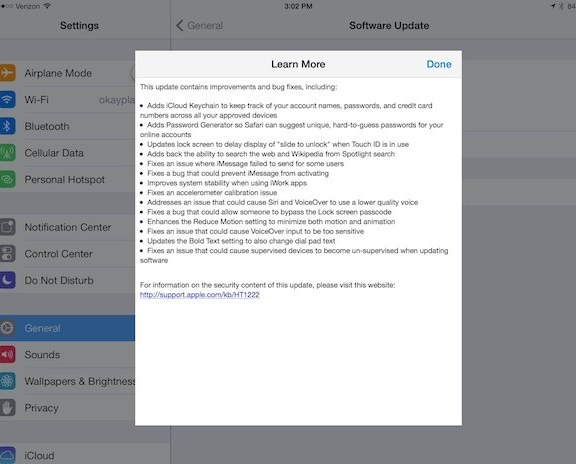
Alongside all the major news coming out of today's Apple iPad event, the company has also released an iOS update. iOS 7.0.3 bring a few new features to the platform, like iCloud Keychain, which works alongside the same feature in OS X Mavericks (which was also released today on the Mac App Store) to keep your account names, passwords, and credit cards synced across your devices, while protecting them with your Apple ID. Here is a rundown of all the changes in iOS 7.0.3:
- Adds iCloud Keychain to keep track of your on account names passwords and credit card numbers across all your devices
- Adds Password Generator so Safari can suggest unique hard to guess passwords for your online accounts
- Updates lock screen to delay display of "slide to unlock" went Touch ID is in use
- Adds back the ability to search the web and Wikipedia from Spotlight search
- Fixes an issue where iMessage failed to send for some users
- Fixes a bug that could prevent iMessage from activating
- Improves system stability when using iWork apps
- Fixes an accelerometer calibration issue
- Address is an issue that could cause Siri and VoiceOver to use a lower quality voice
- Fixes a bug that could allow someone to bypass the lock screen passcode
- Enhances the Reduce Motion setting to minimize both motion and animation
- Fix is an issue that could cause VoiceOver input to be too sensitive
- Updates the Bold Text setting to also change dial pad text
- Fix is an issue that could cause supervise devices to become unsupervised when updating software
You should be able to check the Software Update area on your iPhone, iPad, or iPod touch to grab the update now.
Gallery: Apple releases iOS 7.0.3 with iCloud Keychain, iMessage fix, Touch ID tweaks
OS X Mavericks now available, grab it from the App Store for free
Posted by Andru Edwards Categories: Apple, PC / Laptop, Software,

As we noted earlier, Apple OS X Mavericks is a free update to its desktop operating system, and is a big shift in the approach in pricing for OS X. The update is available now in the Mac App Store, weighing in at 5.29GB in size. Go ahead and download it, and then grab a snack because it'll take about 45-60 minutes to do its thing. Let us know how you like it!
Read More | OS X Mavericks
Gallery: OS X Mavericks now available, grab it from the App Store for free
OS X Mavericks will launch today, completely free
Posted by Andru Edwards Categories: Apple, PC / Laptop, Software,
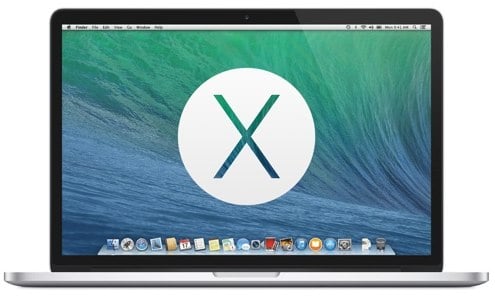
Update: You can download OS X Mavericks now!
At this morning's Apple iPad event, the company announced that its next major desktop operating system, OS X 10.9 Mavericks, will launch today. It will be available exclusively in the Mac App Store, and in a huge shift for the company, it will be completely free. Mavericks brings a few cool features and optimizations to OS X--things like Apple Maps, iBooks, greatly-improved multi-monitor support, native tabbed Finder, tagging support in Finder, iCloud Keychain, and much more.
Mavericks is compatible with a wide range of Macs:
- iMac (Mid-2007 or later)
- MacBook (13-inch Aluminum, Late 2008), (13-inch, Early 2009 or later)
- MacBook Pro (13-inch, Mid-2009 or later), (15-inch, Mid/Late 2007 or later), (17-inch, Late 2007 or later)
- MacBook Air (Late 2008 or later)
- Mac Mini (Early 2009 or later)
- Mac Pro (Early 2008 or later)
- Xserve (Early 2009)
There you have it! Who's planning on grabbing that upgrade when it hits the App Store?
Read More | OS X Mavericks
Gallery: OS X Mavericks will launch today, completely free
What we expect from tomorrow’s Apple iPad event
Posted by Andru Edwards Categories: Apple, Features, Handhelds, PC / Laptop, Software,

Apple is set to go out with a bang this year with its big October 22 event. The obvious product announcement that everyone is expecting belongs to the iPad line, with the iPad 5 and iPad mini both seeing significant upgrades. What else can we expect from what will likely be the final Apple event of 2013? Join us after the break for our analysis and expectations.
Click to continue reading What we expect from tomorrow’s Apple iPad event
Gallery: What we expect from tomorrow’s Apple iPad event
Apple puts out call to developers to submit OS X Mavericks apps ahead of imminent release
Posted by Andru Edwards Categories: Apple, PC / Laptop, Software,

Apple released OS X Mavericks Golden Master to developers earlier this month, and with the next Apple event scheduled for October 22, it would seem obvious that the public release of Apple's next major desktop operating system is imminent. More proof? Apple has sent an email to developers asking them to submit their OS X Mavericks apps starting today:
Make sure your app takes advantage of the great new features in OS X Mavericks when the world's most advanced desktop operating system becomes available to millions of customers later this fall. Download OS X Mavericks GM seed and Xcode 5.0.1 GM seed, available on the Mac Dev Center. Build your apps with these latest seeds, then test and submit them to the Mac App Store.
Apple will begin reviewing Mavericks apps right away in preparation for the expected launch later this month.
Gallery: Apple puts out call to developers to submit OS X Mavericks apps ahead of imminent release
iPhoto 9.4.7 is ready for Mavericks: Here’s what’s new
Posted by Andru Edwards Categories: Apple, Software,
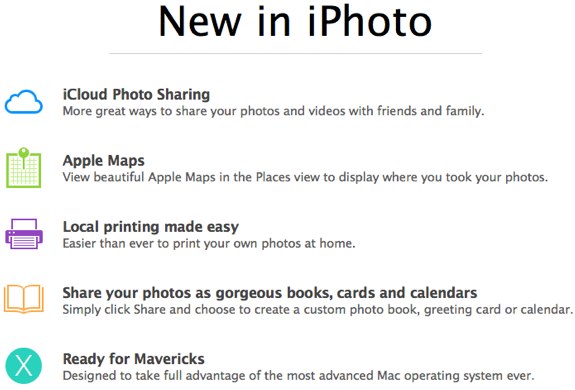
As we'd mentioned earlier, Apple has pushed out the OS X 10.9 Mavericks Golden Master seed to developers. Along with the update, an update to iPhoto is also available. Here are some of the changes Apple is promoting for iPhoto 9.4.7:
- iCloud Photo Sharing: iPhoto sports improved Photo Stream sharing, allowing you to both share photos and videos with friends and family, and subscribe to streams that have been shared with you, right in iCloud. This includes the ability to add new content to streams, comment, and more.
- Apple Maps integration: For images with location metadata, iPhoto now uses Apple Maps to show high quality imagery of the places where your photos were taken.
- Improved local printing: Printing off hard copies of your images has been improved with a focus on improving ease of use.
- Photo projects: The ability to choose photos that can be used to create books, greeting cards, calendars, and more has been improved.
- Mavericks compatibility: iPhoto is ready to take advantage of OS X Mavericks technologies and APIs.
You can grab the new version of iPhoto by updating in the Mac App Store.
Gallery: iPhoto 9.4.7 is ready for Mavericks: Here’s what’s new
OS X 10.9 Mavericks Golden Master now available to developers
Posted by Andru Edwards Categories: Apple, PC / Laptop, Software,

Late last night Apple released the OS X Mavericks Golden Master (GM) seed, build 13A598, to developers. When software is released as GM, that means that work has been completed, and that this is the build that will be released to consumers later this month when Mavericks launches on the Mac App Store. Alongside the Mavericks GM, Apple has also released GM seeds of Xcode 5.1, OS X Server, Remote Desktop 5.7, and iPhoto. Developers who'd like to install the new GM seed will need to visit the Developer Portal and grab a Mac App Store code. The download is roughly 5.3GB, so be sure you're on a solid broadband connection, as opposed to sipping a latte in Starbucks. As for the rest of the world, OS X Mavericks is set to launch later this month, bringing features like iBooks, Maps, Finder Tags, enhanced multi-monitor support, tabbed Finder, and more to Apple's desktop operating system.
We're also assuming that Apple will be launching its updated MacBook Pro, MacBook Pro with Retina display, and the all-new Mac Pro alongside the release of Mavericks.








