

Latest Gear Live Videos
The typewriter is dead as the last factory closes its doors (Updated)

Posted by Andru Edwards Categories: Misc. Tech,
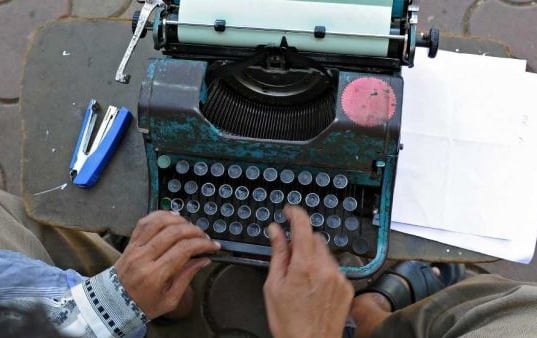
Update: Contrary to the original reports, it seems there are still typewriters being made in China, Japan, and Indonesia. So rather than being the death of the typewriter, this is just another nail in the coffin.
You might want to be sitting down for this. It's time to say your goodbyes, because the world's last remaining typewriter factory, Godrej & Boyce in Mumbai, India, is closing its doors.
Although typewriters have long been obsolete in the West, they remained popular in India for a long time. However, Godrej & Boyce stopped production in 2009, and now its inventory has dwindled to just 500 machines, most of which are Arabic-language models, and no more will be made. It's a different tune than the company was singing back in the '90s, when it produced 50,000 typewriters a year, a third of India's total output of 150,000 units, India's Business Standard reports.
"From the early 2000s onward, computers started dominating," Godrej & Boyce's general manager of operations Milind Dukle told the Business Standard. "All the manufacturers of office typewriters stopped production, except us. [Until] 2009, we used to produce 10,000 to 12,000 machines a year."
When Godrej & Boyce opened in the 1950s, the Business Standard says the typewriter was a "symbol of independent and industrialized India." More than half a century later, one of the company's plants in Shirwal that closed in 2009 was morphed into a refrigerator factory.
Click to continue reading The typewriter is dead as the last factory closes its doors (Updated)
Advertisement
Thanko Keyboard Gives Warm Hands While Typing

Posted by Aaron Zollo Categories: Accessories, USB, Peripherals,
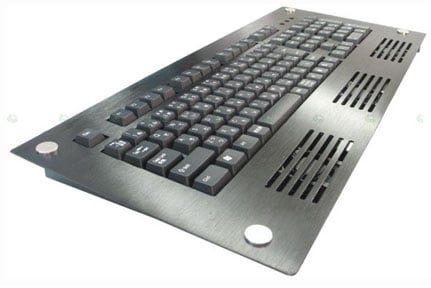
Thanko has previously released a keyboard to keep our arms and hands cool while typing. They now have a new keyboard which can warm our extremities via USB. The new keyboard is prepared for warm and cool weather in that it incorporates three fans which can cool, but also can provide some toasty heat as well. The keyboard is currently in Japan and if you need to have this keyboard for yourself, you’ll need to find a decent importer as there is no mention of it going on sale in the U.S. any time soon.
Read More  | Thanko via Akihabara News
Review: USB Exercising Mouse

Posted by Sheila Franklin Categories: Misc. Tech, Product Reviews, Toys, Videos, USB,
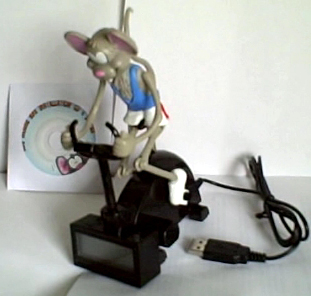
This little guy has been out for a while now, but when our English buds from Crazy About Gadgets sent us a USB Exercising Mouse, we just had to put him through his paces (pun intended.) While waiting for the software to upload, we noticed that Microsoft warned us that it had not undergone safety testing by them. (Thanks for looking out for us, but we’ll take the risk.) Full review and video after the jump.
(Thanks, Phillip)
Click to continue reading Review: USB Exercising Mouse
Read More | Crazy About Gadgets
Easier iPhone Use with My Touch Keys
Posted by Sheila Franklin Categories: Accessories, Apple, Handhelds,
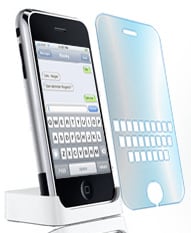 For iPhone users that are having trouble with its smooth keyboard, My Touch Keys may be the solution. It is a tactile overlay that sits on your screen and features cutouts that line up with the on-screen keyboard in portrait mode. Creator Rudy Ugarte claims that you will no longer have a problem with typos and backspacing. Attaching with static cling sheets, we definitely think that the price is right. It’s a two-fer for $7.99 if you and a bud want to give it a try.
Read More | My Touch Keys Product Page
The USB Think Light Helps Improve Your Typing Speed

Posted by Lolita Beckwith Categories: Accessories, USB, PC / Laptop,
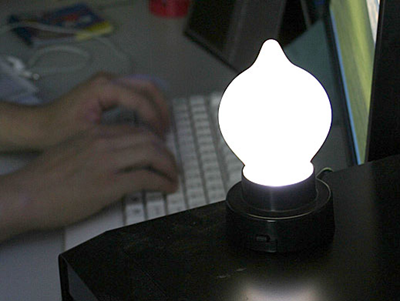
We wonder what Thomas Alva Edison would have made of this incarnation of the light bulb, courtesy of the always-entertaining Brando website. It’s the USB Think Light, and basically, the faster you type, the brighter the lamp shines. If you stop typing, the lamp goes off. That’s it! We suggest pairing it with Brando’s equally wacky USB Mini Fridge to add a little fun and frivolity to your
workday. By the way, if you’re seriously looking to test your typing speed and accuracy, we highly suggest the video game
“The Typing of the Dead”, part of the “House of the Dead” video game franchise, in which you kill zombies by correctly typing words that flash onscreen. Yes, we’re serious. The USB Think Light is available for $15.
Read More | Brando via Gizmodo









Advertisement
© Gear Live Inc. {year} – User-posted content, unless source is quoted, is licensed under a Creative Commons Public Domain License. Gear Live graphics, logos, designs, page headers, button icons, videos, articles, blogs, forums, scripts and other service names are the trademarks of Gear Live Inc.