

Latest Gear Live Videos
Morrissey Posts His First Tweets

Posted by Andru Edwards Categories: Artist News, Upcoming Releases, Rock,
.jpg) Morrissey has started using Twitter.
Morrissey has started using Twitter.
The "First Of The Gang To Die" singer joined the social media site in June 2009 but only posted his first message last night, writing, "Hello. Testing, 1, 2, 3. Planet Earth, are you there? One can only hope... [sic]."
The post has already been re-tweeted more than 14,000 times and he followed the tweet by, "Follow, follow, follow. Twitter is the perfect metaphor for...something. Dunno what [sic]."
The 54-year-old star has revealed the title track from his new album, World Peace Is None of Your Business, along with the artwork for the record.
Click to continue reading Morrissey Posts His First Tweets
Advertisement
Twitter launches new design
Posted by Andru Edwards Categories: Design, Internet,
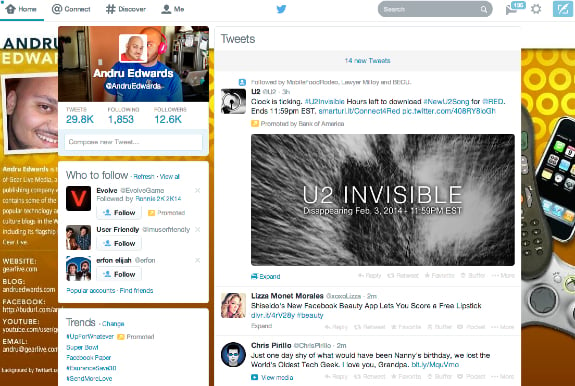
This morning, Twitter deployed its new site redesign, bringing the look and feel of the site up to date with modern design language tendencies. As you browse the site, you'll notice that the font is changed, your profile image and cover photo now appear at the top-left of the screen when perusing your timeline, and flat design elements are now in play. It looks good, and is a big improvement in my mind when compared to the previous design, as subtle as the changes are. It's also good to see the continuance of the flat design look that has been adopted by iOS 7, Facebook, and Windows Phone making its way through more tech companies.
All that said, it isn't enough to pull us away from our beloved Tweetbot, our preferred way of using Twitter. What about you? What do you think of the changes?
Also today, Facebook released it's new Paper app.
Facebook Paper brings elegance to your timeline
Posted by Andru Edwards Categories: Smartphones, Internet, Software,
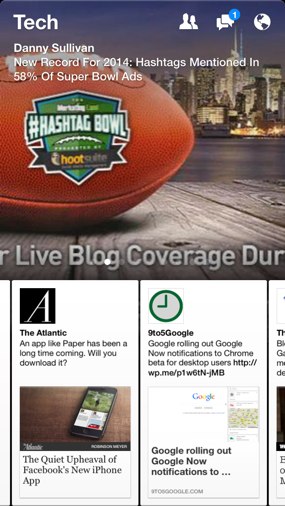
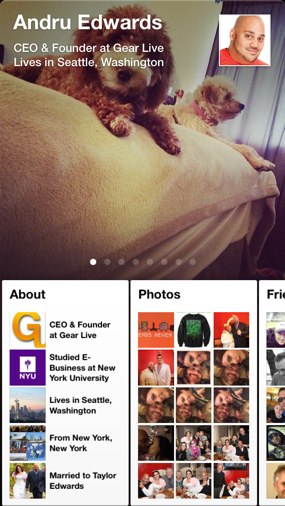
Facebook has released its new Facebook Paper app, a free version of Facebook that introduces new ways of interacting with the social network. Similar to the popular Flipbook app, Facebook Paper is centered around eye-catching, full-screen images, and gesture-based navigation, bringing the topics and people you care about most to the forefront.
A product of Facebook Creative Labs, Paper looks great, and could likely replace the default Facebook app for most users, what with its magazine-style layout. To get users acquainted, Facebook Paper launches with a gesture tutorial, helping you become familiar with the new way of interacting with Facebook. It's a bold move, but it works. Facebook needs to constantly monitor the pain points that its users experience when using the service, especially on mobile. Paper solves a lot of those issues that the common Facebook user encounters in the more bloated full app, bringing a simple elegance and sense of ease with it.
Give it a shot, and let us know what you think in the comments. You can grab Paper now, for free.
Marc Jacobs to Sell Fragrance for Tweets

Posted by Robin Paulson Categories: Fashion Shows, Health & Beauty, News, Sales,
 Who needs cash when you have a Twitter account?
So says execs for the upcoming Marc Jacobs pop-up shop for New York Fashion Week, anyway. Appropriately titled the Daisy Marc Jacobs Tweet Shop, the company will offer visitors goods in exchange for Twitter, Instagram, and Facebook posts with the hashtag "#MJDaisyChain." So while it may be considered free by American monetary standards, the Marc Jacobs products will be paid for with social networking fare.
The shop - which will be open from February 7 to February 9 - comes complete with a lounge, a Daisy photo booth (for your Instagram, of course!), drinks, and Wi-Fi (naturally).
Additionally, "he most creative social media posts" will win Marc Jacobs accessories throughout the day. Sounds like a good deal for any fashionista!
Read More  | Fashionista
Sylvester Stallone: Twitter Gets Me in Trouble
Posted by Andru Edwards Categories: Movies, Rants, Features,
 Sylvester Stallone avoids social media because it gets him into "trouble."
The legendary actor found himself in hot water last year for criticizing fellow Hollywood star Bruce Willis on Twitter - after Bruce dropped out of his movie The Expendables 3 over a pay dispute - and he now chooses to be very "careful" about using social networking websites.
"Every time I use social media I get really in trouble! I think George Clooney said it best when he said you've got to be an idiot to be celebrity and use Twitter. You wake up in the morning when you're sober and your career is over! You've got to be really, really careful. You think you're a genius up there in the middle of the night and you wake up an idiot," he explained.
The 67-year-old star admits he isn't technologically savvy and doesn't quite understand the purpose of photo sharing mobile app, Instagram. "Everyone keeps wanting me to get on Instagram. Is that for younger people, Instagram? For, like, pervs? 'Here we are at the hospital getting our back checked' or 'I'm on dialysis... here we are!' I'm really basic with the iPhone. I think I've figured out how the camera works and that's about it. I keep it very simple," he quipped.
Click to continue reading Sylvester Stallone: Twitter Gets Me in Trouble
Quote of the Day: Chris Pine on Twitter
Posted by Robin Paulson Categories: Movies, Rants, Features,

"No, f--- no. What am I going to tweet about? My sneakers? Or, 'I have 140,000 friends on Facebook.' What does that even mean? I find it to be a waste of time. The Internet is so caustic; just a place where people get to spew nonsense and bullsh--."
- Jack Ryan: Shadow Recruit star Chris Pine explains why he will never join Twitter.
(Make sure to check out our other notable quotes.)
Read More | People
Celeb Chatter: Lena Dunham Hates Twitter, T. Swift Angers Neighbors
Posted by Robin Paulson Categories: D-List, Movies, Music, Sports, Television, Engagements, Weddings, Celebrity Babies, Rivalries, Photos, Paparazzi Photos, Features,
.jpg) + Despite having written over 7,000 tweets and uploaded nearly 1,000 Instagram photos, Lena Dunham says that social networking puts her "under great duress." Cry me a river and delete your Twitter and Instagram accounts already.
+ Despite having written over 7,000 tweets and uploaded nearly 1,000 Instagram photos, Lena Dunham says that social networking puts her "under great duress." Cry me a river and delete your Twitter and Instagram accounts already.
+ Catherine Zeta Jones and Michael Douglas were spotted for the first time together in New York since news of their separation. It's nice to see a Hollywood couple making it work!
+ Real estate mogul Taylor Swift has had her people busy building a wall around her Rhode Island beachfront castle, and her neighbors and surrounding surfers are not too pleased with the construction.
+ Modern Family star Ty Burrell attended a surprise lesbian wedding at his bar in Utah, going so far as to sign as an official witness for the couple.
Click to continue reading Celeb Chatter: Lena Dunham Hates Twitter, T. Swift Angers Neighbors
Celeb Chatter: Stars in X-Mas Onesies, New Couples, Beck’s Landlord Troubles
Posted by Robin Paulson Categories: Movies, Music, Television, Dating, Hook-ups, Clothing, Style, Legal Issues, Rivalries, Photos, Paparazzi Photos, Rumors,
 + She may be one of the most famous and successful former SNL cast members these days, but Kristen Wiig still appreciates her privacy and expects fans to respect it, too. Even if you're a star from The Real Housewives of New York, Wiig will apparently still ask you to not put your fan photo with her on a social networking site.
+ What do Taylor Swift, Jessica Biel, Jamie King, Jessica Alba, Kendall Jenner, and Kylie Jenner all have in common? Their love of holiday onesies, naturally.
+ Has Keri Russell moved on from her husband of 7 years, Shane Deary? Sources who spotted Russell with her Americans co-star Matthew Rhys in New York City recently say that the pair looked to be more than just friends.
+ Beck is tied up in a heated lawsuit over a $11,000 security deposit on a Malibu location he rented from German Inglorious Basterds star Til Schweiger.
Vine now available for Android
Posted by Andru Edwards Categories: Smartphones, Google, Software,
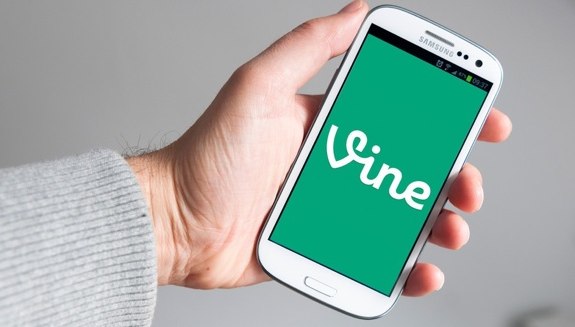
If you own an Android phone, you can now get in on the Vine action that iPhone users have had access to for over four months now. The app is Twitter's answer to video sharing, allowing users to share six-second video snippets with each other. Interestingly, the iOS version and Android versions each have features that the other doesn't. For example, the iOS version includes support for the front-facing camera, mentions, hashtags, and search. The Android version doesn't--but it does have a zoom feature, something that's not found in iOS.
Vine for Android works with any device running Android 4.0 or higher, and you can download it now from the Google Play Store.
Read More | Twitter
Tweetbot for Mac 1.3 brings media timeline, cover images, more
Posted by Andru Edwards Categories: Apple, PC / Laptop, Software,

Tweetbot for Mac has been updated to version 1.3, which mostly carries over a lot of the recent features introduced in Tweetbot for iOS. This includes things like media view, and support for the Twitter cover images on profile pages. Here's the full list:
- New media timeline. Type command f and switch to the media view (next to the search box).
- New look for Tweet detail including retweet and favorite counts.
- Profile Cover Image support.
- Double clicking titlebar above a profile view will scroll profile back to top. Double clicking again will scroll their timeline/mentions/faves to the top.
- Fixed issues with unread items obscuring notification/error messages and attached post windows.
- Fixed issue where you text was still editable after you’d sent a tweet.
- Various other bug fixes.
You can download Tweetbot for Mac now.









Advertisement
© Gear Live Inc. {year} – User-posted content, unless source is quoted, is licensed under a Creative Commons Public Domain License. Gear Live graphics, logos, designs, page headers, button icons, videos, articles, blogs, forums, scripts and other service names are the trademarks of Gear Live Inc.