

Latest Gear Live Videos
Parallels Desktop 5 build 9370 released

Posted by Andru Edwards Categories: PC / Laptop, Software,
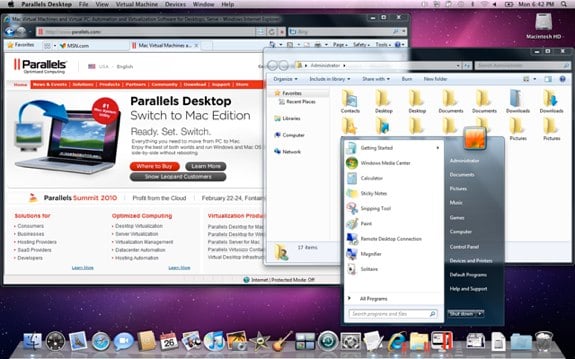
For all of you who run Windows and Linux virutal machines on your Mac by way of Parallels Desktop 5, you should know that the company has released an update this morning aimed at improving performance and enhancing compatibility. The update is recommended for all users of Parallels Desktop 5 for Mac, and is free. Here’s the list of changes:
- Mac folders shared with Windows now work correctly with MS Outlook, Lotus, Quicken and other Windows applications.
- Support for Autodesk Revit 2011 was fixed.
- MS Office 2010 activation is preserved in Boot Camp virtual machines.
- OpenGL now works correctly in Ubuntu 10.04 virtual machines.
- Virtual machines using Boot Camp partitions on 512 GB solid-state disks (SSDs) now work correctly.
- The problem with invisible virtual machines list on new MacBook Pros (released in early 2010) was fixed.
- A rare problem with Windows virtual machine’s screen turning black after upgrading to Mac OS X v10.6.3 was fixed.
- Problems with Parallels Service stopping to respond when the Parallels Desktop settings file is corrupt were fixed.
- Problems with screen resolution in Mac OS X Server v10.6.3 virtual machines were fixed.
You can get a copy of Parallels Desktop 5 for Mac for $10 off with $175 in free software.
Advertisement
Bleeding Edge TV 355: Orange iPhone 4 Bumper Case
Posted by Andru Edwards Categories: Gizmatic, Accessories, Apple, Cell Phones, Features, Podcasts, Videocasts, Videos,
When the iPhone 4 launched, there was a rush and quick shortage of the iPhone 4 Bumper Case. When Apple announced the cases, there were five colors announced (black, white, orange, blue, green, and pink,) but when the device launched, only the black case was available. The other colors are still super-hard to find, and currently have a three-week wait time when ordering them from the Apple Store. We were able to get our hands on the orange Bumper Case, and give you a quick video showing it off. Oh, and yes, we put it on backwards.
You can pick up an iPhone 4 Bumper Case from Apple for $29.
Bleeding Edge TV 354: Unibody Mac mini vs. Apple TV vs. original Mac mini
Posted by Andru Edwards Categories: Gizmatic, Apple, Design, Features, Home Entertainment, PC / Laptop, Podcasts, Videocasts, Videos,
With the newly redesigned unibody Mac mini, it appears that Apple is trying to bring the best of the original Mac mini and the current Apple TV together to make a more formidable machine. After all, the Mac mini is now the only Apple Mac computer that sports a built-in HDMI port, perfect for connecting it to your home theater. In this episode we compare the look and build of the new Mac mini, the original Mac mini, and the Apple TV.
You can pick up the unibody Mac mini at Apple now.
Bleeding Edge TV 352: Unibody Mac mini vs. Original Mac mini
Posted by Andru Edwards Categories: Gizmatic, Apple, Features, PC / Laptop, Podcasts, Videocasts, Videos,
A couple of week ago, Apple introduced a completely redesigned Mac mini, sporting a unibody enclosure along with an HDMI port and SD card slot. The new machine is much thinner than the original design, which the mini has been sporting for about five years now, and we figured we’d give you an up-close comparison of the two models so that you can see both the obvious changes, as well as the more subtle ones.
You can pick up the new Mac mini from the Apple Store online now.
Unboxing Live 058: Apple Mac mini unibody 2010
Posted by Andru Edwards Categories: Apple, Features, HDTV, Home Entertainment, PC, Videocasts,
Apple just released a brand new, completely redesigned Mac mini, sporting a new unibody enclosure. We quickly got our hands on the new mini, which also sports other notable improvements (SD card slot, HDMI port, upgraded NVIDIA graphics chip,) so that we could get to work on testing for our review. In the meantime, though, we figured we’d get an episode of Unboxing Live put together, so that we could give you a look at what’s in the box, and also the unit itself. Apple did a fantastic job at reducing the size of the new Mac mini, while adding a bunch of function.
You can buy the new Mac mini now from Apple.
Mac mini unibody gets the iFixIt teardown treatment
Posted by Andru Edwards Categories: Apple, Mods / Hacks, PC / Laptop,
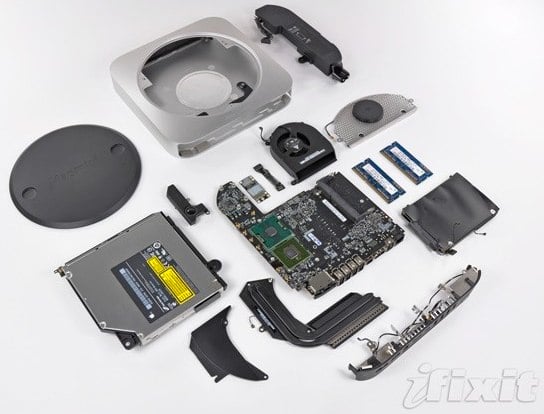
So, you know that new Mac mini we told you about a couple days ago? Yeah, the one that is even slimmer than the one before it, while packing more power? In case you were curious about how Apple was able to cram all that goodness into such a tiny space, wonder no more. Our pals over at iFixIt have gotten their hands on the new Mac mini, and they’ve posted a bunch of images, along with a tutorial, of the teardown process. It’s nice and detailed, and gives you great appreciation for the organizational skills of the people that build these things.
Read More  | iFixIt
Mac OS X 10.6.4 update now available
Posted by Andru Edwards Categories: Apple, PC / Laptop, Software,
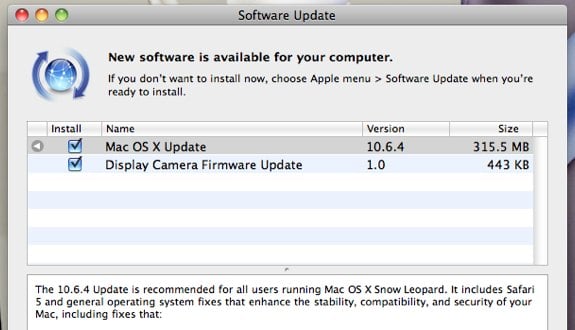
Apple just released Mac OS X 10.6.4 update to the masses, and if you are running Snow Leopard, you can get the update right now by running Software Update. According to Apple:
The 10.6.4 Update is recommended for all users running Mac OS X Snow Leopard. It includes Safari 5 and general operating system fixes that enhance the stability, compatibility, and security of your Mac, including fixes that:
- resolve an issue that causes the keyboard or trackpad to become unresponsive
- resolve an issue that may prevent some Adobe Creative Suite 3 applications from opening
- address issues copying, renaming, or deleting files on SMB file servers
- improve reliability of VPN connections
- resolve a playback issue in DVD Player when using Good Quality deinterlacing
- resolve an issue editing photos with iPhoto or Aperture in full screen view
- improve compatibility with some braille displays
For more info on the update, hit the link below.
Read More | Mac OS X 10.6.4 details
Redesigned Mac mini: HDMI, SD card reader, unibody aluminum enclosure
Posted by Andru Edwards Categories: Apple, PC / Laptop,
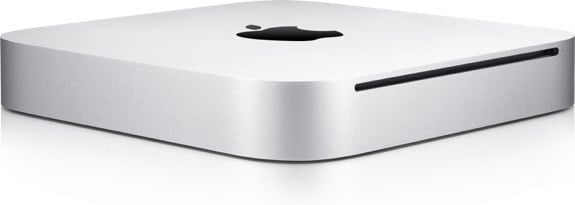
Earlier tonight, the Apple Store went down, and we all figured it was just so that they could get the pre-order page for the iPhone 4 up and running—imagine our surprise when we saw a completely redesigned Mac mini waiting for us as well. The new Mac mini looks gorgeous, sporting a redesigned aluminum unibody enclosure. Even better, this is the first Mac that has an HDMI port built right in, which makes this perfect for hooking up to a television to turn into a media centric computer. Other niceties include an SD card reader on the back, 802.11n Wi-Fi, Mini DisplayPort, and the NVIDIA GeForce 320M graphics chip, which Apple says provides twice the graphics performance as the previous mini. Rounding things out are a 2.4 GHz Core 2 Duo chip, 2GB RAM, and a 320GB hard drive. The unibody enclosure was made in such a way that you could remove a panel on the bottom to easily get to the RAM—any owner of the previous Mac mini can attest to the horrific things you had to go through to upgrade the Mac mini RAM, so this is a welcome change.
The Snow Leopard Server model of the Mac mini remains as well, packing in two 500GB drives (and removing the SuperDrive,) alongside 4GB RAM and a 2.66GHz Intel Core 2 Duo processor. You can order the new Mac Mini now for $699, while the server version sells for $999.
Read More | Mac mini
Sex and the City: Carrie Becomes a PC

Posted by K.C. Morgan Categories: New Line, Warner Bros, Romance, Sequels, Comedy, Upcoming Releases, Videos,
Carrie Bradshaw’s Mac has become a staple of the character, as identifiable with Sex and the City as Manolo Blahniks. But all that’s going to change in the Sex sequel, where Carrie will become a PC. Hi, I’m astounded.
Carrie’s Mac became far more than a prop through the course of the six-season series. An entire episode (“My Motherboard, My Self”) was devoted to the device. It also played a large role in the two-part series finale, serving as a metaphor for Carrie’s true self. Now, all that’s being stripped away thanks to advertising agreements and (I suspect) studio interference.
Hewlett-Packard computers (and only HP computers) will be featured in the new movie. Sarah Jessica Parker will also be featured in upcoming ads for the computer company. Carrie Bradshaw would never sell herself out for some extra movie-making money - remember how she flat-out rejected the Season 5 book cover mock-up? The switch is one that will be noticed only by die-hard Sexers, but it’s a jolting difference all the same.
Read More | Popeater
Netflix begins streaming HD content to PC and Mac users
Posted by Andru Edwards Categories: HDTV, Internet, Movies,
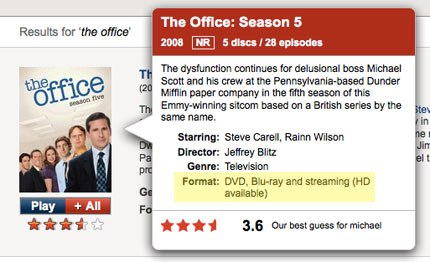
Well, hey, it looks like Netflix has quietly started rolling out HD streaming to PC and Mac clients! If you’ve been streaming Netflix to a Roku, Xbox 360, Wii, PS3, or any other number of Netflix-connected devices, you’ve already had the pleasure of watching the higher quality HD feeds. Pc and Mac users, however, had been left out in the cold all this time, being relegated to standard definition viewing. More than half of HD-enabled streaming titles will stream in HD to a computer. To check and see if a title is available in HD, just hover the mouse over the movie art, and look for “HD available” in the Format area.
Read More | Hacking Netflix









Advertisement
© Gear Live Inc. {year} – User-posted content, unless source is quoted, is licensed under a Creative Commons Public Domain License. Gear Live graphics, logos, designs, page headers, button icons, videos, articles, blogs, forums, scripts and other service names are the trademarks of Gear Live Inc.