

Latest Gear Live Videos
GDC 2009: Hands-On with America’s Army 3

Posted by Alex Lifschitz Categories: Features, First Person Shooters, PC,

Anyone familiar with military gaming (or anyone as cheap as I am) already knows about America’s Army, the PC FPS developed by the United States military as an outreach program for the young’uns. It’s paid for by the guv’mint and completely free of charge to anybody who wants to play it (as any good PR campaign would be), and the folks behind the game let me get some hands-on time with the newest incarnation, America’s Army 3, at GDC 2009 in San Francisco. Hit the jump for some of the things you can expect from the world’s most realistic military shooter.
Click to continue reading GDC 2009: Hands-On with America’s Army 3
Advertisement
HP Mini-Note 2133 first impressions

Posted by Sparky Categories: Design, PC / Laptop, Peripherals, Product Reviews,

I just got my hands on one of the HP Mini-Note 2133 ultra-portable notebook (netbook?) computers. A few first impressions are below, a taste of our upcoming HP 2133 vs. Eee PC 900 Battle Royale:
HP Mini-Note 2133 wins:
- 2133 has a much nicer keyboard
- 2133 has a cleaner design
- 2133 has a faster processor (1.6Ghz vs. 900Mhz)
- 2133 has more RAM (2GB vs. 1GB)
Eee PC 900 wins:
- Eee PC is cheaper ($550 vs. $729-819)
- Eee PC is slimmer and lighter (2133 battery protrudes downward)
- Eee PC has more USB 2.0 ports (3 vs. 2)
- Eee PC is easier to dual boot with Ubuntu
Obviously the HP 2133 has a lot going for it, however it’s significantly more expensive. Stay tuned for more in-depth information about these trendy new netbooks and how they compare for power, usability, and value.
For the Ladies: Burton Women’s Day Hiker

Posted by Jenny Lewis Categories: Accessories, Product Reviews,
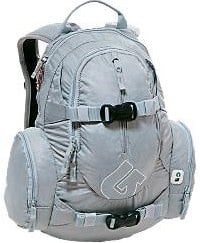 Laptop. iPod. Headphones. Camera. Phone. Wallet. Home keys. Car keys. Moleskine, writing implements, Bluetooth earpiece, DS, games, maybe a spiral notebook or two, possibly even a textbook. And this is all supposed to go into a messenger bag and arrive unharmed and somewhat organized at my destination?
Faced with this issue while packing my regular carryon for a trip last month, I realized something had to change - I needed a better receptacle for all of my junk. After shopping other messengers, slings, totes, and various other bag designs, the best solution was the Burton Women’s Day Hiker 12L. This bag has some serious pockets - plenty of organized space for my phone, various pens and pencils, a fleece-lined pocket for my camera, a clip for my keys, even a separate pocket for my iPod with a cutout to run the headphone cord through. There’s a shovel pocket on the inside of the bag that houses a 13” notebook (although it’s not the most protective pocket on Earth - a sleeve might be a good idea). Two outside board straps make schlepping your sporting board of choice a breeze. Most importantly, the shoulder straps - which are made for women - were comfortable while carrying a heavy load.
The Burton Women’s Day Hiker 12L is available in six colors, including basic black, and retails for $49.95. Just in case you guys get jealous, there’s a men’s version as well.
Microsoft Natural Wireless Laser Mouse 6000 Impressions
Posted by Rob Stevens Categories: Microsoft, PC / Laptop, Peripherals, Product Reviews,
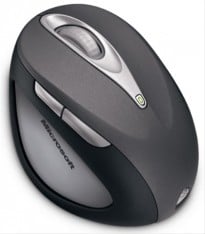 Sweet Mother of Pearl…what is it with companies and these ridiculously long product names. Let me tell you, there’s a reason why “Flickr” is popular, and it’s probably because it’s easy to say. Now that I’ve gotten this out of the way, on to Microsoft’s new ergonomic desktop mouse.
Strangely enough, it wasn’t that long ago that Microsoft’s mice were considered to be the most ergonomic that you could get, but in reality, while they were more comfortable to hold, they were never truly ergonomic. I’ve been using computers from a young age, and as a result, I have a fair amount of RSI built up in my wrists, mostly the right wrist. I can’t use a non-ergonomic keyboard for long without experiencing pain, and that’s why although I’ve tested a great many keyboards in the past, I keep coming back to Microsoft’s Natural series of keyboards. Finally, they put a mouse through the same ergonomic design process as their keyboards and what came out was one of the goofiest looking mice ever made.
Click to continue reading Microsoft Natural Wireless Laser Mouse 6000 Impressions
RoboForm2Go: Your Passwords in Your Pocket
Posted by Sparky Categories: Accessories, USB, PC / Laptop, Software,
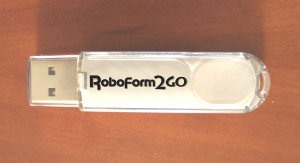 With so many web sites, applications, and services out there on the internet requiring passwords, we are required to remember a dizzying array of usernames and passwords to live our digital life. Browsers and email clients usually have features to remember these passwords for us, but that solution falls short if you use multiple computers, or particularly if your primary internet access comes from public web terminals. Luckily, RoboForm2Go has introduced a portable and secure password management solution in the form of a USB key.
The RoboForm2Go software can be bought separately or pre-loaded onto a USB flash drive. The software requires no install, and can work on any Windows computer with a USB port. The RoboForm2Go software automatically stores your usernames, passwords, and other information for you on the USB thumb drive encrypted with AES 128bit encryption to keep your login information safe should you use the drive. The RoboForm2Go software will also automatically generate random passwords for each new website you visit to help increase security, and will remember your credit card information to make shopping online a breeze.
Click to continue reading RoboForm2Go: Your Passwords in Your Pocket
Read More  | RoboForm2Go Product Page
Thrillville PSP Impressions
Posted by Hector Martinez Categories: Features, Portable/Mobile, PSP, Reviews, Simulation,

While every new system gets its fare share of hate, I’ve gotten especially annoyed at those that say the PSP needs more support from developers. The past few months have seen an explosion of fine games on PSP spanning many genres, and at this point the system probably has the most solid new software line-up heading into this Christmas season. Today, I decided to give folks a look at one of the newer releases which came as a surprise to me, but a pleasant one nontheless.
Click to continue reading Thrillville PSP Impressions
Playstation 3 Boot Video Online
Posted by Christopher Sasaki Categories: PlayStation 3,

This weekend, PSM3 Magazine got their hands on a fully working Playstation 3. Today, they dropped a video and their first impressions of Sony’s new console. The video shows off the boot interface, which definitely shows the influence of the PSP in its design. Their quick impressions: the console is quiet, heavy, and attracts fingerprints like the PSP does. Their blog entry shows off jealousy-inducing pictures of the console in action, along with other impressions of the console in use.
Update: Sony made PSM3 pull the video.
Read More | PSM3
iMac 2.0 GHz Intel Core Duo Impressions

Posted by Andru Edwards Categories: Apple, PC / Laptop, Product Reviews,
 I have had a 2.0 GHz Intel Core Duo iMac for a 7 days now. A few observations:
The stock 512 MB RAM was not enough to keep up with my tasks - that being 15 or so Safari tabs open, iTunes, iMovie, and Garageband open and doing their thing, plus Photoshop, Mail, and NetNewsWire open as well. I know, I am not the “average” user. Truly, even with just the browser and Mail open, I felt the lag. Impressively though, on the G5 my processor would run at about 60% (with 2 GB RAM) when I had all that running. With the 512 MB RAM, the processor was running at 16%. Amazing.
Yesterday I upgraded this thing to 2 GB RAM. It FLIES. I am more than impressed. iMovie and ffmpegx encode video swiftly compared to the G5. You would not believe how many applications I have open right now. In addition to the ones listed above, I also have Adium, Transmit, Windows Media Player, Quicktime, and ffmpegx all running. I have tons of windows open (the 20? screen makes this manageable). My processor is currently running at 17%! Unreal. I have about 120 MB RAM available as well.
Really - the new iMacs are a thing of beauty if you need an elegant workhorse of a PC.









Advertisement
© Gear Live Inc. {year} – User-posted content, unless source is quoted, is licensed under a Creative Commons Public Domain License. Gear Live graphics, logos, designs, page headers, button icons, videos, articles, blogs, forums, scripts and other service names are the trademarks of Gear Live Inc.