

Latest Andru Edwards Videos
Asus Transformer Prime: Tegra 3 tablet, $499

Posted by Andru Edwards Categories: Accessories, Google, Handhelds,

The Asus Eee Pad Transformer Prime is ready for its close-up and under the hood it sports Nvidia's next-generation Tegra 3 mobile processor. That makes the Transformer Prime the first tablet to feature the quad-core System-on-a-Chip (SoC), which Nvida says provides three times the graphics performance of its current Tegra 2 chip while soaking up 61 percent less power.
The 10.1-inch Transformer Prime is nice and thin at 0.33 inches and weighs in at 1.29 pounds, Asus said Tuesday on a conference call with reporters. Thanks to the Tegra 3's improved power consumption, the tablet's battery life is rated for up to 18 hours, although that's when you combine it with the optional mobile dock and keyboard which Asus is also offering, naturally, as part of the Transformer Prime package.
Without the accessory, you're still getting up to 12 hours of battery life, which Asus was happy to point out is enough for "a trans-ocean flight, all-night game session, viewing several movies on a long road trip, or even video recording, editing, and then playing back your child's school play."
The Tegra 3 chip, the first quad-core ARM Cortex A9 CPU, significantly boosts 3D gaming and Internet browsing on tablets like the Transformer Prime, thanks to a 12-core GeForce GPU that's also part of the next-gen SoC, according to Nvidia.
Click to continue reading Asus Transformer Prime: Tegra 3 tablet, $499
Advertisement
Newegg has the ASUS Transformer tablet in stock!
Posted by Andru Edwards Categories: Handhelds, Hot Deals,
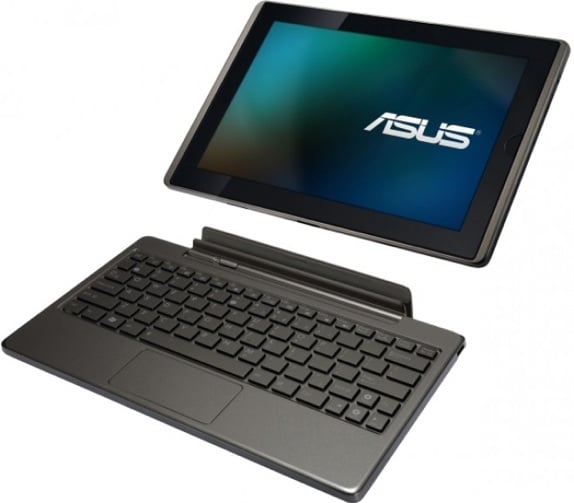
Hey, It looks like the first real, formidable iPad competitor to hit the market is shipping from Newegg as we speak! The ASUS EEE Pad Transformer rocks an IPS display and Tegra 2 processor, and ships with Android 3.1 Honeycomb (the latest update.) We've tried other Android tablets and were left underwhelmed, but this one is hotness! You can get the 32GB model from Newegg for $499, which is $100 less than the 32GB iPad, y'all!
Read More  | ASUS Transformer
HP Mini-Note 2133 vs. Asus Eee PC gallery
Posted by Andru Edwards Categories: Design, Features, PC / Laptop,
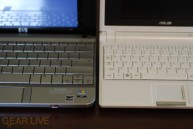
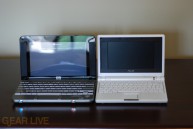
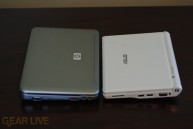
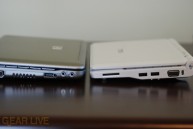
We figured we’d put two of our favorite netbooks together for a quick head-to-head, just to show the size differences between the HP Mini-Note and the Asus Eee PC. We’ve put together a small gallery comparing the sizes of the two systems, including what we believe to be the most important difference, the keyboard size.
Click on through to see the HP Mini-Note vs Eee PC gallery.
Read More | Mini-Note vs Eee PC gallery
Gallery:
HP Mini-Note 2133 first impressions

Posted by Sparky Categories: Design, PC / Laptop, Peripherals, Product Reviews,

I just got my hands on one of the HP Mini-Note 2133 ultra-portable notebook (netbook?) computers. A few first impressions are below, a taste of our upcoming HP 2133 vs. Eee PC 900 Battle Royale:
HP Mini-Note 2133 wins:
- 2133 has a much nicer keyboard
- 2133 has a cleaner design
- 2133 has a faster processor (1.6Ghz vs. 900Mhz)
- 2133 has more RAM (2GB vs. 1GB)
Eee PC 900 wins:
- Eee PC is cheaper ($550 vs. $729-819)
- Eee PC is slimmer and lighter (2133 battery protrudes downward)
- Eee PC has more USB 2.0 ports (3 vs. 2)
- Eee PC is easier to dual boot with Ubuntu
Obviously the HP 2133 has a lot going for it, however it’s significantly more expensive. Stay tuned for more in-depth information about these trendy new netbooks and how they compare for power, usability, and value.
Bleeding Edge TV 231: Eee PC Full Desktop Mode, and installing Beryl for more awesomeness
Posted by Andru Edwards Categories: Full Episodes, Gizmatic, Features, Mods / Hacks, PC / Laptop, Podcasts, Software, Videocasts,
The second in our series of Asus Eee PC how-to videos, this episode features instructions on how to activate the Eee PC‘s hidden Full Desktop Mode, a power-user mode featuring a launcher similar to the Start menu from Windows. Additionally, Nate True demonstrates how to activate Beryl, a 3d desktop effect engine that adds stunning visual effects to your desktop, including windows that stretch and wobble like Jell-O when you move them around and a rotating desktop cube display.
The process to install and activate Beryl is a bit involved, though the results are quite worth it. Check out the video for the details - and as promised, here are the two long lines so you can copy and paste them to your console:
To authorize the community Eee PC repository:
curl http://download.tuxfamily.org/eeepcrepos/key.asc | sudo apt-key add -
Remember the trailing hyphen (-) IS required. To authorize the Beryl repository:
curl http://debian.beryl-project.org/root@lupine.me.uk.gpg | sudo apt-key add -
Again, the ending hyphen (-) is required. We have a few more Eee PC hacks on the way, so be sure you are subscribed so you don’t miss any.
Bleeding Edge TV 207: Asus Eee PC RAM Upgrade
Posted by Andru Edwards Categories: Hack Attack, Short Bytes, Features, Handhelds, Mods / Hacks, PC / Laptop, Podcasts, Videocasts,
The Asus Eee PC is an amazing little wonder of a device. However, unless you buy the 8G version, your little Linux mobile laptop isn’t fully powered. Luckily, getting inside the Eee PC is not much of a challenge at all, and adding in some extra RAM typically works nicely for any computer user. In this episode, Nate True show us how to upgrade the RAM in the Eee PC. All you need is a tiny Philips screwdriver, a 1 or 2 GB RAM module, an Eee PC, and a few minutes of time. Check out the video for the full details, and let us know how it goes if you try it out. Remember, we will have more Eee PC tips and hacks for you soon.
Asus to release lower-end Eee PCs

Posted by Sheila Franklin Categories: Corporate News, Hot Deals, PC / Laptop,
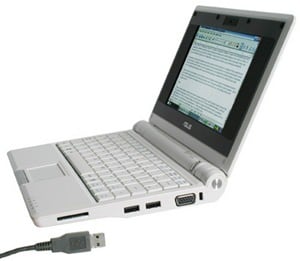
Asus has countered the OLPC with its Eee (easy work, easy learn, easy play) PC. With a 7-inch screen and a weight of about 2 lbs., the inexpensive laptop runs on Linux with Open Office and built-in dictionary, but can also handle Windows XP. With quick boot time, it uses Flash for memory storage on its 4400mAh battery, has a one-click graphic intuitive interface, and can be pre-ordered for a mere $299.99. Asus also offers an Eee PC 4GB with a larger 5200 mAh battery and a 0.3 megapixel webcam. Add $100.00 for the deluxe version, which is available now. Both come with 3 USB ports to allow for expansion and added external storage.
Read More | Smartphone Thoughts