

Latest Gear Live Videos
Tech companies accepting donations for Japan quake relief

Posted by Andru Edwards Categories: Google, Internet, Misc. Tech,
As the devastating images of the earthquake and subsequent tsunamis in Japan come in via cable news, newspapers, blogs, and homemade videos, tech giants like Google, Apple, Twitter, and more are donating funds and using the power of tech to help those in need.
In the wake of the earthquake, Google set up its Person Finder Web site to help people locate the missing or post data on those who had been found. In a Saturday blog post, Google Japan's Ken Miura said his team started working on Google's Crisis Response page within minutes of the quake.
Miura was in Tokyo, about 250 miles away from where the first quake hit, but the Google Japan office – located on the 26th floor – "started shaking slowly," he wrote.
"Although alerts from the building urged us to evacuate via the emergency stairs, I couldn't help but stay and search for information about the earthquake's epicenter and scale," he wrote. Miura said he was a university student when the Kobe earthquake hit 16 years ago and he recalled "the immediate desire for information."
With that in mind, the team launched Person Finder in Japan within an hour of the earthquake, pulled together public information from local governments about affected areas, and posted tsunami warnings on the Google homepage.
Miura also said Google will donate $250,000 to Japanese relief agencies.
Click to continue reading Tech companies accepting donations for Japan quake relief
Advertisement
Google brings Recipe View to search results
Posted by Andru Edwards Categories: Google, Internet,
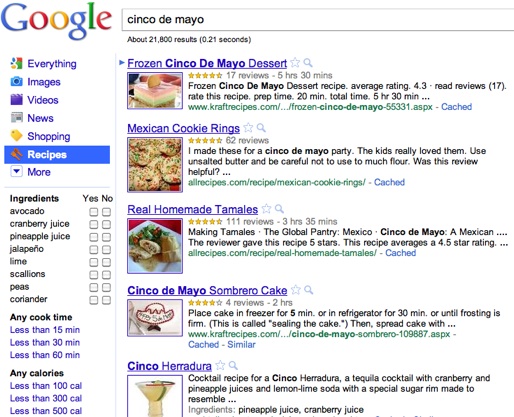
Today Google unveiled an appetizing new search option for cooks and wannabe chefs: Recipe View.
The new search option will be a choice in the left rail that appears after entering a Google search. You can search for recipes by entering the name of a dish or food type, an ingredient, or just an occasion, such as Cinco de Mayo. The results can be further filtered by preparation time, ingredients, or calories. Result recipes also sport star ratings and user reviews, so you can see which ones have been hits.
The feature is more than a taste-bud pleaser, though. In order to implement it, Google engineers made use of rich snippet data. Google product mangaer Kavi Goel said in a blog post that the technology was introduced at the Searchology conference in 2009.
Click to continue reading Google brings Recipe View to search results
Microsoft Bing caught stealing search results from Google

Posted by Patrick Lambert Categories: Corporate News, Google, Internet, Microsoft,
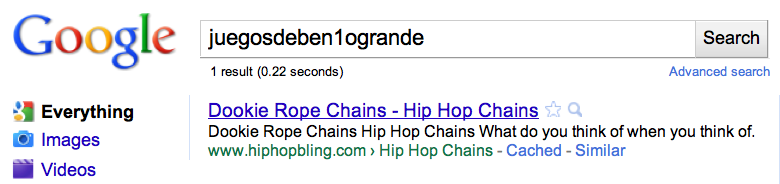
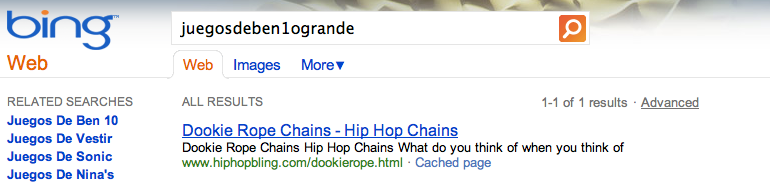
In a very controversial yet fascinating study, Google has exposed what looks like blatant copying of search results by Microsoft's own search engine, Bing. As a test, Google invented 100 query terms, words that do not exist, and they made the search engine return a single link to a site that had nothing to do with the search term. Then, a group of engineers used Internet Explorer 8, equipped with the Bing toolbar, to search for those terms on Google. Low and behold, soon after, Bing started returning the exact same search results. Since the terms were deliberate and random, there can be no coincidence. From the apparent evidence, Microsoft clearly used either IE8, Windows itself, or the Bing toolbar to find out what people searched for on Google, what results they get, and then used that to improve their own Bing site. Check out the blog post for all the details on Google's claim. Something tells me this battle is far from over.
Read More  | Google Blog
Bing Maps now provides mall directories
Posted by Andru Edwards Categories: Internet, Microsoft,

Panic sets in as soon as I walk into a mall. I realize I parked a mile from the one store I wanted to visit, and that I'll have to part the sweaty seas of tweens to get there. With its new mall directory maps, however, Bing Maps just made my mall shopping—and maybe yours—a little less excruciating.
Here's how it works: supported malls will show up in the "Mall Map" link in the Bing Local results, and show you where each store in located. Today's release is still limited, so unless you live in the Boston, New York, or the Seattle metro area, your mall probably hasn't been mapped yet. Over the coming weeks, though, Microsoft intends to continue rolling out maps, beginning with the largest malls and adding support for major cities.
Each mall map features clickable stores from which you may access phone numbers, Web sites, and addresses (not that they'll do you much good in a mall). You can send store information to your phone or e-mail address. One curiously absent feature is store hours; here's hoping they bundle that in with future releases.
For those of you who use Bing or enjoy fraternizing with festering adolescents and bling-your-cell phone stands, take a look below for a complete list of Binged malls.
Click to continue reading Bing Maps now provides mall directories
Bleeding Edge TV 361: Windows Phone 7 preview
Posted by Andru Edwards Categories: Gizmatic, Cell Phones, Features, Handhelds, Microsoft, Podcasts, Videocasts, Videos,
Wanna get an in-depth preview of what Microsoft has in store for Windows Phone 7? In this episode, we chat with Brian Seitz of the Windows Phone team, and he gives us a tour through the entire Windows Phone 7 interface. We get a look at a bunch of features and hubs, including things like social networking integration, Microsoft Office, Xbox Live, photos, friends, Zune, Outlook, and much more. Seeing how Microsoft was able to tie a bunch of their different service offerings (Xbox, Office, Zune, Bing, Explorer, etc.) so tightly into one device is impressive, and definitely gives us hope as they gear up for the launch of Windows Phone 7 devices this fall.
Bing Maps Presents The Taxi Fare Calculator

Posted by John Kilhefner Categories: Internet, Microsoft, Software,

Tired of hailing down cab drivers who pretend to take you the fastest route, only to bog down your travelling with weird routes that add to the total fare? Bing is, as they’ve now added the ‘Taxi Fare Calculator’. This enables you to keep track of the best routes your taxi driver should be going, as well as an estimate on the total fare. Bing Map’s Taxi Fare Calculator was developed during the ‘King of Bing Maps’ competition, and is being tweaked to include more cities. As of now only a few dozen cities around the world are included. However, when more routes are mapped out and a dedicated mobile version is available, you can expect everyone in the know to use the Taxi Fare Calculator to avoid getting the run around from cabbies in unfamiliar cities. Check out the calculator here
Read More | Bing Community
iOS 3.2.1 update for iPad now available
Posted by Andru Edwards Categories: Apple, Handhelds, Software, Wireless / WiFi,
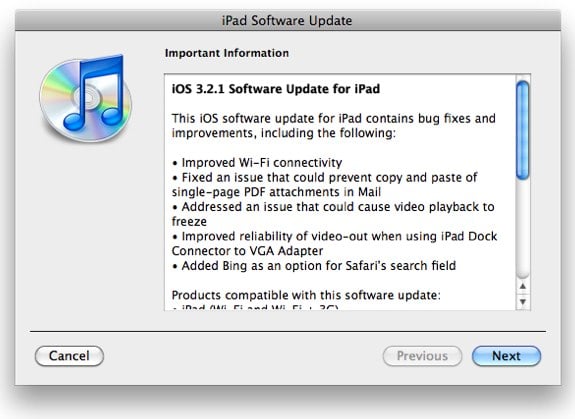
In addition to releasing iOS 4.0.1 earlier today, Apple has also given us iOS 3.2.1, the first software update available for the iPad. Some changes and improvements in 3.2.1:
- Improved Wi-Fi connectivity
- Fixed an issue that could prevent copy and paste of single-page PDF attachments in Mail
- Addressed an issue that could cause video playback to freeze
- Improved reliability of video-out when using iPad Dock Connector to VGA Adapter
- Added Bing as an option for Safari’s search field
Just connect up your iPad and check for the update in iTunes, and you’ll find it ready for you.
Safari 5: Extensions, Reader, HTML5, Bing. Oh, and it’s fast.
Posted by Andru Edwards Categories: Apple, Internet, Software,

Apparently, the release of Safari 5 wasn’t big enough to be mentioned in the WWDC 2010 keynote this morning, but nevertheless, the company has launched a fully-updated version of its browser. So, what’s new? Quite a bit, actually. First, Safari 5 is much faster—it runs Javascript 25% faster than Safari 4, is twice as fast as Firefox on the Mac, and is even 3% faster than Chrome. So yeah, it’s fast. There’s also a new feature called Safari Reader. If you hit a web page that has an article on it, you can hit the Reader icon, and the article will be overlaid over the site in a very readable fashion. Another biggie is the addition of a bunch of extra HTML5 features. As we know, Apple is all about supporting HTML5 as a platform, and they are putting their money where their mouth is by having Safari 5 be the browser with the most HTML5 support at the moment. Oh, and for those of you who want more choice in your search bar, Safari 5 offers Bing as a search option, built-in, alongside Google and Yahoo! Search.
You can download Safari 5 now.
Read More | Safari 5
Bing launches improved Auto-suggest attached to your personal search history

Posted by Finnian Durkan Categories: Internet, Microsoft,

If there is one thing that I hate, it is when technology inconveniences me more than it helps. We’ve all been there: it’s late, there’s a movie quote or an actor that you can’t get out of your head—you want, nay, NEED to solve this riddle before your body will allow you some restful shut-eye. What do you do? You roll over in your bed/futon/inflatable mattress and flip open your ever-present and never shutdown laptop and open a link to your favorite search engine. As you mindlessly begin to type your parameters, in my case the phrase ‘that hairy guy that dated Carla on Cheers’ (Nick, played by Dan Hedeya incidentally) is my search of choice tonight. No sooner have you gotten the letters ‘T-H-A..’ into the searchbox then a menu opens up listing more unrelated ‘tha’ phrases than a Wu-Tang song. After briefly looking at a list of ‘Thai Restaurants’ and ‘Thankless Jobs’ (*ahem*) you quickly close the menu and type out your search terms in their entirety. Annoying, isn’t it?
Well, Bing has taken that first step to making your oh-so-difficult web-searching easier by integrating your query history into their auto-suggest feature. Now when you begin to type your search in Bing your previous search queries will be taken into account when serving up auto-suggest keywords. Not only that, but they will appear in the same color (purple) that your web-browser uses to display already-visited links thus helping to differentiate them from non query-based auto-suggestions. In my case this means that when I type in ‘T-H-A’ like I previously mentioned about 30 purple-hued links to ‘That so-and-so from such-and-such-movie’ will appear since I am forever referencing pop culture but am blessed with the memory recall of a 2 month-old. At least now I’ll be able to save myself a few keystrokes before Bing directs me to IMDB. Bing has also allowed this feature to be turned off completely or to be managed with their ‘Manage History’ option if you are paranoid that your boss is going to search your work computer’s internet history and wonder why you keep searching ‘jobs that don’t suck like the one that i have now’. Either way, it’s progress.
Windows Phone 7 Series keynote video
Posted by Andru Edwards Categories: Smartphones, Handhelds, Software, Videos,
The big news today is the announcements of Windows Phone 7 Series over at the Mobile World Congress in Barcelona, and Microsoft has released video of the announcement and reveal of their new mobile OS. Let it be said right now, Microsoft has essentially killed what we all know as Windows Mobile, and has replaced it with what may, in fact, be the slickest interface we’ve seen on a mobile phone. They borrowed heavily from the Zune HD navigation scheme, but made it highly polished and optimized for a device that is constantly connected to a cellular data connection. Also, it looks like that whole Xbox Live Anywhere demo that we saw at E3 a few years ago is finally coming to fruition, as Windows Phone 7 Series includes Xbox Live gaming built right in. Hit the play button on the videoafter the jump for a look at everything, but color us impressed.
Hey, Apple, the ball is in your court.
You can expect to find Windows Phone 7 Series devices in stores this holiday season.
Click to continue reading Windows Phone 7 Series keynote video









Advertisement
© Gear Live Inc. {year} – User-posted content, unless source is quoted, is licensed under a Creative Commons Public Domain License. Gear Live graphics, logos, designs, page headers, button icons, videos, articles, blogs, forums, scripts and other service names are the trademarks of Gear Live Inc.