

Find Our Latest Video Reviews on YouTube!
If you want to stay on top of all of our video reviews of the latest tech, be sure to check out and subscribe to the Gear Live YouTube channel, hosted by Andru Edwards! It’s free!
Friday September 2, 2005 4:22 pm
Apple iMac and Mighty Mouse Are Upsetting Me

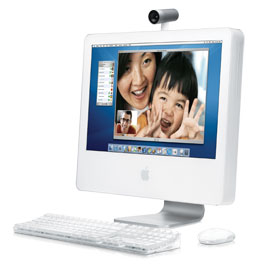 What the heck, yo? I picked up a Mac mini and a PowerBook over the past few months, and both worked so well that I decided to drop $2,000 on a new iMac G5 to use as my main work computer. Not even a couple of weeks out of the box, and it is already giving me strife. Hooked up to it is my Mighty Mouse, which when connected to the PowerBook, worked flawlessly. Now I use it with the iMac, and the cursor jumps to the corners of the screen at random, even if I am in the middle of clicking or dragging something. I just finished running all sorts of utilities to get the iMac back into the stable world, as all programs just stopped functioning - and the Finder couldn’t be restarted. So I repaired permissions, and repaired the volume, and finally the iMac is back up to snuff…I think. The annoying-as-hell Mighty Mouse problem still remains. I have tried using the thing with two different mousepads, as well as without one. Still, no dice. If I could get this mouse working correctly, that would so solve a bunch of my troubles.
Anyone out there with a similar Mighty Mouse experience?
EDIT: Wow - it looks like the culprit of the iMac crash was the BlogAds.com order page. Everything works fine until I go there. In fact, right after I wrote the original post, I went there again, and as soon as I did, my monitor went a bit dim, and OS X told me that I needed to hold down my power button to reboot in about five different languages. Come on, Henry, let’s get that fixed. In other news, my mouse is still acting ridiculously stupid.
Latest Gear Live Videos
Advertisement
Advertisement









Advertisement
© Gear Live Inc. {year} – User-posted content, unless source is quoted, is licensed under a Creative Commons Public Domain License. Gear Live graphics, logos, designs, page headers, button icons, videos, articles, blogs, forums, scripts and other service names are the trademarks of Gear Live Inc.