

Find Our Latest Video Reviews on YouTube!
If you want to stay on top of all of our video reviews of the latest tech, be sure to check out and subscribe to the Gear Live YouTube channel, hosted by Andru Edwards! It’s free!
Thursday January 5, 2006 7:17 pm
Live From CES: Hands On With Vista—Parental Controls

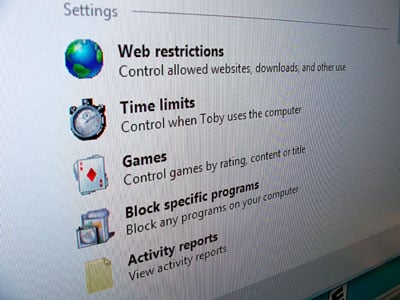
Now, it’s true that something like parental controls are usually the last “cool” feature you’d expect a blog site to chat about, but Vista has big plans for keeping Timmy’s future porn habit at bay. The administrator account can impose controls on each user, including what times the accounts are allowed to access the computer, what sort of web site filters are applied (allow Timmy to see sites tagged “pornography” but not “bomb-making”, etc.) and even time limits—how many hours per day he’s allowed on the machine. One of the most impressive elements of this implementation is that the access limitations for web filtering are controlled at the network application layer. What this means is that they’re applied across the board: In Internet Explorer, Firefox or any other browser, feed readers or any other services bouncing over TCP/IP. I go into some more of the advanced parental control features after the jump.
It also utilizes a pre-fetching system which pulls the content from the links on the active page and blocks the links if they violate the filters.
Vista’s game management system (which I’ll discuss in a post to follow) allows parents to specifically restrict or allow games based on rating criteria or just by restricting the games themselves. Even the folder the game is installed to becomes inaccessible, as our rep proved when he tried to access Minesweeper on a blocked account.
Features like these, in addition to a new Activity Report system, will allow parents to keep watch over their children’s computing habits, both in terms of length of time spent online and the nature of said time.
And for those interested in spying on their spouse or loved ones, Vista warns the user upon logging in that the system is, indeed, being monitored.








