Clicky

On Announcements: Show us your Pwned Face and win a Limited Edition Xbox 360 Modern Warfare 2 console!

We’re giving away a limited edition Modern Warfare 2 Xbox 360 bundle!

We are kicking off our holiday giveaways with a bang! We’ve teamed with our friends at shoot it! to bring you this Modern Warfare 2 Xbox 360 limited edition console, a $400 value. The bundle includes a custom Xbox 360 console with exclusive design, a 250GB Xbox 360 hard drive, Call of Duty Modern Warfare 2, a pair of black controllers, and more. It hits stores on November 10th, and we’ve pre-ordered one that we’re giving away to one of you. Be sure to check out the giveaway rules to see how to enter!

Latest Video: Bleeding Edge TV 322: Motorola DROID Reviewx

In this video we give you a preview and walkthrough of the new Motorola DROID smartphone from Verizon Wireless. We go over Android 2.0, Google Maps Navigation, the QWERTY keyboard, and more.
Play Video
Close Player   Episode Permalink Comment on this Video Subscribe to this show via iTunes, Miro, or RSS Download for: iPod High Definition
Wednesday May 11, 2005 9:14 pm

HOW TO: Hack A PSOne LCD Into Your Computer

Posted by Jesse Easley Categories: Features, Mods / Hacks, PC / Laptop

PC PSOne LCD Mod

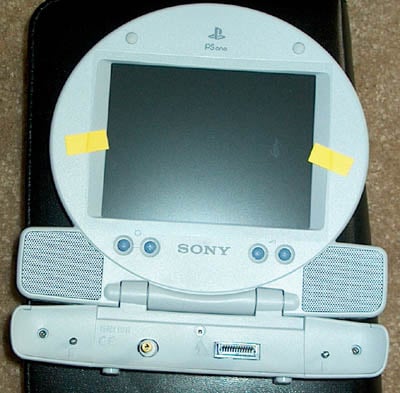
I’ve been wanting to do something neat to my computer for a long time.  I thought of etching something into the side window, thought of adding water cooling, I thought of doing a bunch of things.  Well, in my search ventures online to find something neat to do I found a really cool mod to do with your PC using a PSone LCD Screen. Jump on down to see how it went.


Description

Here is what you’ll need.

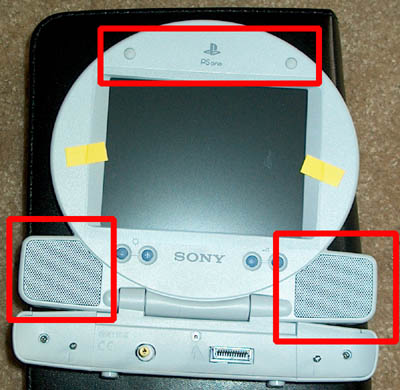
First, you need to take out the screws in the screen.  In the image above there are 3 red squares. The screws are underneath both speaker grills and under the two rubber “stoppers” on the top of the screen. Once you take those out you can take a flat head screw driver or other flat item to seperate the plastic casing from the screen. Once that is done you have to get the casing off of the base of the screen.  To do this all you have to do is remove the 2 screws on the left and right sides of the base and use the same method to remove the case.
Description

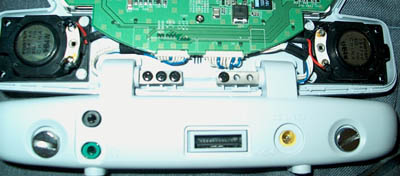
Allright! Now that the casing is off it’s time to take more screws out! If you look at the hinge of where the LCD meets the base you’ll see six screws.  Before you remove them the best thing to do is to unplug the speakers from the circuit board to make life a little easier.  Once the screws are removed and the speakers are unplugged you should make sure there are no extra screws to be removed because some of the screens do vary.
Description

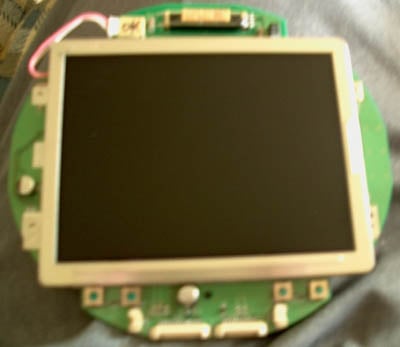
Here is the LCD screen ouside of the casing and the base board unplugged.  You’ve now completed most of the work for this mod. Now all you really have to do is figure out how you want to mount it in your case and hook cables up.  There are several ways you can mount the LCD. Some people will mount the LCD inside the computers open CD-Rom bays, but I have 2 drives out of 4 open spots which didn’t leave me with any room for the LCD.  I decided to mount the LCD on the PC Case door. To do this I had to cut a square out of the door where the LCD would show through using my dremel.  Rather than randomly cutting a square I took the casing from the LCD and traced out the size of the LCD screen on the PC door (shown below.)
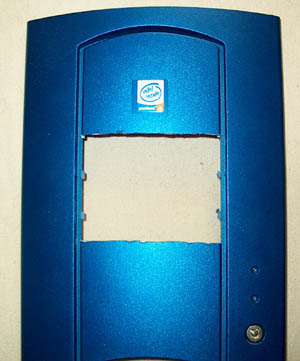
Description

Now that we’ve cut out the spot for our LCD we have to mount it to the case.  The trend for mounting these is to use the foam double sided tape to stick to the circuit board and the PC case to keep it in place, so that’s what I did. Below is a picture of what the inside of the door looks like with the LCD mounted. If you look at the bottom you will see that the mini-board which takes the power and video source is now hooked up. You can choose to mount that any way you wish as long as the door still closes.
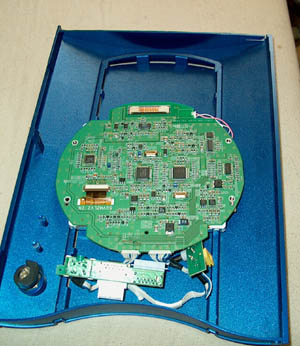
Description

Here’s the last part! Since the LCD is mounted and ready to go you can place the door back onto the case.  The way I wired everything isn’t the most visually appealing way but it works.  The LCD has to pull power and rather than soddering some wires together I decided to use the power cable that came with the LCD.  To make this work I fed the power cable through one of my open PCI slots on the back of my pc up through one of my 2 open CD-Rom drive bays (with the covers still on them.)  Now, I’m using a ATI Radeon 9800 Pro AGP Video card which supports dual monitors and video out.  You can wire the LCD directly to the VGA output on your card, but to make this easy for beginners and myself I used a simple Mini-Jack to RCA video cable to run from my video card to the LCD.  I fed this cable the same way as the power cable so it would reach the LCD without cables everywhere.  That’s it! Once your cables are fed, you plug them in and make sure your video card is set to use multiple monitors and you’re done! Here’s the final outcome of my project.
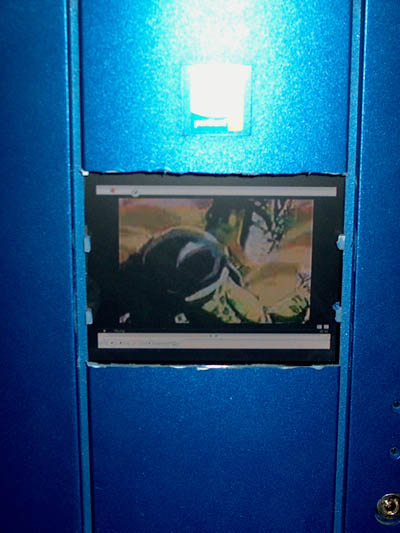
Description

Like I mentioned earlier you can do this by soddering cables to your video card or a VGA cable from the LCD.  Click the Read More link at the bottom of this article to see that tutorial. If you have any questions about this feel free to email me at jesse@gearlive.com. *Yes the cutting isn’t the best in the world*


- Jesse Easley


  • Related Tags:

Advertisement

Comments:

dude, this is phat

THIS IS ANCIENT NEWS! Either you stole those pics or I know who you are on BT

muahhaha

you should get something to cover your amateurish dremelling job on the door, such as automotive window trim—get a little chrome going on…

I did something similar to my PC, but instead of putting the screen on the front of the case, I modded a cdrom drive and removed the laser and put the screen inside it. So I could open the cd drive and use the screen, then slide it away when i’d finished using it. I didn’t manage to get it to hang down vertically as I wanted, but it worked pretty well.

nice cutting there chief.

piss poor…............................
............................................
need any web, game or communication hosting?
vist www.blaze-hosting.com

Where can we get a beaver with dull teeth to cut our case like you did?

You people need to eat a bowl of dicks. So he needs a little trim… what the #### do you care what his case looks like?

Nice hack man!

“Where can we get a beaver with dull teeth to cut our case like you did?” I’m sure if you ask your mom nice enough she’d do it for you to. 

The cutting isn’t the best but many people are to scared to even try something like this. Good job.

This is at least my 4th time back here just to read the comments. It’s a toss up between “Nice cutting there chief” and “Where can we get a beaver with dull teeth to cut our case like you did?” I don’t know which one makes me chuckle more. Because they both describe what I was thinking exactly on that case.

Oh the beaver comment definitely wins :D

Nice hack though, really (apart from the obvious)

lol, the dremmel skills shown will probably be better than my attempt when I try to cut me case up.

Cheers for the info, a tutorial is better than no tutorial

Ok.. I know the dremel cut isn’t the greatest.. I was in a rush… Plus I never claimed to be an expert dremel user =)  I just wanted to share this tutorial (allthough I am by far not the originator of the idea.) I do find the cut comments amusing though =)

0wned

hey beav!

nice chewing job!

Nice idea,  Head down to Ace hardware or whatever and get some window trim or get a small peice of black tubing(rubber) and make a slit in it so you can cover up the cutting. essentially framing the window

Hey can you mod this to work with any tv with regular rca cables.

Anyone know where can I find info to turn the PSONE LCD to VGA for laptop hookup?

me gustaria saver como puedo conectar como monitor para mi compuadora mi pantalla lcd el diagrama si me lo puede facilitar pofavor

Thats pretty damn awesome im about to do the same only i think im gonna mount it in the side of the case inside of my window, nice job tho

Hey, I’ve been searching google for ever and can’t find a way to hook my TV to my old PS one screen does anyone know how to do this?. Though this “hack” looks cool too.

hey man…i was reading this and im like a big xbox modder and i was tring to c if i can put a psone lcd in it….i just have to findout how to get the video to work…n e ideas?¿ if u do send me a email go i.m me at TheoFro3 thats my sn..


Thanks man

Later

I can not find the “read more” icon you speak of that leads to the tut mind posting the url or emailing it to me at dustin15406@msn.com.

jesse i really need your help with this mod or anyones. i setup a mp3 server running this screen wit ha nvidia ti4200 and spent hours and hours and still can’t get screen to diplay image yet computer sees there is a screen hooked up i even adjusted the timings to many settings for the screen yet no picture any help would be greatly appreciated i don’t want this screen to go to waste!!! thanks in advance for any help!

thats a sweet mod, and i just gotta find somewere to buy one of thoes ps1 screens, how much are they?...also…would it work if i were to just keep the screen in the plactic ps1 thing and not mount the screen inside my case?

-Ben

LOLOL yo this cracks me up all ur making fun of #### hahahaha

i have everything set right in powerstrip with x800gt video card and dual displays enabled but i still can’t get a picture or desktop on display at all but i tested scree nand it works on ps2 system please any help would be great have been messing with this for about 5 months now and don’t really want top hack to a vga cable not sure if it will work anyway any help would be appreciated thanks again, scott

There’s a good tutorial for doing this from a couple of years back here:

http://www.bit-tech.net/article/136/

As for the cutting, well…it really is pretty bad.  I’m not sure it’s beaver-tooth bad, but it’s close.  Using a Dremel without an edge guide is asking for trouble.  Make your own edge guide by clamping a piece of wood to the object you want to cut, so that the tool can follow the edge of the guide.  You’ll end up with nice, clean cuts.

oh for christ sakes the guy said *Yes the cutting isn’t the best in the world* .lay off the guy,he was showing us something so if its not up to your standards then go away.Who needs the whining.. my dads better then your dad blah blah blah

hey i need help on doing this i have my lcd taken apart and all but i dont know what to do after this im a noob at this but i would like help im not sure how to connect it to my pc….can u do it through the av in? not the multi bu the green…please help

I found it easier to hack it through s-video/component video then the vga hack i will post some pics and a short tut on how to do it if any one is interested.

hey does any 1 no the wiring and set up for puttin an lg mobile screen in the pc case

tut tut tut,the shittist looking mod i have ever seen.

forget about what the losers are saying, their just jealous because they didnt think of actually doing something totally kewl!! I think its off the hook! GREAT JOB! now where do I plug in all the wires at??

this is really kool i might try it sometime

Mark Atkinson Mark Atkinson 10/4/09 5:39 pm

hello, does anyone know weather a large based LCD screen has ever been modded into an old xbox with one of the lcd capable mod chips. im getting an xbox and am mapping out my mods i entend on doing and the chip i think i like the best is a sodered version of “xacuter 3ce” . which is lcd compatable. has anyone ever exployted or hacked this feature and found a way to put a larger lcd read out to one of these mod chips cause the direction my mod will take will not bound the internals to stay with the original case . i will put it in something much larger. if anyone knows where to get info on this or has done it please piont me in the right direction thanx.


Comments: Page 1 of 1 pages

Advertisement

Post a Comment:


Smileys

Remember my personal information

Notify me of follow-up comments?


Advertisement